

On a Monday morning, the senior partner drops a stack of client files on a junior associate’s desk and says, “Just get these ready for tomorrow.” The associate sighs, opens three different apps, and spends an hour chasing versions, invoices, and the client’s last email. What if your firm could manage every case, client update, and document in one dashboard, so your attorneys focus on clients, not endless email chains.
If you’ve ever heard, “We’ve always done it this way,” this post is for you. In this blog, we’ll walk you through why attorneys resist legal tech (and exactly how to overcome each objection so your firm modernizes without losing the things that matter most).
Why Attorneys Resist Legal Tech
Many resistance points aren’t about stubbornness. They’re practical concerns that need honest answers.
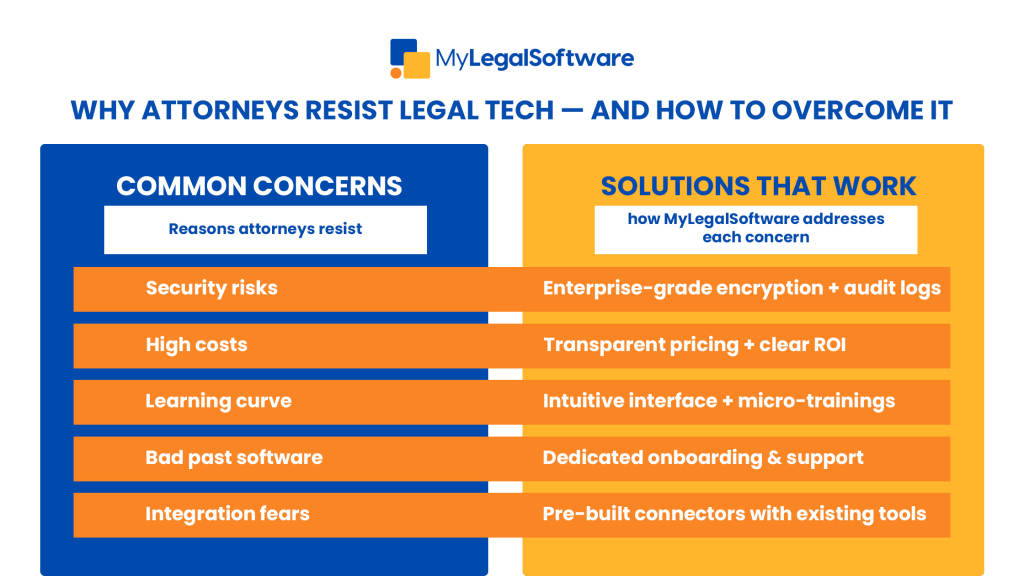
- Fear of change & loss of control: Lawyers are trained to manage risk; a new system feels like handing control to software.
- Security & confidentiality worries: Client privilege is everything; any cloud solution must prove itself.
- Perceived cost vs. value: Upfront fees and subscriptions feel risky for small firms.
- Learning curve & time investment: Busy teams don’t have hours to become product experts.
- Bad past experiences: Legacy products that were slow, buggy, or poorly supported leave lasting doubt.
- Cultural inertia: Partners, staff, or IT have different comfort levels with technology.
- Integration concerns: “Will this work with Outlook, Zoom, or our accounting system?” is a common stopper.
The Real Cost of Not Modernizing
Avoiding legal software isn’t neutral. It costs time, money, and client experience.
- Lost billable hours: Manual timekeeping, duplicate data entry, and searching for documents reduce billable productivity.
- More errors: Version control problems, missed deadlines, and billing mistakes produce client friction.
- Scaling limits: Manual processes break down as your caseload grows.
- Competitive disadvantage: Clients expect fast, secure communication and transparent billing.
Thinking of legal software as an expense rather than an investment misses the long-term benefits: reclaimed time, more accurate billing, and happier clients.
What Modern Legal Software Actually Does
Understanding features helps demystify objections. Most platforms focus on these core areas:
- Case management: Centralized matter files, deadlines, contacts.
- Time & billing: Accurate timers, trust accounting, automated invoices.
- Document automation & version control: Templates, e-signatures, audit trails.
- Client portals & secure messaging: Two-way communication that preserves privilege.
- Integrations & APIs: Sync with email, calendars, accounting, and courts.
- Reporting & analytics: Real-time KPIs for utilization, receivables, and matter profitability.
- Security & compliance controls: Encryption, role-based access, and audit logs.
Each feature maps directly to common attorney concerns: security, control, accuracy, and ROI.
Step-by-Step Guide to Implementing Legal Tech
A phased, measurable rollout beats a big-bang approach every time.
- Audit your current workflows: Map how cases move, who touches what, and where bottlenecks exist.
- Define success metrics: Examples: reduce admin hours by X/week, cut overdue invoices by Y%, or improve client response time.
- Choose a pilot team: Pick a small, influential unit (e.g., litigation or family law) that will use the software daily.
- Customize & configure: Build templates, set permissions, and connect calendars/accounting.
- Train in micro-sessions: 20–30-minute focused training, recorded for on-demand access, works better than all-day workshops.
- Go live with support: Have a super-user on-site (or online) for the first 2-4 weeks.
- Measure & iterate: Evaluate against success metrics, collect feedback, and tune workflows.
- Scale gradually: Expand by practice area after the pilot proves value.
This process reduces risk, demonstrates value early, and builds internal champions.
Best Practices for Adoption and Training
Adoption is a people problem as much as a tech problem.
- Get partner buy-in early: Leaders set the tone. Visible sponsorship accelerates adoption.
- Create champions: Appoint lightweight “power users” who help colleagues and evangelize wins.
- Use small, practical training modules: Teach by doing. Create a real case in training and show immediate wins.
- Document playbooks: One-page SOPs for common tasks reduce anxiety.
- Measure and reward: Share KPIs publicly and celebrate wins (faster invoicing, fewer missed deadlines).
Keep feedback loops short: Weekly check-ins during rollout fix friction quickly.
Traditional Methods vs. Modern Software
Manual / paper-heavy workflow
- Multiple tools, frequent duplication, slow searches, higher error risk.
Modern legal software
- Single source of truth, automated reminders, easier reporting, better client experience.
Clearly, modern legal software isn’t intended to replace judgment; it is intended to amplify it.

How to Measure Success
Set a small set of KPIs and revisit them monthly:
- Billable hours recovered per attorney.
- Average time to invoice after matter milestones.
- Number of missed deadlines or calendar-related errors.
- Client satisfaction via brief post-matter surveys.
- Software adoption rate (active users / licensed users).
- Accounts receivable days (improve cash flow).
Measure early wins and report them to partners; concrete numbers are persuasive.
What to do Next
Resistance to legal tech is rarely stubbornness; it’s sensible caution. Address the underlying concerns: security, control, cost, and training, and you turn skeptics into advocates. Cloud-based legal software saves time, reduces errors, improves billing accuracy, and gives attorneys more space to practice law.
Ready to rise above admin overload? Schedule a free demo to see how MyLegalSoftware can transform your law firm’s workflow and show measurable results. Visit MyLegalSoftware.com to book your demo and start a 14-day free trial today.







