

Most attorneys can recall a time when administrative work quietly expanded into the edges of their day. Not because the tasks were difficult, but because they required constant attention, careful tracking, and repeated verification. It prompts a broader thought about legal practice: how much more could your firm accomplish if repetitive billing tasks were handled automatically, freeing your team to focus on client strategy, case preparation, and meaningful legal work?
Key Challenges Law Firms Face Without Modern Software
For many law firms, invoicing is still a manual, time-consuming task. Spreadsheets, paper files, and scattered time logs can easily lead to lost hours, inconsistent billing, and missed revenue. Errors on invoices not only create extra work for staff who must correct them but can also erode client trust. On top of that, tracking billable time across emails, phone notes, and calendars adds unnecessary complexity and overhead, leaving attorneys frustrated and administrative staff overwhelmed.
How Automated Invoicing Improves Efficiency
This is where automated invoicing transforms a firm’s workflow. By capturing billable time directly at the source, the software ensures accuracy and reduces write-offs. Standardized templates and rules simplify the generation and approval of every law office invoice, so invoices are consistent and professional. Built-in reminders and online payment links help clients pay faster, improving cash flow, while integrated client portals make it easy for clients to review their bills and resolve questions without back-and-forth emails.
What Is Included in a Legal Invoice Workflow
Automated invoicing is not just about sending bills—it’s about creating a streamlined workflow that connects case management, time tracking, and billing. A comprehensive legal invoice workflow typically includes:
- Time Capture: Real-time timers and quick entries linked directly to matters ensure no billable minute is lost.
- Rate Management: Flexible rate cards by attorney, task, or client to maintain billing consistency.
- Expense Tracking: Itemized costs can be imported from receipts or accounting systems, eliminating manual entry.
- Invoice Templates: Professionally branded, compliant templates tailored to different practice areas streamline the billing process.
- Automation Rules: Billing cycles, late fees, and approval routing can all be automated, reducing manual work.
Key Features of Legal Software That Support Invoicing
Beyond basic invoicing, modern legal software provides additional features to make the entire billing process more efficient. Centralized case management ensures client and matter data is accurate and up to date. Integrated time and expense tracking improves accuracy while increasing billable hours. A client portal allows secure delivery and online payment, while reporting and analytics give firms insight into billing velocity, write-offs, and attorney productivity. Integration with accounting platforms and payment processors further reduces administrative friction.
With these tools in place, law firms are ready to move from traditional, error-prone billing toward a fully automated system. The first step is choosing the right software, which sets the foundation for an efficient, accurate, and reliable invoicing workflow.
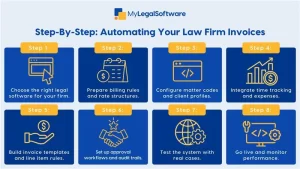
Step 1: Choose The Right Software
Look For These Essentials:
- Legal-Focused Functionality: Timekeeping, matter codes, and trust accounting.
- Automation Capabilities: Scheduled invoice generation and rule-based billing.
- Payment Options: Cards, ACH, and links embedded in invoices.
- Security And Compliance: Encryption and audit logs for billing records.
Pick a provider with legal experience, so the law firm’s invoice templates match industry expectations.
Step 2: Prepare Your Billing Rules and Rate Structures
Inventory Your Pricing:
- List hourly rates, flat fees, and contingency arrangements.
- Decide how to bill for paralegal time versus attorney time.
Set Billing Policies:
- Define billing cycle, billing increments, and late fee rules.
- Create approval thresholds for partner review before invoices are sent.
Step 3: Configure Matter Codes and Client Profiles
Standardize Data:
- Create a consistent matter code system for matters and sub matters.
- Ensure client contact information, billing addresses, and tax IDs are complete.
This prevents mismatched invoices and reduces manual corrections at billing time.
Step 4: Integrate Time Tracking and Expenses
Make Time Capture Easy:
- Enable desktop and mobile timers, and add quick entry forms for phone calls and emails.
- Train staff to tag entries to the correct matter at the moment of capture.
Expense Capture:
- Use receipt uploads and expense categories that map directly to invoice line items.
Step 5: Build Invoice Templates and Line-Item Rules
Design Templates That Work:
- Create templates for hourly billing, contingency settlements, and retainer replenishment.
- Include clear line descriptions that explain work done and why it was necessary.
Automation Rules:
- Auto-apply taxes, discounts, or retainers according to your policies.
- Group similar time entries for readability, or show detailed line items per client preference.
Step 6: Set Up Approval Workflows And Audit Trails
Approval Flows Save Time:
- Route invoices above a certain amount to partners for review.
- Use a single click to approve, edit, or reject with notes.
Audit Trails:
- Keep immutable logs that record who changed an invoice and when.
Step 7: Test The System with Real Cases
Run A Pilot:
- Pick a subset of matters across practice areas to test billing cycles.
- Validate invoice formatting, payment links, and accounting exports.
Check For Mistakes:
- Reconcile sample invoices against time logs and trust account entries.
Step 8: Train Staff and Document Processes
Make It Part of Daily Workflow:
- Create short training modules for time entry, invoice review, and client communications.
- Document billing policies and troubleshooting steps in an internal playbook.
Ongoing Coaching:
- Review a few sample invoices weekly during the first month, then monthly thereafter.
Step 9: Go Live and Monitor Performance
Launch With Clear Expectations:
- Communicate timelines and what clients will see in the portal.
Track KPIs:
- Monitor days sales outstanding, invoice dispute rates, and write-off percentage.
Iterate:
- Use analytics to refine billing cadence, template wording, and automation rules.
Real World Example: Small Firm Transformation
Before Automation:
- A family law firm used spreadsheets and paper timesheets, which led to lost hours and frequent corrections.
After Automation:
- The firm implemented automated law office invoice templates, integrated timers, and client portals.
Result:
- Billable time capture increased by 12 percent, invoice disputes dropped, and collections improved within 60 days.
Comparison With Traditional Invoicing Methods
Paper And Spreadsheets:
- Prone To Human Error: Manual transcription causes mistakes and omissions.
- Slow Approval: Paper routing delays invoicing and collections.
- Limited Visibility: Hard to measure partner productivity and billing velocity.
Automated Invoicing:
- Consistent Output: Templates and rules standardize every legal invoice.
- Faster Collections: Online payments and reminders reduce payment friction.
- Better Insights: Dashboards show where revenue leaks are and which matters need attention.
Best Practices for Law Firm Adoption and Training
Start Small, Scale Fast:
- Pilot with a single practice area to refine settings before firm-wide rollout.
Keep Templates Client Friendly:
- Use plain language in line items, so clients understand charges and are less likely to dispute invoices.
Enforce Timely Time Entry:
- Encourage same-day time capture to improve accuracy and reduce later reconstruction.
Maintain Security and Compliance:
- Use encrypted storage and keep backups, especially for client financial data.
Regularly Review Billing Rules:
- Reassess rates, write-offs, and retainer policies quarterly to keep revenue healthy.
Troubleshooting Common Issues
Missing Time Entries:
- Implement automatic reminders and brief manager reviews for late entries.
Client Disputes:
- Provide clear line-item descriptions and a client portal where questions can be resolved quickly.
Integration Errors:
- Reconcile accounting exports monthly and keep contact info for support with integrators.
Metrics To Track Post Implementation
Monitor These KPIs:
- Days Sales Outstanding (DSO) to measure collection speed.
- Billing Realization Rate to see how much of recorded time becomes billed revenue.
- Invoice Dispute Rate to identify clarity issues with invoices.
- Write-Off Percentage to catch pricing or collection problems early.
Conclusion
Automated invoicing replaces repetitive tasks with reliable processes, saving time, reducing errors, and improving cash flow. By standardizing matter codes, integrating time capture, and using automation rules, your firm will deliver consistent law firm invoices that clients can understand and pay promptly.
Schedule a free demo to see how MyLegalSoftware can transform your law firm’s workflow. Start capturing more billable time, reduce billing errors, and get paid faster with a system built for legal practices.

Frequently Asked Questions
How does automated invoicing benefit a law firm compared to manual billing?
Automated invoicing reduces manual data entry, cuts down on errors, and speeds up invoice generation — which helps ensure you bill promptly, avoid write‑offs, and improve cash flow.
Can automated invoicing software handle different billing models (hourly, flat fee, retainers)?
Yes. Modern legal billing software supports multiple billing arrangements — hourly rates, flat fees, retainer billing, and mixed models — and lets you create templates tailored to whichever model you use.
Will automated legal invoicing improve client payment times and reduce collection delays?
Yes. With features like scheduled invoice delivery, payment reminders, and online payment options, automated invoicing helps clients pay faster and reduces days‑sales‑outstanding.







