
You’re juggling three hearings this week, two client meetings tomorrow, filing deadlines scattered throughout the month, discovery cutoffs to track, and a settlement conference next Tuesday. Every date matters. Every deadline is critical.
Then it happens; one calendar entry gets buried in an email thread. You forget to transfer it to your main calendar. By the time you notice, it’s too late. A crucial filing deadline is missed, your client’s case is at risk, and you could face potential malpractice exposure.
Scenarios like this happen in law firms more often than anyone wants to admit. But the right attorney calendar software can prevent these disasters. It safeguards your practice, protects your reputation, and ensures your clients are covered. Effective calendaring is essential for modern law practice management.
Legal calendaring software does more than just track dates, it anticipates deadlines, sends automatic reminders, and creates accountability across your entire team.
Why Every Law Firm Needs Reliable Calendaring Tools
Legal deadlines operate like dominoes. One wrong date derails an entire case. Miss a statute of limitations and your client loses their right to sue. Forget a response deadline and risk default judgment. Skip a discovery cutoff, and critical evidence gets excluded.
Reliable calendaring systems eliminate these preventable errors that can damage your reputation and compromise client outcomes. Yet many firms still rely on fragmented methods: email reminders, paper desk calendars, assistant memory, sticky notes on monitors. These approaches fail under pressure.
When systems fail, the consequences are serious: malpractice claims, disorganized case files, dissatisfied clients who lose trust, attorney burnout from the stress of potentially forgetting something important, and administrative overload from manually tracking everything. Legal calendaring programs prevent all of this by providing a structure that works.
But before selecting a system, there are seven critical questions you need to ask. Let’s walk through each one.
Question 1: Does It Handle Every Type of Legal Deadline You Face?
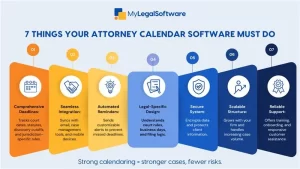
Your calendar needs to manage more than court appearances. Court dates are obvious. But what about statute-driven deadlines that calculate automatically based on trigger events? Filing cutoffs that vary by jurisdiction? Discovery schedules with multiple dependent dates? Settlement conferences and mediation appointments?
A comprehensive system handles everything. It manages your litigation calendar for complex cases with dozens of interconnected deadlines. It tracks simple matters with just a few key dates. The software should adapt to whatever your practice demands.
Question 2: Will It Integrate with Your Daily Workflow?
Standalone calendar tools create more problems than they solve. You need seamless integration with the systems you already use daily. Does it sync with your email so appointments flow automatically? Does it connect to your case management software? Can you access it from your phone when you’re in court?
Integration creates a unified workflow instead of forcing you to jump between multiple platforms. When your calendar connects to everything else, information flows naturally. Nothing gets lost in translation between systems. This is what makes a true calendar legal solution instead of just another disconnected tool.
Question 3: Does It Automate Reminders and Reduce Human Error?
Manual reminder systems fail. You mean to set an alert but forget. You set one reminder, but should have set three at different intervals. Automation solves this completely.
The best legal calendar software sends multiple reminders automatically. One week before. Three days before. The morning of. You can customize the timing, but the system handles execution. This protects against human errors that cause missed deadlines. Reliable automation means you sleep better at night.
Question 4: Is It Built Specifically for Legal Practice?
Generic calendars miss legal-specific requirements. Google Calendar doesn’t understand court rules. Outlook doesn’t calculate filing deadlines based on jurisdiction-specific requirements. Apple Calendar can’t handle the complexity of calendaring legal tasks across multiple cases and practice areas.
You need systems created specifically for law firms. Systems that anticipate motion deadlines. That understands compliance rules vary by court. That recognizes the difference between calendar days and business days. Legal-specific tools save time and prevent errors that generic solutions can’t catch.
Question 5: How Secure Is the System?
Your calendar holds sensitive information: case numbers, client names, hearing details, filing locations- and all of it needs protection. Generic cloud calendars often don’t meet the security standards that legal practices require.
Choose software with encryption both in transit and at rest, access controls that let you manage who can see what, and audit trails showing who accessed which information. Secure calendaring software for law firms isn’t optional; it’s an ethical obligation to safeguard client confidentiality.
Question 6: Will It Scale as Your Caseload Grows?
Your needs today differ from your needs in three years. Solo practitioners need simpler structures. Growing firms need systems that handle multiple attorneys, paralegals, and overlapping cases across different departments.
Can the software manage increased complexity without becoming unusable? Does it support more users easily? Can it handle hundreds of active deadlines simultaneously? Choose calendaring systems that grow with your practice instead of requiring replacement when you expand.
Question 7: What Support, Training, and Cost Structure Comes with It?
Even the best software requires learning. Does the vendor provide real onboarding? Can you reach customer support when problems arise? Are training resources available for new team members?
Pricing matters too. Is it transparent or full of hidden fees? Do they offer free trials of legal calendaring software so you can test before committing? When something breaks at 9 p.m. before a filing deadline, you need support that responds. Vendor reliability matters as much as software features.
Choose Smart, Protect Your Practice
Choosing reliable legal calendaring software is fundamental to risk management. The right system prevents malpractice claims. It reduces stress. It protects your clients and your reputation.
MyLegalSoftware offers powerful case management with built-in calendaring designed specifically for legal practice. MyLS manages your entire case lifecycle from first contact through resolution.
Stop worrying about missed deadlines. Stop relying on scattered reminder systems. Stop risking your practice on manual tracking methods that eventually fail.
Try MyLS free for 14 days and experience how much smoother practice becomes when calendaring, case management, and client communication work together seamlessly.
Frequently Asked Questions
What makes attorney calendar software different from regular calendar tools?
Legal-specific systems understand court rules, calculate jurisdiction-based deadlines automatically, and provide the security and compliance features law firms require.
How does legal calendaring software reduce malpractice risk?
Automated reminders prevent missed deadlines; centralized tracking eliminates confusion, and audit trails provide documentation if questions arise about deadline management.
Can small firms or solo attorneys benefit from law calendar software?
Absolutely. Solo practitioners often benefit most because they lack administrative support to manually track deadlines and need reliable systems more than anyone.
What features should I prioritize when choosing a calendaring system?
Automation, legal-specific deadline calculations, mobile access, integration with your existing tools, reliable support, and security that protects client confidentiality.
Is free legal calendaring software reliable enough for professional use?
Some free options work for very basic needs, but professional practice typically requires paid solutions with better support, security, and legal-specific features.







