
You rely on digital tools every day. Client records, billing details, case notes; everything is stored online. The shift to cloud-based practice software has made it easier to manage files and keep cases moving from anywhere. But with convenience comes concern. Sooner or later, a client may ask a hard question: “How safe is my information?”
That’s not just a passing worry. Clients trust you with their most sensitive details. Protecting that information is part of your professional duty. Security failures can mean reputational damage, malpractice claims, or even lost clients and money.
The truth is, cloud technology has advanced quickly. But not every attorney knows what protections are already built in and what steps are still their responsibility. That’s why you need more than a passing understanding of legal cloud security.
You need a clear framework for evaluating risks, knowing best practices, and ensuring your tools actually protect client data. This guide will walk you through why law firms are moving to the cloud, the real risks, and the safeguards that keep information secure.
Why Law Firms Are Moving to the Cloud
The legal industry has seen a steady shift toward cloud-based legal tools. Flexibility is a major reason. You and your team can access files securely from court, the office, or home. That kind of mobility became essential with the rise of remote work.
Cost is another factor. Instead of maintaining expensive on-site servers, law firms can now pay for only the storage and services they need. Updates happen automatically, reducing downtime and IT headaches.
Client expectations also play a role. Clients want faster responses, real-time updates, and reliable communication. Cloud systems make that possible by syncing documents and messages in one place. For small and mid-size firms, the move levels the playing field with larger competitors.
You gain the same tools without the massive overhead. Of course, convenience means nothing if security is ignored. That’s where legal cloud security comes in.
What is Legal Cloud Security?
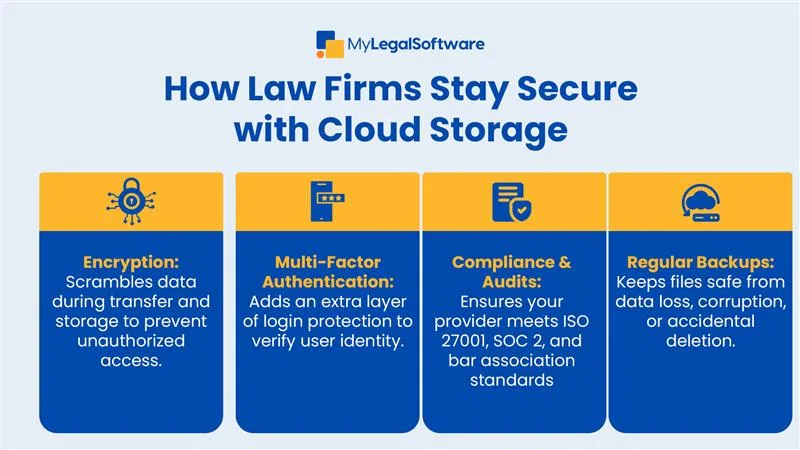
Legal cloud security is a set of protections that keeps your client’s data safe when stored in law firm cloud software. The most common safeguard is encryption. Files are scrambled during transfer and while stored. So, even if intercepted, they’re unreadable without the proper key.
Multi-factor authentication adds another layer. Instead of relying only on a password, you or your staff must confirm your identity through a second method, like a code sent to your phone. Role-based permissions ensure that paralegals, attorneys, and admins only access the information they need.
Vendors design cloud systems with these protections in place, but your role is still important. A poorly configured account can expose sensitive files just as quickly as an outdated server in your office.
Legal cloud security isn’t a one-time task. It’s an ongoing process that combines vendor tools, staff training, and regular monitoring. When each part works together, you reduce the risk of a breach and give clients the confidence they need to trust your firm.
Core Risks and How to Avoid Them
Even the best software can’t eliminate risks if you don’t use it wisely. One major threat is unauthorized access. Weak or reused passwords remain one of the easiest ways hackers break in. Phishing emails that trick staff into sharing credentials are just as dangerous.
Data loss is another concern. Whether from accidental deletion, device theft, or system failure, lost files can create chaos. That’s why routine backups are non-negotiable.
Human error is often the biggest risk. A misdirected email or unchecked link can expose confidential client details. Staff training and regular reminders reduce these slipups.
Finally, don’t ignore compliance requirements. Rules on how you must protect client data in the cloud aren’t optional. Check your jurisdiction’s bar guidelines and ensure your systems meet those standards.
Attorney data protection requires a layered approach. Strong passwords, encryption, access controls, and staff education all work together. By addressing these risks early, you avoid the costly scramble of damage control later.
Best Practices for Cloud Security in Law Firms
Protecting client data isn’t just about buying the right software; it’s about using it the right way. Start with strict password policies. Every user in your firm should create strong, unique passwords and update them regularly. Enable multi-factor authentication for all accounts, not just for administrators.
Next, limit user permissions. A junior associate shouldn’t have full access to every client file. Role-based settings keep sensitive information on a need-to-know basis.
Regular security audits are another must. Review who has access to your system and remove outdated accounts. Train your team to spot suspicious emails or login attempts.
Finally, partner only with vendors who provide secure legal technology. Ask about encryption methods, data redundancy, and compliance with privacy laws. A reliable provider should be transparent about how your data is protected.
Balancing Accessibility and Security
Law firm cloud software is designed to make your work faster and more efficient. But that speed should never come at the expense of security. You want staff to access files easily, yet you also need to ensure the wrong person never does.
Balancing convenience with protection starts with good design. Choose systems that give you control over user permissions and allow secure logins from verified devices. That way, your team can work from anywhere without exposing confidential data.
It’s also worth considering where your data is stored. Many firms use multiple cloud providers for different functions. Make sure each one meets your security expectations.
The goal is simple: create a system that’s flexible for your attorneys but airtight for your clients. Strong legal cloud security doesn’t have to slow you down. When configured properly, it actually makes your firm more responsive, efficient, and trustworthy.
Compliance and Client Confidence
Every attorney knows that confidentiality is non-negotiable. Your ethical duty extends to the tools you use. That means ensuring your cloud provider meets professional standards and follows strict compliance protocols.
Look for certifications like ISO 27001 or SOC 2, which prove that your provider follows rigorous data security procedures. But compliance isn’t only about technical controls; it’s also about communication. Clients want reassurance that their information is safe.
Explaining how you protect client data in the cloud can build confidence. When clients know you take security seriously, they’re more likely to share sensitive details and stay engaged throughout the case. Legal compliance cloud software helps you demonstrate accountability and maintain trust, which is vital in every client relationship.
Secure Systems Build Stronger Firms
In today’s digital world, security isn’t optional; it’s essential. The right cloud-based practice software allows you to protect client data, simplify daily work, and improve collaboration across your firm. When your systems are secure, your focus shifts from worrying about risks to delivering quality legal service.
If you’re ready to take your data protection seriously, consider trying MyLegalSoftware (MyLS). It’s a trusted case management platform built for immigration attorneys and general practitioners. You can explore its full range of features: case tracking, secure communication, and task automation, with a free 14-day trial.
MyLS helps you manage client information from first contact through resolution, giving you the peace of mind that your data is protected every step of the way.
Frequently Asked Questions
How secure is cloud-based practice software?
Most modern platforms use encryption, multi-factor authentication, and frequent backups to safeguard your data.
Can small firms trust cloud security for attorneys?
Yes. Many providers tailor affordable, compliant options designed specifically for smaller practices.
What should I ask before choosing a cloud provider?
Request details about encryption, compliance certifications, and where your data is stored.
Does using the cloud meet professional ethics rules?
As long as you verify the provider’s security measures and maintain confidentiality, it complies with most state bar guidelines.
How can I ensure secure remote access?
Require multi-factor authentication and restrict logins to approved devices.
Can cloud software integrate with other tools?
Yes. Most cloud-based legal tools integrate with email, billing, and document management systems for seamless operation.







