
The associate stayed late again, eyes sore from comparing two versions of a contract on a split screen, hunting for a single clause that changed. The partner wanted the revision history clean and billable time accurate; the client wanted the draft returned by morning.
Imagine a world where your firm could find every edit in seconds and convert those minutes into billable hours: saving time, cutting errors, and freeing your team to work on higher value tasks?
That’s what you get with modern document comparison software.
Why Manual Document Comparison Drains Law Firms
Manual document comparison can be draining for law firms for several reasons including:
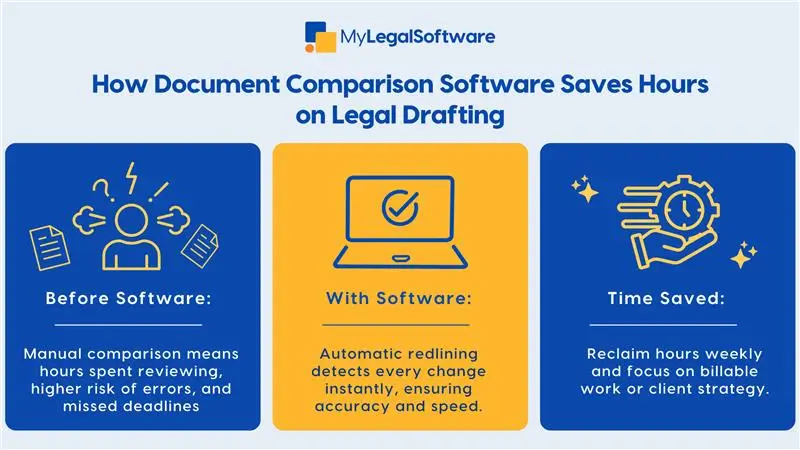
- Comparing documents manually is slow, error-prone, and stressful.
- Reading page after page to spot a single wording change wastes experienced lawyers’ time.
- Mistakes happen when teams miss subtle edits in redlines or when different versions circulate without a clear audit trail.
- Time spent on manual comparison is time not spent on client strategy, hearings, or business development.
How Document Comparison Software Improves Efficiency
Document comparison software locates differences automatically, highlighting insertions, deletions, and format changes. This means attorneys can confirm revisions in minutes rather than hours.
With accurate side-by-side views, you reduce the risk of missing a clause that changes liability or fee terms. When paired with case management, the tool can link version history to a matter, client, and billable record.
Key Features of Effective Document Comparison Tools
Version Tracking and Audit Trails
Automatic versioning creates a reliable record of who changed what and when. This helps with internal approvals, client transparency, and regulatory compliance.
Word Level and Structural Comparison
Compare text at the word, sentence, or paragraph level and detect layout or formatting changes. A good document comparison tool flags moved text and modified tables as well.
Batch Comparison and Reporting
Run comparisons across multiple documents at once to check template updates or mass contract revisions.
Generate reports for partners or clients that summarize changes and time saved.
Integration With Case Management Software
Link revised documents to matters, timelines, and billing. Integration makes sure the document comparison process becomes part of a streamlined workflow.
Step By Step Guide to Implementing Document Comparison Software
-
Assess Needs and Use Cases
List the tasks that consume the most drafting time: contract revisions, form updates, discovery review, or regulatory filings.
Identify which teams will use the tool and what file types matter most.
-
Choose The Right Tool
Evaluate options based on accuracy, speed, file compatibility, and integration with existing systems.
Look for solutions that position themselves among the best document comparison software or best file comparison software when accuracy and legal standards matter.
-
Plan A Pilot Program
Start with a small team and a defined set of documents. Measure time spent before and after implementation to quantify savings.
-
Train The Team
Provide short, focused training sessions and guides. Emphasize how the tool improves quality control and reduces repetitive tasks.
-
Integrate With Workflow
Connect the comparison tool to your document management and case management systems. Automate version archiving and link results to billable matters.
-
Monitor And Iterate
Collect user feedback and refine rules, templates, and workflows to maximize value.
Comparison With Traditional Methods
Manual Comparison:
- Relies on human review, which is time-consuming and subject to variability.
- Risks missed changes in complex documents.
- Generates inconsistent audit trails and version control.
Traditional Redlining:
- Works well for single document collaboration but becomes unmanageable with multiple drafts.
- Requires manual reconciliation across contributors.
Document Comparison Software:
- Finds all differences with higher accuracy and speed.
- Provides consistent version control and reporting.
- Scales across matters, teams, and file types to save hours every week.
How Time Savings Translate into Bottom Line Results
A single partner reviewing drafts manually can lose several billable hours per week to tedious comparison work. Multiply that across associates and paralegals, and the cost compounds.
Document comparison software turns hidden administrative hours into recoverable billable time. A faster turnaround improves user satisfaction and can be a competitive advantage in winning new work.
Best Practices for Law Firm Adoption and Training
Start Small: Pilot on a single practice area to show measurable gains, then expand.
Create Templates: Standardize clauses and templates to reduce variability before comparison.
Define Ownership: Assign a document owner for final checks and approvals.
Track Metrics: Monitor time saved, reduction in errors, and user adoption rates.
Encourage Champions: Identify power users who can mentor peers and promote best practices.
Security And Compliance Considerations
- Choose software with robust security controls, encryption, and role-based access.
- Ensure versions and audit trails meet regulatory or discovery obligations.
- Check that the solution supports your jurisdictional data residency and retention policies.
Choosing The Best Document Comparison Software for Your Firm
Look for:
- High accuracy in text and structural comparison.
- Support for Word, PDF, and other common file types.
- Batch processing and enterprise reporting.
- Integration with your document management and case management systems.
- Clear licensing and support for firm scale.
When reviewing vendors, test each tool using actual firm documents and track how long it takes to complete common tasks. Any solution claiming to be top-tier file comparison software should also prove its legal-level accuracy and ability to integrate seamlessly with enterprise systems.
Common Objections and How to Address Them
Objection: Implementation Takes Too Long
Response: Start with a targeted pilot and expand after early wins.
Objection: The Tool Is Expensive
Response: Compare time saved and recovered billable hours to the subscription cost; compute return on investment.
Objection: Staff Resist Change
Response: Focus training on how the tool makes daily work easier and reduces repetitive tasks.
Quick Checklist for Rolling Out Document Comparison Software
- Define key use cases and involve all stakeholders.
- Run a realistic pilot with firm documents.
- Train users with short practical sessions.
- Integrate with document and case management.
- Measure time saved and iterate.
Conclusion With Clear Next Step
Document comparison software is not just a convenience; it is a productivity multiplier. By automating error prone tasks, it saves hours on legal drafting, strengthens version control, and helps firms convert administrative time into billable work. Cloud-based tools improve collaboration, create reliable audit trails, and let legal teams focus on strategy rather than administrative work.
Schedule a free demo to see how MyLegalSoftware can transform your law firm’s workflow and how you can compare real-time savings against your current process. Discover the best document comparison software for your practice and start reclaiming hours for high-value legal work.
Frequently Asked Questions
What is document comparison software and how does it differ from manual redlining?
Document comparison software automates the process of identifying differences between versions of a document. It highlights insertions, deletions, moved text and formatting changes more accurately and faster than manual review or simple redlining.
Can document comparison software handle multiple file formats like Word, PDF and scanned documents?
Yes. Many modern tools support Word, PDF, Excel, PowerPoint, and even scanned or OCR (Optical Character Recognition) documents. That makes them well suited to legal drafting where multiple formats are standard.
How quickly can a law firm expect to see time savings after implementing document comparison software?
While results vary, firms often report moving from hours of manual review per document to minutes with the right software. The precise time saved depends on the document volume, complexity, and the degree to which the workflow is integrated.







