

If you’ve ever wondered how law firms juggle hundreds of cases, documents, deadlines, and witnesses without losing their minds, the answer is simple: court case management software.
You can think of it as a digital filing cabinet. It helps law firms stay sharp, organized, and ahead of deadlines.
What Court Case Management Software Is
Court case management software is a digital system that centralizes all case-related information into an organized workspace.
We’re talking documents, evidence, court deadlines, communications, calendars, and billing. Instead of hunting through scattered files or email threads, attorneys gain control over all their data.
Some platforms also automate routine tasks, which frees up time for meaningful work.
Why Centralization Makes You Trial-Ready
You no longer have to imagine having every motion, discovery, and piece of evidence in one searchable place. A great case management software does that.
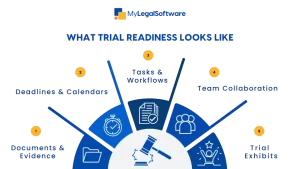
No more last-minute scrambling. No more missing exhibits. It ensures that every document, note, or deadline is in its place. This way, you are ready for trial at a moment’s notice.
It also helps every team member see the same up-to-date information. This increases efficiency.
-
Managing Documents and Evidence
Modern systems allow you to:
- Upload and tag documents
- Organize evidence by date, witness, or issue
- Generate chronologies and linked timelines
- Prepare trial exhibits faster than ever
Some platforms use AI to categorize and annotate documents, saving hours of tedious review work.
-
Workflow Automation & Task Tracking
Court cases involve tons of tasks, including discovery responses, filing deadlines, and client updates.
A sound system tracks every task automatically. You get:
- Checklists
- Automated reminders
- Workflow guidance
It reduces errors, keeps your firm compliant with court rules, and lets attorneys have more time to develop effective strategies.
-
Collaboration & Communication
Trial prep is a team sport. Attorneys, paralegals, co-counsels, and experts all need to work together.
Court case management software supports collaboration. Teams can share annotations, assign tasks, and see updates instantly.
Whether you’re at the office, in court, or working remotely, everyone stays on the same page.
Litigation-Specific Features
-
Automated Chronologies
The system can generate timelines from your evidence. This is gold for constructing narratives and trial strategy. You spot patterns, link facts, and build your story better.
-
Transcript and Deposition Management
Upload transcripts and link them to exhibits or issues. Search by keyword, witness, or topic. This makes it easier to prepare for cross-examination.
-
Trial Presentation Tools
Export hyperlinked PDFs, sync exhibits with audio/video, or create digital trial notebooks. Prep and presentation happen in the same system.
Benefits for Trial-Focused Firms
-
Efficiency and Productivity
Repetitive tasks like renaming files, indexing, or pagination are over. Attorneys spend more time on strategy.
-
Reduced Risk of Errors
Automated tracking keeps deadlines in check. Missed filings and misplaced evidence reduce drastically.
-
Better Cross-Team Coordination
Cloud access ensures everyone works from the latest version. Role-based permissions and audit logs keep teams accountable and consistent.
-
Integration Into the Full Litigation Life Cycle
These platforms aren’t just for documents. They cover:
- Intake and conflict checks
- Discovery and document review
- Deadline management
- Strategy sessions and internal collaboration
- Exhibit prep and trial presentation
Everything flows smoothly, so that when the trial week comes, there is no scrambling.
-
Cloud Access & Remote Work Trends
Most systems are cloud-based now. You can prepare in court, at home, or while traveling. Security isn’t compromised, as encryption and permission settings protect client data.
-
Analytics & Decision Support
Beyond organizing files, the software helps you make better decisions. Track case progress, identify bottlenecks, allocate resources, and forecast workloads.
When you see potential issues before they explode, you stay prepared and calm.
Integration With Other Technologies
Good court case management software doesn’t live in isolation. It connects with:
- E-discovery and document automation tools
- Billing and time tracking systems
- Client communication portals
- Court calendars
Everything flows smoothly from preparation to operations.
- Impacts on Trial Teams
- Faster access to evidence: Less time searching, more time analyzing.
- Better strategy planning: AI tools uncover key connections in evidence.
- Consistency: Templates and automated indexing maintain quality under pressure.
Challenges to Consider
No tool is perfect. Firms need to consider:
- Training and adoption costs
- Data migration accuracy
- User adoption and process alignment
- Security and compliance
Choosing the right system is about balancing features, firm size, practice areas, and budget.
Staying Trial-Ready in 2025 and Beyond
Court case management software is a strategic advantage.
By centralizing information, automating routine tasks, supporting real-time collaboration, and integrating with other legal tech, firms perform better.
Be ready. Be organized. Be trial-ready.
Try MyLegalSoftware Today
If you want to experience firsthand how court case management software can transform your firm’s trial readiness, MyLegalSoftware makes it easy. You can start a free trial and explore all the features that keep your team organized and prepared for court. Or, if you prefer a guided walkthrough, schedule a demo with our team to see how the platform can seamlessly fit into your firm’s workflow.

Frequently Asked Questions
What is court case management software?
It’s a digital platform that centralizes all case-related information, such as documents, evidence, deadlines, communications, and billing, into one workspace. It helps law firms stay organized and prepared for trial.
How does it help law firms stay trial-ready?
It helps firms by centralizing documents, automating tasks, generating timelines, tracking deadlines, and supporting team collaboration.
Can I access case information remotely?
Many platforms, including MyLegalSoftware, are cloud-based, allowing you to access your cases from anywhere while keeping your data secure.
Will the software integrate with other tools?
Most systems integrate with document automation, e-discovery, billing, client communication, and court calendar systems for seamless workflows.
Is MyLegalSoftware suitable for small or large firms?
The platform scales to fit firms of all sizes and practice areas, offering flexible features and role-based access to meet your team’s needs.
How can I get started with MyLegalSoftware?
You can start a free trial to explore the software, or schedule a demo to see how it fits your firm’s workflow and trial preparation process.







