

Many law firms make the mistake of choosing legal software that fits the moment, rather than the mission.
If you want tech that grows with you, start by knowing your growth trajectory. Everything else depends on it.
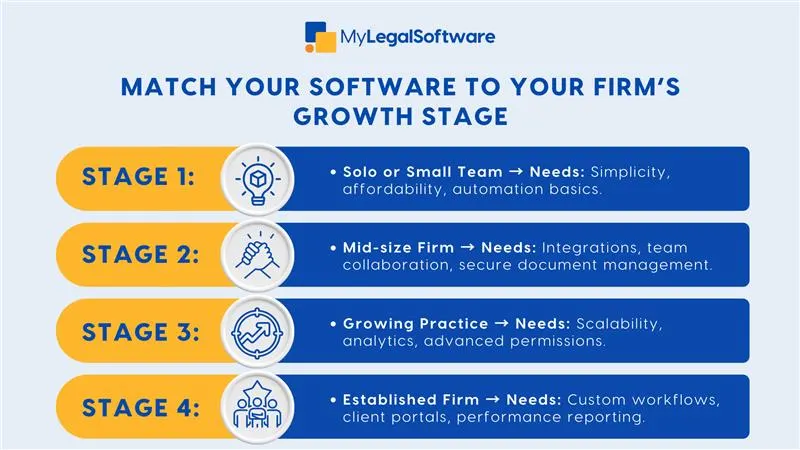
Step 1: Know Your Growth Trajectory
Before you start talking to vendors, ask yourself: where’s your firm headed in the next year or five?
Your stage determines what to go for.
- A solar or small firm with 1 to 10 users will need something simple and affordable. The setup should take hours, not weeks.
- A growing firm with 10 to 50 users will need workflow automation, access control, and integrations with accounting or HR.
- A scaling or multi-office firm has 50 to 250 users or more. It will focus on multi-tenancy and vendor support.
- An enterprise firm with over 250 users will want customization, dedicated support, and private or on-premises hosting options.
Once you understand your current position on the growth journey, you’ll know what’s non-negotiable and what can wait.
Step 2: Look Beyond Features and Think Scalability
A tool that feels perfect today might fail once your team grows. So, check what happens when you double your workload or add 50 more users.
Here’s how to evaluate legal software growth
1. Scalability & Performance
Ask: How many users can the system handle before it slows down?
Why: Some tools crumble under pressure. Get performance metrics and client references at your target scale.
2. Pricing & Total Cost of Ownership
Ask: How will this price change as we grow?
Why: A tool that’s cheap for 5 users can cost a fortune for 50. Run numbers for 12, 24, and 36 months. Always include add-ons, integrations, and migration fees.
3. Security & Compliance
Ask: Is the software SOC 2 Type II or ISO 27001 certified?
Why: You’re handling sensitive data. Encryption, MFA, and proper compliance are necessary.
4. Integrations & Extensibility
Ask: Does it pair well with others?
Why: As you grow, you’ll need your billing, email, and document tools to work together. An open API saves hours.
5. Data Ownership & Portability
Ask: Can we export our data easily and in full?
Why: You never want to be trapped. Make sure you can take your files, billing records, and history with you if you switch vendors.
6. Workflow & Feature Fit
Ask: Does it fit how we work?
Why: Legal workflows need matter management, document versioning, time tracking, and client portals. You shouldn’t have to hack your process to make it work.
7. Vendor Stability & Roadmap
Ask: Will this company still be here in five years?
Why: You’re building a long-term system. Choose a vendor with a solid track record and a roadmap that matches your firm’s growth plans.
8. Implementation & Support
Ask: How much help do we get during onboarding?
Why: Implementation time means downtime. A good vendor helps you migrate, train, and get results fast.
9. Adoption & User Experience
Ask: Will my team actually use it?
Why: Software that’s hard to use won’t get used. Test it with real users before you buy.
Step 3: Ask Questions During Vendor Demos
Here’s a list of questions to guide your demos:
Scalability
- What is your recommended number of users?
- Do you throttle API requests?
Security
- Do you have SOC 2 or ISO 27001 certifications?
- Who holds the encryption keys?
Integrations & Data
- Do you provide public API documentation?
- Can we export all the data ourselves?
Pricing
- How does the pricing scale for 12, 24, and 36 months?
- Are integrations or API calls extra?
Support & Roadmap
- What is your SLA for support?
- What major updates are planned for next year?
Score and document all answers to make an objective choice.
Step 4: Use a Simple Scoring Matrix
You can create a spreadsheet to rate each vendor on a scale of 15 and weigh what matters most.
An example for a growing firm:
| Criterion | Weight | Vendor A | Vendor B |
| Scalability | 20% | 5 | 4 |
| Pricing | 20% | 4 | 5 |
| Security | 15% | 4 | 5 |
| Integrations | 15% | 5 | 4 |
| Workflow Fit | 15% | 5 | 4 |
| Support | 10% | 4 | 4 |
| Data Portability | 5% | 5 | 4 |
It keeps the decision grounded in data.
Step 5: Roll It Out Right
Buying the right software isn’t the end. Rolling it out is where firms stumble.
Here’s what helps:
- Talk to your team. Document their daily workflow.
- Set goals like “reduce billing time by 20%.”
- Start with one practice group, then expand.
- Prep your data migration early.
- Train power users to guide the rest.
Step 6: Notice Red Flags
Walk away if you see any of these:
- No standard security certification.
- No clear way to export your data.
- Pricing that jumps with user count.
- No references from firms of your size.
- A vague roadmap or frequent instability.
MyLegalSoftware (MyLS) Is for Law Firms of All Sizes
MyLegalSoftware is your law firm’s growth partner.
It’s a one-stop case management system that covers scheduling, billing, communication, and case tracking, all in one place. It works for solo lawyers, mid-sized firms, and enterprise teams alike. In addition, it grows right along with you.
Start a free trial or schedule a demo today.

Frequently Asked Questions
What’s the biggest mistake law firms make when choosing software?
They focus only on features, but features don’t mean much if the system can’t scale or if pricing doubles when your team grows. Always think about long-term performance over short-term convenience.
How do I know if a vendor’s software is scalable?
Ask for metrics, such as the number of users they support, how they handle high data loads, and whether they offer multi-region hosting. Ask references from firms of your size.
What should I look for in pricing models?
Run the math by comparing per-user, flat-rate, and usage-based options. Add migration and support costs too. The cheapest option upfront isn’t always the best once your team expands.
How important is security in legal software?
It’s non-negotiable. Your clients trust you with sensitive data. Look for vendors with standard security certifications like SOC 2 Type II or ISO 27001, encryption, MFA, and audit logs. You can ask for a recent security report.
What if I need to switch the software later?
Make sure you can export all your data without relying on any vendor, as this serves as your safety net. A good vendor will make data portability easy and transparent.
How can I test user adoption before committing?
Do a pilot. Let users test the tool for a few weeks. If your team finds it clunky or confusing, adoption will likely fail, no matter how good the features are. MyLegalSoftware offers a free trial period for users to test the tool. You can start the free trial now.
How does MyLegalSoftware support law firm growth?
MyLegalSoftware was built for scale. It works for solo or multiple offices, covering your entire workflow, including case updates, billing, communication, and scheduling, all in one secure, centralized system. MyLS grows with your firm.







