
You need one document, a signed retainer from three months ago, or the latest draft of a brief. The client is on the phone waiting, or the court deadline is in two hours. You know the file exists, but where?
You check your email, then the shared drive, then your desktop folder, and finally ask your paralegal if they saved it elsewhere. Ten minutes are wasted searching for something that should take ten seconds. This happens multiple times daily.
Disorganized files quietly drain billable hours, but the real problem isn’t just lost time. It’s a risk: version control errors, missed documents, security gaps, and frustrated clients when you can’t instantly access their information. Document chaos creates professional liability, not just inconvenience.
This is what happens when law firms outgrow outdated document handling without implementing proper systems.
What Document Management Really Means in Legal Practice
Document management for legal firms means more than storing files. It’s organizing everything by matter, controlling access by role, maintaining version history, enabling secure sharing, and ensuring nothing gets lost regardless of staff changes.
The difference between basic storage and true legal workflows matters immensely. Dropbox stores files. Google Drive organizes folders. But neither understands legal matter structure, conflict checking, privilege protection, or the audit requirements attorneys face.
Legal documents demand higher standards than general business files: client confidentiality, work-product protection, ethical obligations, and regulatory compliance. These requirements define what document systems must deliver.
Many firms treat document systems as simple file cabinets, but they are actually workflow infrastructure that determines whether your practice runs smoothly or constantly battles its own disorganization.
Why Traditional File Systems Fail Lawyers
Shared drives create chaos at scale. Everyone saves files differently. Naming conventions vary. Folder structures multiply. Finding anything requires knowing who saved it and how they organized it.
Email attachments scatter documents across inboxes. The latest version lives in someone’s sent folder. But which version is actually the latest? Nobody knows for certain.
Desktop folders disappear when computers fail or staff leave. Critical client files exist only on one person’s laptop. This creates both operational risk and ethical problems.
Version control problems multiply fast. Multiple people edit the same document. Changes conflict. You’re never certain which draft is current. Security gaps and compliance risks grow because traditional systems lack proper access controls or audit trails.
This is why firms need actual document management software for lawyers designed for legal practice requirements.
What Attorneys Should Expect from Modern Systems
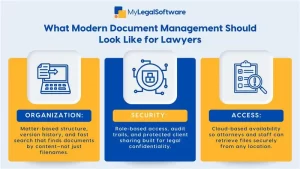
Matter-based organization keeps everything related to a case together automatically. Every document, email, note, and file connects to the client matter without manual sorting.
Role-based access protects sensitive information. Associates see what they need. Paralegals access appropriate files. Clients view only their documents. Partners control everything. Permissions enforce confidentiality automatically.
Searchability that actually works finds documents by content, not just filename. You search for a phrase inside a contract and the system locates it instantly across thousands of files.
Secure sharing with clients and co-counsel happens through controlled portals instead of unencrypted email. You maintain security while enabling collaboration.
Attorney document management software built for legal work includes these capabilities as standard features, not expensive add-ons.
Cloud-Based Systems and the Shift in Legal Workflows
Remote access without compromising security matters more than ever. You work from court, home, or client offices. Cloud-based document management systems for law firms provide secure access regardless of location.
Collaboration across offices or jurisdictions becomes seamless. Your New York associate and California partner access the same current documents simultaneously. No version conflicts. No emailing files back and forth.
Disaster recovery and business continuity depend on cloud infrastructure. When your office floods or hardware fails, your documents remain safe and accessible. This protection proves invaluable during unexpected disruptions.
Choosing the Right Fit for Your Firm Size
Small firms need simplicity and affordability. Growing firms need scalability without overpaying for unused features. What works for five attorneys overwhelms solo practitioners. What satisfies solos lacks the features that twenty-attorney firms require.
Ease of onboarding and daily use matters more than feature lists. Complex systems slow adoption and frustrate staff. Document management software for small law firms should feel intuitive from day one.
Document management programs for law firms vary dramatically in pricing, complexity, and capabilities. Match your actual needs instead of buying based on marketing promises.
Evaluating Best Without Getting Lost in Marketing
“Best” depends entirely on practice type. The best document management software for law firms doing litigation differs from what transactional practices need. Immigration firms have different requirements than criminal defense.
Attorneys should focus on practical criteria such as search reliability, access speed, integration capabilities, support quality, and real-world feedback from practicing attorneys.
Red flags include vendors avoiding questions about data ownership, systems requiring extensive IT support, platforms lacking legal-specific features, and pricing structures hiding true costs.
The best legal document management software is the one that fits your practice’s specific workflow needs and budget. Generic rankings for “law firms” are largely meaningless because no two practices operate the same way.
Control, Confidence, and Continuity
Document clarity improves legal confidence. When you can find anything instantly, you feel prepared. When version control is automatic, you trust that you’re working from current drafts. When access controls are reliable, you satisfy ethical obligations without constant worry.
The right system supports better client service. Fast document retrieval during calls. Instant portal access for clients needing files. Secure sharing with co-counsel. These capabilities become expectations clients have of modern legal practices.
MyLegalSoftware helps immigration attorneys and general practitioners manage documents alongside cases in integrated workflows. Everything connects naturally, without manual coordination across disconnected tools.
Ready to experience how proper document management transforms practice efficiency? ImmigrationQuestion.com offers a 14-day free trial. Test it with your actual files and see real workflow improvement instead of just reading about theoretical benefits.

Frequently Asked Questions
What is document management for lawyers, and why is it different from regular file storage?
Legal document management includes matter-based organization, role-based access controls, version history, audit trails, secure client sharing, and integration with case workflows that regular storage solutions lack.
How does document management software improve law firm efficiency?
Instant document retrieval eliminates search time, automatic organization reduces manual filing, version control prevents errors, and secure sharing streamlines collaboration with clients and co-counsel.
Is cloud-based document management secure for law firms?
Yes, when choosing reputable legal-specific providers- look for encryption, secure access controls, regular backups, disaster recovery, and compliance with legal industry security standards.
What should small law firms prioritize in a document management system?
Ease of use, matter-based organization, reliable search, affordable pricing, integration with existing tools, and support quality matter more than extensive feature lists.







