
Every modern client expects speed and convenience from your law firm. And that’s precisely what paperless workflows deliver.
Going paperless is eco-friendly, yes. But it also improves how your firm runs, how your team collaborates, and how clients perceive your service. However, going paperless isn’t as simple as uploading a few files to the cloud. It’s about building a workflow that’s secure and easy for both you and your clients to use.
So, let’s talk about how to run a paperless legal workflow that your clients will love.
-
Start with a Clear Plan
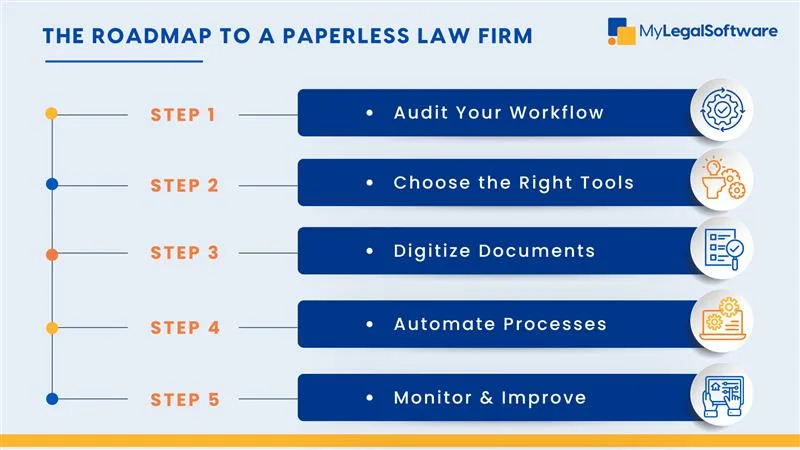
Don’t jump in without a roadmap.
Start by auditing how your firm currently handles documents, including where files are stored, who manages them, and how clients currently share information. This helps you know what to digitize first.
Once you identify the problem areas, such as lost files, slow approvals, or manual signatures, you can map out a new workflow using a paperless legal document management system.
Think of it like moving to a new office. You wouldn’t just dump everything into boxes and hope for the best. You plan where everything goes, so it’s easy to find later.
-
Choose the Right Legal Software
Most firms get it wrong by picking generic tools that weren’t designed for legal work.
You need an eco-friendly law firm software that handles both document organization and client collaboration.
A platform like MyLegalSoftware (MyLS) can help you set up client-friendly digital processes, manage files securely, and even integrate with popular workflow systems.
That means less time scanning, sorting, or chasing signatures and more time serving clients.
And because it’s built for lawyers, MYLS offers paperless e-filing, task tracking, and secure client portals; everything you need to keep your workflows digital and seamless.
-
Simplify Client Document Sharing
Clients don’t want complicated systems. They want it easy.
So, your digital setup should make it effortless for clients to send, view, or sign documents from anywhere.
Use digital client document sharing tools that are encrypted, mobile-friendly, and intuitive.
Your goal is to make clients feel like it’s easier to work with your firm than with anyone else.
Pro Tip: Send short, guided instructions the first time a client has to upload or sign something online. It takes five minutes, but it can boost trust and comfort.
-
Switch Gradually
No one said you have to ditch paper overnight.
Start small, maybe with digital client intake forms or e-signature workflows. Once your team gets used to it, extend it to billing, case updates, and document approvals.
And then, before you know it, your team will be running a fully paperless law practice.
-
Prioritize Security and Compliance
Clients trust you with sensitive data, don’t betray that trust with poor digital habits.
Your paperless legal workflows should include encrypted storage, secure backups, and role-based access for team members.
If your software includes audit trails and automatic version control, even better. That way, you can track every edit or upload without lifting a finger.
Compliance isn’t optional. Choose eco-friendly law firm software that complies with the data protection standards in your jurisdiction.
-
Train Your Team and Clients
Switching to digital workflows will only work if everyone understands how to use them.
Hold short, practical training sessions for your staff. Walk them through the process of uploading, sharing, and retrieving documents.
Then, help your clients too.
Create quick guides or short explainer videos showing how to use your digital tools. When clients find your systems easy to use, their trust in your firm skyrockets.
-
Track and Refine
Once your paperless workflow is live, monitor how it’s performing.
How fast are files being shared? How often are documents misplaced or delayed? How satisfied are clients with the new system?
Use analytics in your legal workflow software to see what’s working and where you can improve.
The data doesn’t lie. It shows you exactly where your workflow is slowing down and guides on how to improve it.
Maintaining client-friendly digital processes goes hand in hand with reducing paper in law firms.
Let your clients experience paperless systems and watch their satisfaction rate rise.
Ready For a Paperless Law Firm?
Going paperless is about working smarter and creating a better client experience. A well-designed paperless law practice saves time, strengthens security, and reduces costs while supporting an eco-friendly mission. Clients notice when processes are smooth, responsive, and easy to use.
With paperless legal workflows, your firm gains speed and accuracy. Reducing paper in law firms also reflects professionalism. It shows clients that your firm values efficiency, sustainability, and innovation. The shift to eco-friendly law firm software doesn’t just save the planet; it saves your law firm. So, this is a transition you should make.
MyLegalSoftware can help you make the transition. MyLS is an all-in-one case management software for law firms of all sizes that fully supports a paperless workflow.
Start a free trial or schedule a demo to get started.
Frequently Asked Questions
What does paperless law practice mean?
A paperless law practice uses digital tools to create, store, share, and manage legal documents instead of relying on physical paper files. It means your case files, client forms, billing, and even signatures are handled electronically, making your workflow faster and more organized.
Why should my law firm go paperless?
Time is money. Going paperless saves hours spent printing, filing, and searching for documents. It also improves client experience by making collaboration and communication smoother. Plus, it helps your firm stay compliant, eco-friendly, and ready for the future of legal work.
How can paperless legal workflows help client experience?
Clients appreciate speed and convenience. A paperless system allows them to securely share and sign documents from anywhere. It also ensures faster updates and fewer errors, which builds confidence in your firm.
Is going paperless secure?
Yes, as long as you use the right tools. Modern legal e-filing systems and document management platforms like MyLS come with encryption, access control, and secure storage. That means sensitive client data stays protected.
What if my clients are traditional and prefer physical documents?
Transition gradually. Offer both options at first, then explain how digital processes save them time and effort. Once they see how convenient and secure your client-friendly digital processes are, they will prefer the paperless option.
Can going paperless really save money?
Yes. You’ll cut costs on printing, storage, and physical office space, but the real savings come from efficiency. Less time wasted on manual paperwork means more time for billable work and client engagement.
How does MYLS support paperless legal workflows?
MyLS helps law firms switch easily to paperless systems with tools for document automation, e-filing, client portals, and secure digital sharing. It’s built specifically for legal professionals, so it fits your workflow.
Is paperless workflow eco-friendly?
Yes. By reducing paper waste and printing, your firm cuts its environmental footprint while projecting a modern, responsible image.







