

On a Monday morning, an associate in the office pulls up a client file on a desktop, while a partner on the train reviews the same matter on a phone. The associate types a quick note. The partner replies with a task and uploads an expert declaration, all before coffee.
What if your firm could manage every case, client update, and document from a single dashboard, whether someone is in the office, at home, or on the road? Hybrid law firm case management makes that possible, and it changes how firms deliver client service, protect revenue, and scale.
Why Hybrid Law Firms Need Modern Case Management
The hybrid legal work model mixes remote work with in-office collaboration. That flexibility is attractive, but it exposes weaknesses in traditional workflows.
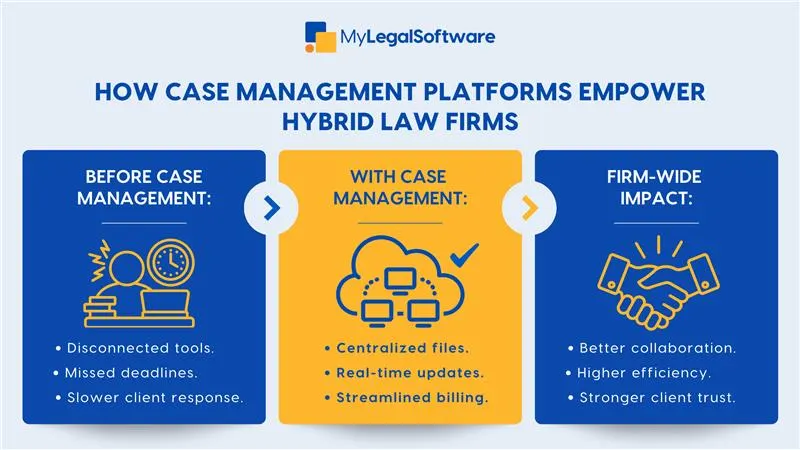
Without centralized case management, teams risk:
- Duplicate work and versioning errors when documents are on scattered drives.
- Missed deadlines because calendar items and task lists don’t sync across locations.
- Poor client experience when responses are delayed or inconsistent.
A purpose-built platform for case management hybrid work closes those gaps by making everything available, auditable, and secure no matter where people log in from.
Key Features that Power Hybrid Law Firm Models
Modern platforms designed for legal practice focus on features that matter to flexible firms. If you’re evaluating legal tech for hybrid firms, look for these core capabilities:
-
Centralized case hub
All matter information: pleadings, correspondence, bills, notes, appears in one place. That single source of truth prevents version confusion and lets any team member pick up work midstream.
-
Real-time collaboration and activity feeds
Activity streams show who did what and when. Team members see updates instantly and can comment, assign follow-ups, or tag others. This is essential for remote collaboration tools.
-
Secure client portal and document exchange
Clients want timely updates. A client portal lets clients view documents, submit forms, and send secure messages from anywhere. It reduces email back-and-forth and speeds approvals.
-
Time tracking and billing integrated with matters
Built-in timers, task-linked billing, and automated invoices keep billable work visible and collectible, even when parts of the team are remote.
-
Role-based access and compliance controls
Hybrid firms must balance accessibility with confidentiality. Granular permissions, audit logs, and encryption ensure only authorized staff can access sensitive files.
-
Mobile-ready interface
A user-friendly mobile UI means attorneys can review, approve, or update matters from the courthouse, a coffee shop, or a plane.
How Hybrid Teams Use Case Management
Case management platforms solve everyday friction.
- Intake to assignment: A new lead submits a form; the system auto-routes the matter, creates the file, assigns a paralegal, and places an initial task on the attorney’s dashboard.
- Remote document execution: An attorney uploads a draft affidavit; a remote associate reviews, edits, and uploads an executed version without emailing attachments.
- Billing from anywhere: Timekeepers log time via mobile after client calls; the system attaches hours to the correct matter and queues invoices for review.
- Rapid status updates: A client logs into the portal and sees the hearing date and next steps, no reception phone tag required.
These workflows reduce back-and-forth, increase billable hours, and improve client satisfaction.
Step-by-Step Guide to Implementing Case Management in a Hybrid Firm
Adopting software is a project, not a purchase. Here’s a practical rollout path that minimizes disruption.
-
Set clear objectives
Decide what success looks like: reduce time to bill, cut document search time, improve remote response times, or all the above. Objectives guide feature selection.
-
Inventory processes and tools
Document how teams currently intake clients, manage documents, log time, and communicate. Note pain points and software overlaps.
-
Choose software built for hybrid work
Select a platform that supports cloud access, strong security, mobile use, and integrations (email, calendaring, document storage). Prioritize case management hybrid work compatibility.
-
Pilot with a small team
Start with one practice group or a set of power users. Use the pilot to refine templates, workflows, and permission settings.
-
Train and onboard progressively
Offer role-based training sessions, short how-to videos, and live Q&A. Provide a free onboarding rep or internal champion to help ramp users.
-
Migrate data carefully
Plan document and contact migration in phases. Preserve metadata and folder structures when possible to reduce loss of context.
-
Measure and iterate
Track KPIs such as time-to-bill, days-in-accounts-receivable, document retrieval time, and user adoption. Adjust workflows based on real usage.
Comparison: Traditional Methods vs. Hybrid-ready Case Management
Traditional approach
- Documents scattered across local drives and multiple email threads.
- Manual time entry and separate billing systems.
- Tasks communicated via meetings and emails; hard to track.
- Office-bound work culture creates bottlenecks.
Case management hybrid work approach
- Centralized matter files with version control.
- Integrated timers and billing tied to matters.
- Assignable tasks with reminders and mobile notifications.
- Work flows smoothly whether staff are remote or in the office.
The result: fewer errors, faster invoicing, and higher realization of billable time.
Best Practices for Adoption and Training
Smooth adoption is more about people than technology. Follow these best practices.
- Appoint an internal champion who understands both legal work and tech.
- Provide short, targeted training for different roles — not one-size-fits-all.
- Create templates for common matter types to reduce setup time.
- Encourage mobile use with quick-start guides for on-the-go tasks.
- Monitor usage and recognize top adopters to encourage behavior change.
- Keep security training ongoing: phishing and device security matter when staff work remotely.
Measuring ROI for Hybrid Case Management
Track these metrics to prove value:
- Reduced time to invoice (days from service to invoice).
- Increased billable utilization (percentage of time recorded as billable).
- Lower administrative hours per matter.
- Faster response times to client inquiries.
- Reduction in document retrieval time.
Even modest improvements in these areas compound into significant firm-level gains.
How MyLegalSoftware Helps Hybrid Firms Thrive
Hybrid law firm models demand flexible, secure, and centralized tools. Cloud-based case management saves time, reduces errors, and helps your team focus on billable work, regardless of where they log in.
If your firm is exploring legal tech for hybrid firms or needs a solution that supports remote and in-office collaboration, MyLegalSoftware is designed to meet that need. Schedule a free demo to see how MyLegalSoftware can transform your firm’s workflow and help you practice smarter, connect better, and grow faster.

Frequently Asked Questions
-
What is a hybrid law firm model?
A hybrid law firm combines in-office and remote work, allowing attorneys and staff to collaborate from anywhere.
-
How does case management software help hybrid law firms?
It keeps all cases, documents, and communications in one place, so teams stay connected and efficient whether working remotely or on-site.
-
What features matter most for hybrid firms?
Look for cloud access, secure file sharing, task tracking, and client portals that make collaboration seamless.







