
It was Friday afternoon, and a partner called the office in a panic because a client received a surprise bill with duplicate charges. The billing manager spent the weekend untangling which documents had been billed twice, and which time entries belonged to which matter.
What if your firm could manage every case, client update, and document in one dashboard and stop billing errors before they reach your client?
Why Billing Errors Happen in Immigration Law Firms
Small mistakes add up. When firms rely on fragmented tools, manual entries, and email threads to track documents and time, the risk of billing errors grows.
Common issues include misplaced documents, duplicate uploads, unclear version control, and timekeepers coding hours to the wrong matter.
The Cost of Billing Mistakes
Billing mistakes harm revenue and client trust. They cost staff time to resolve disputes and can delay payments. For immigration law firms handling sensitive deadlines and complex filings, these errors have downstream effects on case outcomes and client satisfaction.
How Document Tracking Software Improves Billing Accuracy
Document tracking software creates a single source of truth for documents and related activities. When documents, deadlines, and time entries are linked, clerical errors drop and billing clarity increases.
Firms report fewer duplicate invoices, faster reconciliation, and more predictable monthly revenue.
Core Features that Reduce Billing Errors:
- Centralized document repository that links files to matters
- Automatic version control to prevent duplicate submissions
- Read receipts and audit trails to show who accessed or edited a document
- Time entry prompts based on document activity to capture billable work
- Permission controls to prevent unauthorized edits
Real-World Application: A Short Case Study Summary
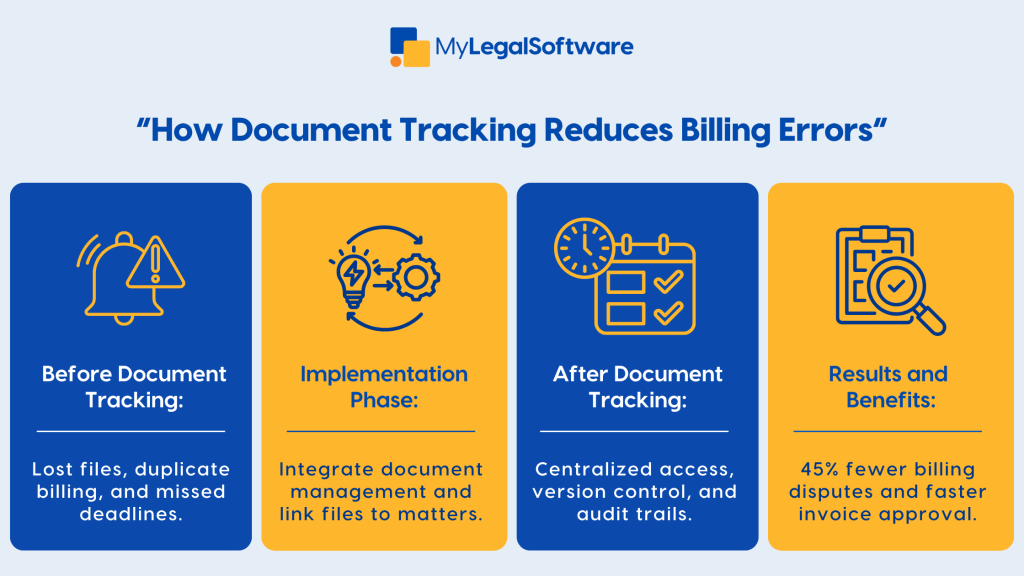
An immigration firm with 12 attorneys implemented MyLegalSoftware document tracking module. Within three months, the firm saw a 45 percent reduction in billing disputes and cut reconciliation time by half. The change came from linking every document upload to a matter and prompting timekeepers to confirm time against document events.
Step-By-Step Guide to Implementing Document Tracking
Assess Your Current Workflow
Map how documents move through your office from intake to filing. Note where duplicates, delays, or lost files occur.
Choose The Right Document Tracking Solution
Look for software designed for law firms with built-in case management, secure storage, and billing integration. Legal document tracking software that integrates with your billing system will deliver the most accuracy gains.
Migrate Documents with a Plan
- Audit existing files and identify duplicates
- Establish naming conventions before migration
- Import documents in batches and validate links to matters
Train Your Team on New Processes
Create short role-based trainings. Focus on how to link documents to matters, how to use version control, and how to log time when documents are created or reviewed.
Monitor And Refine
Review billing metrics and dispute counts monthly. Use audit logs to identify process breakdowns and retrain staff where needed.
Comparison With Traditional Methods
Traditional Methods:
- Rely on local folders and email
- Manual time entry with no document linkage
- High risk of version confusion
Document Tracking with Case Management:
- Centralized cloud storage linked to matters
- Automated prompts for time entries related to document work
- Clear audit trails and reduced duplicate billing
When measured side by side, firms using law firm document management systems typically see fewer billing mistakes and faster invoicing cycles.
Best Practices for Adoption and Staff Buy-In
- Start small with a pilot team to prove value
- Create clear naming conventions and a versioning policy
- Make linking documents to matters mandatory for billing approval
- Use permissions to limit who can edit final billing documents
- Offer bite-sized training sessions and quick reference guides
- Track key metrics like billing disputes, invoice adjustments, and reconciliation time
How Document Tracking Boosts Revenue and Efficiency
Linking documents to matters reduces the friction in billing workflows. Staff spend less time hunting for files and more time on billable work. Accurate bills reduce client pushback and speed collections. Over time, these gains translate into measurable revenue improvements and higher utilization rates for attorneys.
Addressing Common Concerns
Data Security
Legal document tracking systems built for law firms provide encryption at rest and in transit, role-based access, and robust audit logs to meet client confidentiality requirements.
Integration With Existing Tools
Choose software that integrates with your billing and email systems, so time entries and documents flow seamlessly into invoices.
Change Management
Adoption requires leadership support and consistent enforcement of the new processes. Make compliance with document linking part of your billing approval workflow.
Key Features to Look for in Legal Document Tracking Software
- Matter-linked document indexing
- Time entry prompts based on document actions
- Versioning and check-in/check-out controls
- Secure client portals for document sharing
- Billing integration and invoice change tracking
- Searchable audit trails for compliance and billing reviews
Measuring Success: Metrics To Track
- Number of billing disputes per month
- Percentage reduction in invoice adjustments
- Average time to reconcile billing statements
- Increase in collected revenue due to faster payments
- User adoption rates for document linking
Conclusion
Document tracking is not just a back-office improvement. It is a strategic tool that reduces immigration law firm billing errors, shortens reconciliation cycles, and builds client trust. Cloud-based case management with integrated legal document tracking saves time, lowers risk, and helps your team focus on billable work.
Schedule a free demo to see how MyLegalSoftware can transform your law firm workflow and start cutting billing errors today.
Frequently Asked Questions
-
What kinds of billing errors can document-tracking software help avoid?
Document-tracking software helps prevent errors such as duplicate billing for the same work, missing billable hours tied to document review or drafting, mis-allocating time to the wrong matter, and losing time entries because documents were misplaced or not linked to a case.
-
How long does it take a law firm to implement a document-tracking system and see results?
Most firms can implement the core features (document linking, version control, time prompts) within 4-8 weeks, with measurable improvements in billing accuracy and reduced disputes appearing within 3-4 months. The exact timeline depends on firm size, existing workflow complexity, and staff training.
-
How does document tracking integrate with time-keeping, billing, and case management systems?
Good legal document-tracking software links each document to a matter, triggers prompts for time entry when documents are reviewed or edited, and feeds into billing modules. This ensures the time spent on that document is captured accurately, avoids manual reconciliation, and creates a seamless workflow between case management, document management, and billing.







