

You start the day with a full docket. But before you even sip your first coffee, the inbox is overflowing. Court reminders, client messages, and urgent updates compete for your attention. Case details sit in different emails, spreadsheets, and paper files. Deadlines sneak up. Even a simple task, like finding a document, takes far longer than it should.
Many attorneys know this chaos all too well. Growing a firm with scattered systems is exhausting and risky. The constant juggling drains time and increases errors. It also frustrates clients who expect fast, reliable service.
This guide highlights 10 warning signals. Once you see them, you know it’s time to upgrade to workflow automation law firm solutions and stronger legal workflow automation tools. Each sign reveals how outdated systems hurt your practice and how law firm process automation can help you stay organized, efficient, and profitable.
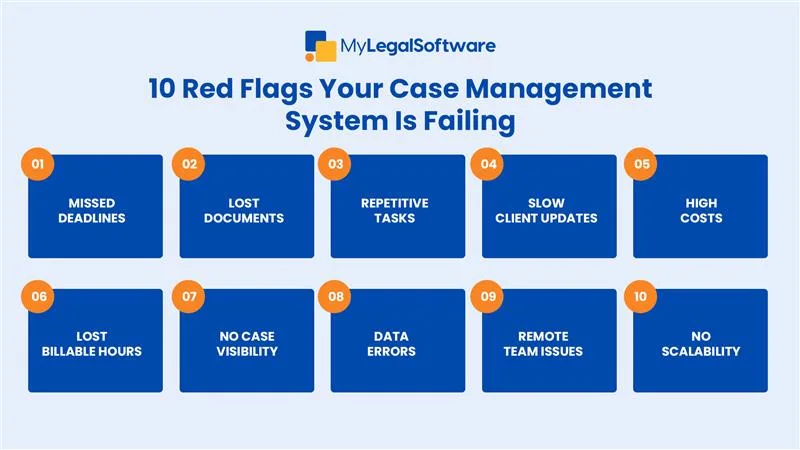
10 Warning Signals
-
Missed Deadlines or Last-Minute Scrambles
You shouldn’t miss a deadline or fall into a last-minute rush. It’s a sign your process is failing. Manual reminders or scattered calendars can’t keep up with busy caseloads. Legal operations automation and reliable legal workflow tools track tasks automatically, send alerts, and ensure that you don’t miss anything. Automation means every deadline is logged, assigned, and visible to the whole team.
-
Constantly Searching for Documents or Emails
If your team spends more time hunting for files than reviewing them, you’re losing valuable billable hours. Manual storage and email chains create confusion. A strong law firm automation tool stores every document in one secure place, searchable in seconds. Smart indexing and automated workflows keep case materials organized from intake to resolution.
-
Staff Overload from Repetitive Tasks
Reentering data, drafting the same forms, or copying information across platforms leads to burnout. Small firms feel this pressure even more. Law firm process automation can auto-populate forms, trigger next steps, and eliminate double entry. This frees staff to focus on meaningful client work instead of repetitive tasks.
-
Client Complaints About Delays or Poor Updates
Clients expect timely updates and quick responses. When calls or emails pile up unanswered, trust goes down. Legal workflow automation provides built-in client communication features and automated updates. Attorneys can share progress securely, giving clients real-time visibility without extra effort.
-
High Administrative Costs with Little Return
If administrative overhead grows but revenue does not, your system is draining resources. Manual processes demand more staff hours and lead to higher costs. Workflow automation for law firms reduces routine tasks, helping to reduce law firm overhead without sacrificing service quality.
-
Difficulty Tracking Billable Hours Accurately
If your billing depends on handwritten notes or memory, lost hours are inevitable. Manual time tracking leads to underbilling and missed revenue. Law firm automation tools record time automatically as tasks are completed. With built-in timers and automated logs, attorneys capture every minute accurately and can invoice clients with confidence.
-
No Clear View of Case Progress
Without a dashboard to track active cases, it’s hard to know what’s done, what’s pending, and what’s overdue. This lack of visibility creates delays and missed opportunities. Legal workflow automation delivers clear case timelines, task assignments, and status updates in real time. Attorneys and staff can instantly see where each matter stands.
-
Data Entry Errors That Affect Client Files
Small mistakes in client data can lead to serious consequences in legal work. Copying and pasting information increases the chance of human error. Automated law firm processes reduce these risks by transferring data seamlessly between forms, tasks, and documents. One correct entry updates every connected record.
-
Trouble Managing Remote or Hybrid Teams
Managing a team across offices or from home is nearly impossible without the right tools. Scattered emails and manual updates slow everyone down. Workflow automation law firm solutions give teams a single, secure platform to collaborate, share updates, and work on cases in real time, no matter where they are.
-
Inability to Scale as Caseloads Grow
If every new client means more chaos, your systems are holding you back. Growth should not require endless hiring or longer work hours. Law firm process automation supports growth by handling larger caseloads without extra strain. Automated workflows adapt as your practice expands, letting you serve more clients efficiently.
Take Action Before It’s Too Late
Each of these warning signs points to the same problem. Outdated systems can’t keep up with today’s legal demands. Investing in better tools isn’t about technology for its own sake. It’s about protecting your reputation, safeguarding client relationships, and creating room to grow.
If you’re ready to see the difference, try MyLegalSoftware (MyLS). This powerful case management platform helps immigration attorneys and general practitioners manage every step of a case. You can explore its full features with a 14-day free trial and see how it streamlines tasks, cuts costs, and supports growth.

Frequently Asked Questions
What is legal workflow automation in law firms?
It’s the use of technology to create repeatable processes for tasks like client intake, document drafting, and deadline tracking, ensuring nothing is missed along the line.
Can small firms afford law firm process automation?
Yes. Modern tools scale to fit small practices and often cost less than the lost time and errors caused by manual systems.
How does automation help reduce law firm overhead?
It cuts repetitive tasks, lowers administrative staffing needs, and saves billable hours that would otherwise be lost to manual work.
Will law firm automation tools replace staff?
No. Automation supports staff by removing tedious tasks, allowing them to focus on higher-value client services.
Can automation integrate with existing systems?
Most modern platforms integrate with email, billing, and document management software, making adoption smooth and disruption minimal.







