
You must prioritize client needs to run a successful law firm. Today’s clients want speed, clarity, and an easy way to track their cases. One way to achieve this is by getting a law firm client portal. The only problem is that firms often choose tools that seem appealing, but many of them fail to integrate, scale, or meet client needs, ultimately causing frustration.
You need client portal software for your law firm that’s secure, easy to use, and built to work with your existing practice tools.
Pick a portal that’s secure and integrates with your practice management and accounting systems. It must be client-friendly and come with real vendor support. Ensure you choose a tool like MyLegalSoftware (MyLS) that allows you to test before investing.
Why the Right Client Portal Matters
A good legal client portal manages all your client communication in one secure place. It cuts inbox clutter, reduces phone calls, and helps your team stay consistent.
Security is another selling point.
A portal with encrypted messaging, access controls, and complete audit logs prevents information from leaking.
With a client portal, clients receive better overall service. They can check documents, pay invoices, upload IDs, and see updates without waiting for a call.
What to Look For
Here’s a must-have list you shouldn’t compromise on when picking software.
Must-haves
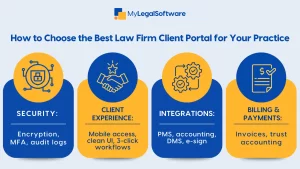
- End-to-end encryption, both at rest and in transit.
- MFA and SSO support, because security must meet global standards.
- Audit logs and granular access controls, so you always have a clear trail.
- Document sharing and e-signature, either built in or fully integrated.
- Billing and payments that are PCI compliant and connected to your trust accounting.
- Mobile access, since clients use their phones more than any other device.
- Case management and accounting integrations that save hours of work.
Nice-to-haves
These are additional features a standard client portal may have.
- Intake forms
- Workflow triggers
- Secure chat with read receipts
- Branding and dashboards
- Emerging AI search
If you’re torn between options, pick the one that is simplest for your clients to understand, like MyLS.
Security Questions to Ask Every Vendor
Here are some things to confirm first before purchasing. Ask about:
- Encryption standards
- MFA and SSO options
- Pen-testing summaries
- Data-hosting location
- Disaster-recovery details
- HIPAA/GDPR support if you handle regulated data
If a vendor hesitates on any of this, move on.
Integrations
A portal becomes useless if it doesn’t connect to what you use daily. Make sure it integrates with your:
- Case management system
- Accounting and billing
- Document management
- E-sign tools
- Calendar & email
- SSO provider
MyLS is an all-in-one solution that offers these features and integrates smoothly with your everyday work tools.
Client Experience
Your clients will judge the portal. Ask yourself, can a non-technical person:
- View a document,
- Pay an invoice,
- Upload a file
All without help? If the answer is no, your clients won’t use it.
Ask vendors for a one-page client guide and short onboarding videos. Even better if they have a mobile app.
Pricing and ROI
Some portals use tiered or per-user pricing. Some bundle the portal inside a full PMS.
Look beyond the monthly fee and estimate these:
- Training time
- Implementation cost
- Integration cost
- Support quality
And then model ROI around:
- Fewer intake hours
- Faster collections
- Fewer email errors
- More client retention
Use this to determine your actual savings.
Vendor Reliability
Before you sign anything, make sure the vendor is reliable by checking these out:
- User reviews
- Uptime SLA
- Support hours
- Data export policy
- Product roadmap
Ask what’s coming next. You want a vendor that’s investing in automation, better APIs, and client UX.
Implementation Plan
Here is a simple implementation plan you could follow:
- Week 0–1: Define goals and budget.
- Week 2: Scripted demos with the same checklist for vendors.
- Week 3: Security Review and Contract Terms.
- Week 4: Map integrations
- Week 5–6: Pilot with 5 to 10 clients. Gather feedback.
- Week 7: Train staff. Build client templates.
- Week 8: Roll out firm wide. Track adoption and payment speed.
Questions to Ask During the Demo
- What encryption standard do you use?
- Do you support MFA and SSO?
- How do you integrate with our existing tools?
- Can clients sign documents inside the portal?
- What’s your uptime SLA?
- How do we export data if we ever leave? Are there fees?
These questions can help you distinguish between solid and risky vendors.
What Not to Do
- Picking a feature-heavy tool that clients find confusing.
- Choosing portals that don’t integrate with your existing stack.
- Underestimating onboarding for staff and clients
- Ignoring long-term support and SLA details.
- Buying before testing.
MyLegalSoftware as the Ideal Client Portal
Get all the essential features your law firm needs to manage clients effectively on MyLegalSoftware.
Schedule a demo today.

Frequently Asked Questions
What is a client portal for law firms?
It’s a secure online space where clients can message you, share documents, pay invoices, and see case updates. Think of it as a central hub that replaces scattered emails. And it keeps everything organized inside one secure system.
Why should my firm use a legal client portal?
You get to reduce email clutter, speed up intake, and keep clients updated. Plus, you lower risks since files aren’t floating around inboxes.
What features are important?
Look for encryption, MFA, audit logs, simple document sharing, built-in or integrated e-signing, billing, payments, and mobile access.
How do I know if a portal is secure?
Ask the vendor for encryption specs, documentation, penetration tests, and MFA/SSO options. And then check where the data is hosted and how backups work.
Should a client portal integrate with my practice management system?
A portal without integration becomes a silo. Make sure it works with your CMS, accounting, calendar, and e-signature tools. You don’t want to do duplicate work. This makes MyLegalSoftware an excellent choice for your law firm.
Will clients actually use portals?
They will, if it’s simple to use. If the login is easy and the mobile UI works well, adoption jumps. Test with a non-technical staff member first. If they struggle, your clients will too.
How much does client portal software for law firms cost?
Pricing varies by vendor, ranging from per-user to per-matter to bundled with a practice management system. Calculate the total cost by adding the subscription, setup, integration, and training. Calculate ROI by faster payments, fewer emails, and fewer errors.
How do I introduce a client portal without overwhelming staff?
Train your team. Use templates for onboarding messages and measure adoption weekly, allowing you to address friction points early.
What questions should I ask during demos?
Ask about encryption, uptime SLAs, integrations, data export rights, and support hours. Get clarity on who handles onboarding if you don’t want surprises after you invest.
What’s the biggest mistake firms make when choosing a client portal?
Picking a feature-heavy tool that clients won’t use. Always choose client experience over shiny extras.







