
There’s a certain dread that creeps in when a partner says, “Can you find that brief from the Johnson case?” You know it’s in there somewhere, buried under years of scanned pleadings, duplicate drafts, and “final_final_copy” PDFs. The search begins, morale dips, and another hour of billable time disappears into the black hole of your firm’s document archive.
Most law offices have one, a place where yesterday’s organization tools meet today’s digital overload, and, oftentimes, the result is chaos. What used to fit neatly into a filing cabinet now sprawls across shared drives, desktops, cloud folders, and email chains. For a profession built on precision, that kind of disorder both wastes precious time and carries risk.
Cleaning up your archive can mean reclaiming control of your records before they control you, and so it becomes important to do it in a way that keeps every vital document secure and accessible.
The trick is balance: declutter without deleting what matters, modernize without losing history. With the right approach, your firm can go from information overload to clarity and never have to fear or think “Where’s that document?” again.
The Hidden Cost of a Messy Archive
Law firms live and die by documentation. When your team spends fifteen minutes searching for a file that should take thirty seconds, that’s not just frustration; it’s billable time evaporating. Add up those minutes across a month, and you’ll see how expensive clutter really is.
Beyond productivity, disorganization opens the door to mistakes. Two versions of a contract in circulation can easily create confusion, or worse, liability. Then there’s compliance: courts and regulators expect you to know exactly what you’ve kept, where it’s stored, and how long you’re keeping it. A messy archive can’t make that promise.
That’s where legal software becomes less of a luxury and more of a necessity. The smartest systems now handle the dull but dangerous parts of record management (sorting duplicates, tagging metadata, enforcing retention schedules), so you don’t have to.
How Technology Restores Order
A good document management platform is like a meticulous clerk who never sleeps. It indexes every file, keeps only one “final” version, and flags records that have overstayed their retention period. You can search by client, case number, or keyword and find what you need in seconds.
Better still, it builds in compliance from the start. Once retention rules are programmed (say, seven years for pleadings or three years for certain contracts), the system automatically tracks expiration dates and applies legal holds where required. That’s not just convenience; it’s peace of mind.
Security, too, improves when you stop using scattered storage. Centralized, encrypted archives mean no more worrying about sensitive case files sitting in forgotten folders or being shared beyond intended eyes. You get a clear record of who accessed what and when; a vital safeguard if your firm ever faces an audit or discovery request.
What Smart Cleanup Really Looks Like
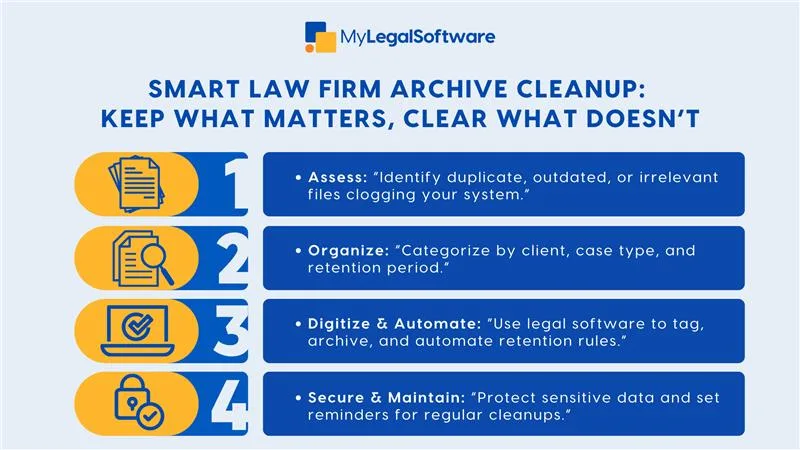
The cleanup itself doesn’t happen overnight. It begins with a full inventory: every shared drive, old server, email archive, and cloud folder. You’ll quickly see just how sprawling your digital estate has become. From there, you identify what’s active, what’s historical, and what’s simply redundant.
Next comes structure, the metadata and naming conventions that give files order and context. Think of it as teaching your archive to speak your language. Once that’s in place, batch tools can migrate and tag documents automatically, freeing your staff to focus on more valuable work.
And when it’s time to dispose of expired records, automation ensures nothing is deleted prematurely or without a proper audit trail. A defensible disposal process, logged and timestamped, can save your firm considerable headaches down the road.
The change doesn’t have to be disruptive. Many firms start small, piloting with one practice area, then expanding as the team gains confidence. Over time, the new system becomes second nature, and those frantic file hunts fade into memory.
The Human Side of Digital Order
Technology can do the heavy lifting, but lasting order depends on people. Attorneys and paralegals must be trained to file documents consistently, apply the right metadata, and trust the new system. Designating a “records champion” helps: someone who ensures the firm’s retention policies are followed and periodically reviews them for compliance.
It’s also important to show the team the payoff. Fewer headaches. Faster searches. Better client service. Every attorney who spends less time chasing files spends more time doing what clients actually pay for, which is practicing law.
The Next Step
Cleaning your document archive isn’t about technology for technology’s sake. It’s about protecting the integrity of your work and freeing your team from the clutter that holds them back.
MyLegalSoftware helps law firms do exactly that: automate their retention policies, streamline document cleanup, and secure every record in one intuitive platform. If your firm is ready to turn that digital chaos into clarity, schedule a free demo today and see how MyLegalSoftware can help you clean up your archive without losing a single important record.
Frequently Asked Questions
How do clean up a law firm’s document archive without losing critical records?
You start by imagining what stays and what goes, not by hitting “delete” in panic. Most firms audit file sources, tag files with metadata, run deduplication, and then rely on retention rules with hold protocols. The key is a staged, defensible cleanup that respects both efficiency and compliance.
How long should a law firm keep client documents before they can be deleted?
It depends, and that’s no strict answer, because it’s a question tied to statute, ethics rules, case types, and firm policy. Some records must stay seven years, others indefinitely under legal hold. A solid archive system embeds those rules, so the software reminds you; you don’t have to memorize each one.
What happens if I accidentally delete a document during cleanup?
If your system has versioning and audit logs, you can recover earlier versions or trace who deleted what and when. Good document-management software treats deletion as a process, not an instant action. That kind of “insurance” is why firms live to clean another day.
Is it better to store archives in the cloud or on premises?
It depends on your firm’s security, budget, and access patterns. Cloud archives offer scalable security, remote access, and automated indexing. On-premises still gives control. The best choice is consistency. Whichever you choose, make sure your archive is accessible, encrypted, and audited.







