

Your inbox is full again. New client leads, overdue forms, and court reminders crowd your day. You want to practice law, not act as an operations manager. That’s the practical reason many firms adopt law practice automation: to reduce repetitive work and free time for legal strategy.
Automation can handle routine chores. It schedules reminders. It drafts standard documents. It moves client data from intake to matter files. When implemented well, it speeds up work and cuts errors. When rushed or misapplied, it creates new problems. You need a clear plan that balances efficiency with ethics, security, and client care.
In this guide, we’ll walk you through what automation does, where it helps most, the rewards you can expect, the risks to avoid, and simple best practices to follow.
What is Law Practice Automation?
Law practice automation means using software to perform predictable tasks automatically. This is not about replacing judgment or advocacy. It’s about reducing manual steps for routine processes. Examples include automated intake forms, deadline reminders, and document assembly.
Legal process automation goes beyond one-off fixes. It involves mapping out workflow, identifying repeatable steps, and assigning tools to carry them out. That way, tasks always follow the same, auditable path. You get consistency, faster throughput, and fewer dropped steps.
For many firms, this is the foundation of a more reliable practice.
The Benefits of Law Practice Automation
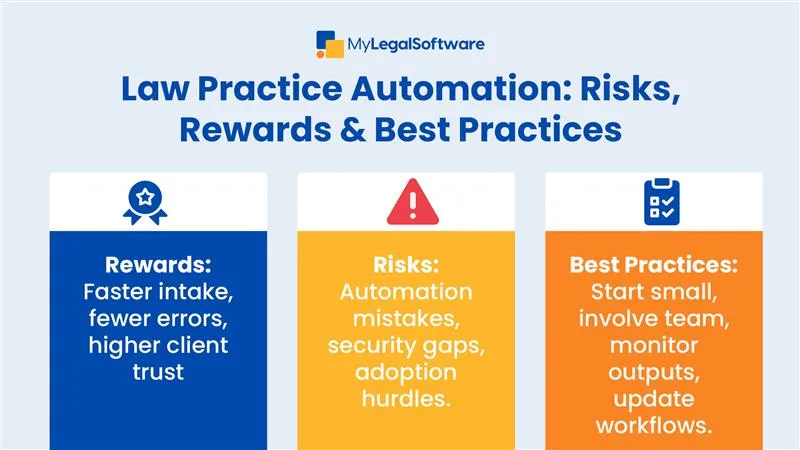
The benefits of law practice automation show up quickly. You’ll cut hours spent on admin. Intake moves faster. Billing errors drop. Clients receive acknowledgments and updates right away. That kind of responsiveness improves conversions and client trust.
Automation also makes growth less painful. A small team can handle a bigger caseload without immediately hiring more admin staff. That scalability matters when you’re trying to expand or take on higher-value work.
Automation also reduces simple human mistakes. Consistent workflows mean fewer missed deadlines and clearer records for audit or review. Those outcomes point straight to better client service and steadier cash flow.
Law Firm Automation Rewards
Beyond time savings, law firm automation rewards include consistency and capacity. When your intake, conflict checks, and document templates run the same way every time, you create reliable results your clients can count on.
That consistency reduces rework and builds a predictable pipeline.
You also gain capacity. Automating routine steps means your team can focus on complex tasks that require legal skill. That shift often leads to better outcomes and higher job satisfaction. And over time, the firm’s brand improves. Clients see faster responses, clearer invoices, and fewer administrative errors. Those reputational gains are real and measurable.
Law Firm Automation Risks
While the rewards are real, there are also law firm automation risks. The first is over-reliance. If you trust software blindly, you may miss errors or overlook unique case details. Automation is not a substitute for professional judgment.
The second risk is poor setup. If workflows are mapped incorrectly, you simply automate mistakes. That can harm client files and your reputation.
The third risk is security. Automating processes often means moving data through multiple systems. Without strict protections, you may increase exposure to breaches.
Finally, automation can fail if the firm resists adoption. If staff avoid the tools, you end up with half-manual, half-automated processes that cause more confusion than order.
Legal Automation Best Practices
Following legal automation best practices prevents many of those risks.
Start small. Automate one process, like intake forms or deadline reminders, before rolling out firm-wide. Next, involve your team early. If attorneys and staff help design workflows, they’ll be more likely to adopt them.
Always maintain oversight. Automation should support decision-making, not replace it. Set review checkpoints to ensure outputs are accurate. Security should also be part of your design. Use systems with encryption, audit logs, and access controls.
Finally, update workflows regularly. As laws, clients, and firm processes evolve, your automation should evolve with them. That’s how you keep it reliable and compliant.
A Practical Guide to Legal Process Automation
Start by mapping current processes step by step. Identify pain points: where do delays or mistakes occur? Then ask: can we automate this without losing quality?
Prioritize high-volume, repetitive tasks. Intake questionnaires, reminders, and billing are often good entry points. Choose systems that integrate well with your existing tools so you don’t create silos. Train your staff so they understand how to use and supervise the new systems.
By taking these steps, you avoid costly mistakes and maximize the benefits of law practice automation.
Smarter Practice, Better Service
Adopting automation is about more than speed. It’s about giving attorneys more time for client advocacy and less time on paperwork. Done right, it strengthens client trust, reduces errors, and positions your firm for steady growth.
This is where MyLegalSoftware (MyLS) comes in. It’s a trusted case management platform designed for immigration attorneys and general practitioners. With built-in automation, it helps you manage cases smoothly from first contact to resolution. Sign up for a 14-day free trial to see how it can support your workflows and improve your practice without extra strain.
Frequently Asked Questions
What is law practice automation?
It’s the use of software to handle routine tasks like intake, scheduling, and document prep.
Can small firms afford automation?
Yes. Many tools scale to fit the size of your firm and pay for themselves through efficiency.
How does automation reduce overhead?
It cuts repetitive admin tasks, reducing the need for extra staff and lowering costs.
Will automation replace staff?
No. It supports staff by removing repetitive work so they can focus on higher-value tasks.
Can automation integrate with existing systems?
Yes, most tools connect with billing, calendars, and case management software for smooth operations.







