

Imagine you’re a partner at a law firm. One Friday afternoon, you find ten loose invoices on your desk, each with different formats, unclear descriptions, and missing client references. Your firm lost time chasing answers and delayed payments followed.
What if your firm could send clean, consistent invoices that reduce questions, speed payments, and protect your fee structure? MyLegalSoftware helps turn chaotic billing into a reliable, repeatable process that keeps clients informed and your trust intact.
Why Invoice Format Matters for Law Firms
A professional invoice is more than a bill; it is a record of value and a client communication tool. Poorly formatted or vague invoices create confusion, increase disputes, and reduce the chance of on-time payment. Consistent formats reduce administrative load and make reporting and trust building simple.
Key Challenges Without Modern Billing Tools
Manual billing creates common problems:
- Inconsistent wording that sparks client questions.
- Missing matter numbers, retainer balances, or tax details.
- Time entry errors that reduce recoverable fees.
- Delays in issuing invoices that push payments out.
How Software Improves Efficiency and Revenue
Legal billing software brings client intake, time tracking, and invoicing into one system, which keeps everything consistent. When intake information is captured accurately from the start, invoices automatically populate with the right contact and matter details. Automated time capture and easy-to-use templates then proceed to reduce errors, allowing your team to focus on billable work instead of paperwork.
Invoice Template: Basic Format Example
Use a simple, repeatable structure:
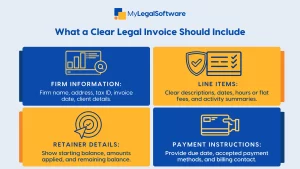
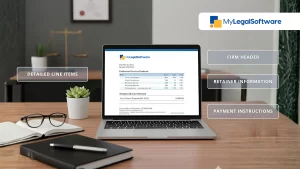
- Firm Header: Firm name, address, contact info, tax ID.
- Invoice Metadata: Invoice number, invoice date, due date, matter number.
- Client Block: Client name, billing address, client ID from intake.
- Summary: Short matter description and billing period.
- Line Items: Date, activity code, brief description, hours, rate, amount.
- Subtotals: Fees, expenses, taxes if applicable.
- Retainer Notes: Retainer balance before and after application.
- Payment Instructions: Bank, check, trusted payment portal link.
- Contact For Questions: Name and phone or email for billing inquiries.
Sample Invoice Wording and Line-Item Examples
Clear, concise wording reduces disputes. Here are sample line items and labels you can reuse.
Line-Item Description Examples
- Client Intake: Initial client intake call and conflict check, 0.5 hours.
- Legal Research: Research on state landlord tenant statute, 1.5 hours.
- Drafting: Draft demand letter and client review, 2.0 hours.
- Court Filing: Prepare and file notice of appearance, flat fee.
- Travel: Travel to courthouse, 0.75 hours plus parking expenses.
- Expense: Filing fee paid to court, reimbursable.
Friendly But Precise Invoice Sentences
- “Please note: This invoice applies to services provided between July 1 and July 15.”
- “Retainer applied: $1,500. Remaining retainer balance: $300.”
- “Payment due within 30 days of invoice date. Please contact billing@firm.com with questions.”
Professional Tips for Wording That Reduces Queries
- Use One Sentence Per Line Item: Describe what was done, the date, and the time spent.
- Avoid Internal Codes in Client-Facing Descriptions: Replace “TRR-4” with “Telephone call with opposing counsel on case strategy.”
- Add Short Context for Large Entries: If a single entry exceeds three hours, add a one-line explanation.
- State Next Steps When Appropriate: “Next: Prepare motion to compel upon client approval.”
- Include Clear Contact Information for Billing Questions.
How To Present Time and Flat Fee Entries
- For hourly work: Show date, activity, hours, hourly rate, total.
- For partial hours: Use tenths of an hour and be consistent across the firm.
- For flat fees: List as a single line with a compact description and the agreed flat fee amount.
- For mixed billing: Provide a short summary row that totals hourly fees and flat fees separately.
Best Practices for Retainers and Trust Accounting
- Show Retainer Transactions: List original retainer, sums applied to invoices, and current trust balance.
- Make Trust Use Transparent: Indicate exactly which invoice lines the retainer paid.
- Keep Records Linked to Intake: Connect legal client intake notes and the engagement letter to retainer entries for easy audit.
- Follow Jurisdiction Rules: Ensure your trust accounting practices comply with local bar rules.
Integrating Client Intake with Billing
A strong intake client process reduces billing friction. Capture billing address, preferred invoice method, tax requirements, and matter code at first contact. Use that data to populate invoices automatically and to ensure the client receives the right documents for the first time.
Step By Step Guide to Implementing Legal Billing Software
- Map Current Processes: Document how intake, timekeeping, and invoicing work today.
- Choose Core Templates: Set a firm-wide invoice template for fees, expenses, retainers, and taxes.
- Import Client Data: Pull client intake records and matter details into the system.
- Train Staff: Run brief, focused training sessions for intake staff, fee earners, and accounts receivable.
- Pilot With a Practice Group: Start with one team, collect feedback, and iterate.
- Roll Out Firm-wide: Apply templates and controls across the practice once workflow is stable.
- Review Monthly: Audit invoices for clarity, timeliness, and compliance.
Comparison With Traditional Methods
Traditional spreadsheets and word invoices feel flexible but create risk. They are prone to transcription errors, inconsistent wording, and mismatched client details. Modern legal billing software standardizes language, enforces matter codes, and logs every change for compliance.
Real World Use Cases
- A small firm reduced billing disputes by 40 percent after standardizing descriptions and using templates.
- A mid-size practice increased collections by shortening invoice cycles and offering secure online payments.
- An intake-focused firm automated client onboarding, so invoices carried the correct billing address and PO number every time.
Metrics To Track After Implementation
- Days Sales Outstanding (DSO) and change over time.
- Percentage Of Invoices Approved Without Revision.
- Time Spent Preparing and Sending Invoices.
- Percentage Of Payments Received Through Online Portal.
- Number Of Billing Disputes Opened Per Quarter.
Conclusion
Clear, consistent legal invoices improve collections, reduce disputes, and build client trust. When intake client data, time tracking, and billing templates work together, your firm spends less time on administration and more time on client matters. Schedule a free demo to see how MyLegalSoftware centralizes client intake, legal client intake records, time tracking, and billing templates to produce clean, professional invoices that get paid faster.
Ready to transform billing? Request a free demo today and see how automated invoicing can reduce disputes and improve cash flow.
Frequently Asked Questions About Legal Invoices
How Detailed Should Line-Item Descriptions Be?
Provide enough detail for the client to understand the value; avoid internal shorthand. A one-line description plus the date is usually sufficient.
Should I Show Hours for All Entries?
Yes, for hourly billing. For flat fee work, show the flat fee and note what it covers to avoid future confusion.
Where Do I Put Retainer Information?
Display it in a dedicated trust or retainer section near the totals with starting balance and remaining balance after application.







