

You are handling cases well, with solid legal analysis and strong client relationships, but something still feels off because operations are chaotic. Handoffs between team members are unclear, tracking case status requires checking multiple systems, and important follow-ups are sometimes missed.
These inefficiencies quietly cost more than you may realize, from lost billable hours spent reconstructing information to ongoing stress about what might be forgotten and client frustration when simple questions take too long to answer. The legal work itself is solid, but operational friction is the real problem.
Modern legal operations software should support your practice without becoming another burden by reducing chaos rather than adding complexity. The right system makes operations feel effortless and frees you to focus on the legal work that truly matters.
What Legal Operations Really Means for Practicing Attorneys
Legal operations in a law firm encompass everything that supports legal work without being legal work itself, including case intake, document organization, deadline tracking, team coordination, client communication, and billing. These operational tasks enable the practice of law, even though they are not themselves the practice of law.
Operations differ from legal work yet directly affect outcomes. Poor operations lead to missed deadlines, disorganized files, confused communications, and stressed attorneys. Strong operations create space for excellent legal work.
Many attorneys adopt legal ops software too late. They struggle with manual systems until operations become unbearable. Then they scramble to implement solutions under pressure. Early adoption prevents crises instead of reacting to them.
Why the Perfect Tool Is About Fit, Not Features
Bloated platforms fail attorneys constantly. Software loaded with hundreds of features nobody uses. Complex interfaces requiring extensive training. Systems designed for enterprise corporations, not law practices. These platforms look impressive in demos, but frustrate daily use.
The danger of buying software designed for someone else’s workflow is real. What works for corporate legal departments doesn’t always match small firm needs. Generic business software misses legal-specific requirements entirely.
Attorneys should prioritize fit before features. Does it match how you work? Does it solve your specific pain points? Can your team learn it quickly? These questions matter more than feature lists.
-
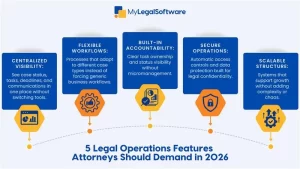
Centralized Visibility Across Every Case
Fragmented tools break momentum constantly. Information scattered across email, spreadsheets, file servers, and calendar apps means you’re always switching contexts. Each switch costs mental energy and increases error risk.
True visibility means seeing everything about a case in one place: current status, pending tasks, recent communications, upcoming deadlines, and related documents, all connected without needing to jump between systems.
Centralized operations reduce mental load dramatically. You’re not trying to remember where something was saved. You’re not reconstructing case status from scattered notes. Better visibility leads directly to improved client communication and deadline management.
-
Workflow Support That Matches How You Practice Law
Rigid systems frustrate attorneys who don’t fit the predetermined mold. When software forces you into workflows that don’t match your practice reality, you fight the system daily instead of being supported by it.
Adaptable workflows matter. Different case types need different processes. Immigration applications follow different patterns than litigation matters. Your system should accommodate this variety without requiring extensive customization or technical knowledge.
Operational tools must follow legal logic rather than forcing generic business processes. Legal work has specific rhythms, requirements, and standards. Software designed for legal practice understands these patterns.
-
Built-In Accountability Without Micromanagement
Good systems clarify responsibility naturally. When tasks are clearly assigned, and status is visible, people know what they’re responsible for. This creates accountability through transparency rather than surveillance.
The difference between oversight and pressure matters. Oversight means systems that show who’s handling what. Pressure means systems that feel like constant monitoring. Attorneys need the former, not the latter.
Accountability protects attorneys as much as firms. Clear records of who did what when protect you if questions arise later. Documentation proves proper handling without requiring memory or reconstruction.
Operational clarity reduces burnout. When you’re confident that nothing is missed across your practice, you worry less. When responsibilities are clear, you fight less about who should handle what.
-
Secure Information Handling Without Slowing You Down
Security should feel invisible, not obstructive. Properly designed systems protect client information automatically without creating friction in daily work. You shouldn’t need security training to do basic tasks safely.
Access control without friction means appropriate people see appropriate information automatically. Junior staff access what they need for their work. Partners see everything. Clients access only their files. This happens systematically instead of through constant manual permission management.
Protecting client trust while staying efficient requires systems built for legal confidentiality from the beginning. Generic business software adds security as an afterthought. Legal operations software treats it as a foundation.
Operations software functions as a risk-management layer protecting both clients and your practice reputation.
-
Scalability That Supports Growth, Not Complexity
What happens when firms grow without operational support? Chaos compounds. What barely worked with five attorneys would likely fail with 15. Manual coordination that functioned in one office breaks across multiple locations.
Scalability is about consistency, not just size. Systems that maintain reliable operations, whether you’re handling twenty cases or two hundred. Processes that work the same regardless of staff turnover.
Preparing for future caseloads and team expansion means choosing software that grows with your practice. You shouldn’t need to replace systems every few years because you outgrow their capabilities.
Operations Should Support You, Not Compete with You
Legal operations exist as an ally, not overhead. The right operational systems make practicing law easier instead of adding an administrative burden. They reduce stress by handling mechanical tasks, so you focus on judgment and strategy.
When operations run smoothly, outcomes improve. Clients receive better service. Cases progress more efficiently. Attorneys experience less burnout. Teams coordinate naturally. These improvements come from removing operational friction, not from working harder.
MyLegalSoftware is designed specifically to support immigration attorneys and general practitioners through complete operational workflows from first client contact through final case resolution. The platform handles operations comprehensively so you can focus on legal work.
Ready to evaluate whether your current systems actually support your practice or just create more work? MyLegalSoftware offers a 14-day free trial. Test it with real cases in your actual workflows. See whether operational support really reduces stress and improves outcomes.
Operations should feel like support, not another job responsibility. The right system makes that possible.
Frequently Asked Questions
What is legal operations software, and how does it differ from case management tools?
Legal operations software encompasses all operational support, including intake, coordination, communication, and reporting. Case management is one component. Comprehensive platforms integrate operations with case work seamlessly.
Do solo and small firms really need legal ops software?
Yes. Solos and small firms lack administrative staff to handle operations manually. Software provides capabilities that larger firms achieve through dedicated operations teams.
How can legal operations tools reduce attorney burnout?
By removing operational chaos that creates constant worry. When systems track deadlines, organize information, and clarify responsibilities, attorneys stop mentally carrying operational burden.
What mistakes do attorneys make when choosing operations software?
Choosing based on features rather than fit, buying enterprise tools for small firms, ignoring integration needs, accepting poor user experience, and failing to evaluate actual daily workflow impact.
Can legal operations software improve client experience?
Absolutely. Faster response times, proactive communication, organized information, secure portals, and reliable deadline management all directly improve how clients experience your service.







