

Most firms today want clean billing that boosts cash flow without creating extra admin work.
Which is why this question has been coming up lately: “Should you stick with traditional billing tools or switch to practice-management billing software?”
Here’s what to know.
What We’re Comparing
Practice-Management Billing Software
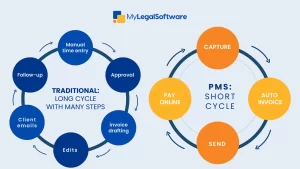
You get everything in one place — matters, time capture, expenses, client communication, trust accounting, invoicing, and reporting.
And then you likely get extras like client portals, online payments, and automation.
Traditional Billing Tools
You’re working with stand-alone time trackers, spreadsheets, desktop accounting tools, or a billing system that doesn’t talk to your matter management.
So, you end up with manual entries, mistakes, and a lot of back-and-forth.
What Law Firms Care About
Most billing decisions come down to:
- Missing billable time
- Slow invoices
- Compliance issues
- Client experience
- Admin waste
- Profitability
- Security
Ensure your tool helps you fix these. If it doesn’t, it’s dead weight.
Why Practice-Management Billing Software Wins
-
You generate more revenue
Integrated timers, mobile time capture, and one-click entries help you track time as you work. That’s how you avoid write-offs and bill what you deserve.
-
You invoice faster
Templates. Automated approval flows. E-billing. Clients can pay instantly through a portal. Firms using these tools get paid faster.
-
You make fewer mistakes
Trust accounting is tighter, and the Audit logs are complete. The system checks conflicts and keeps your billing rules consistent. So, you’re compliant at all times.
-
You get business intelligence
You’ll see what’s profitable, what’s slow, and where money leaks. Then you can decide what to fix.
-
You match client expectations
Clients want portals and online payments. They expect clear invoices that they can access at any time.
Modern billing helps you meet that standard.
Industry Signal
Integrated systems are winning.
Firms that adopt cloud practice-management billing software report better cash flow, better realization, and fewer admin hours burned.
There Are Risks
Any big switch comes with friction. You can expect these risks.
Implementation
If you skip training or data cleanup, the rollout will likely fail.
Vendor risk
You need SOC 2, encryption, clear data-exit terms, and tangible support.
Don’t assume the tool has it; verify with the vendor.
Automation without discipline
If your firm still makes entries days later, the system can’t save you. The software may not work for you. Ensure you build disciplined billing habits.
What a Good Implementation Looks Like
- Pick a partner sponsor
- Map your billing process
- Build a business case
- Shortlist vendors
- Plan your migration
- Pilot with a test group
- Train people
- Go live in phases
- Track your KPI
- Improve quarterly
Important KPIs
You should measure things you can change, like:
- Days Sales Outstanding (DSO)
- Collection rate
- Realization rate
- Revenue per lawyer
- Invoice cycle time
- Write-off %
- Trust reconciliation errors
These numbers tell you if the system is working.
What Your Vendor Should Prove
Ask for:
- Encryption details
- Trust-accounting compliance
- Full audit logs
- Accounting integrations
- Migration plan
- SLA response times
- Data-exit guarantees
- Real references.
Pricing Models to Expect
- Monthly subscriptions
- One-time licenses
- Implementation fees
- Payment processing fees
What PMS Makes Easier
You get:
- Alternative fees.
- Phased billing.
- Dashboards that show profitability in real time.
- Better pricing decisions.
- Less struggle.
This is where modern tools shine.
Mistakes to Avoid
- Buying software without mapping your workflow
- Migrating messy data
- Skipping training
- Ignoring trust-accounting rules
- Not piloting with your team
Guide for Firms
Solo/micro firms: A light cloud PMS with billing is usually worth it.
Small to mid-size firms: Integrated PMS almost always wins.
Large firms: Integrated PMS and strong API connections to your financial system.
Every firm: Pair the software with disciplined billing habits.
How MyLegalSoftware (MyLS) Helps
MyLegalSoftware gives you end-to-end billing built into your practice-management tools. With MyLS, capture is simple, invoices go out faster, and trust accounting stays compliant.
Reporting helps you make smarter decisions about pricing and staffing. You also get guided onboarding, hands-on support, and a setup that doesn’t overwhelm your team.
If you want a smooth switch, MyLS makes it easy.
Schedule a demo or start a free trial when you’re ready to modernize your billing.

Frequently Asked Questions
What’s the difference between practice-management billing software and traditional billing tools?
Traditional tools work in silos. You track time in one place, bill in another, and store documents somewhere else. Practice-management billing software puts everything — time, matters, billing, trust accounting, and client communication — in one system, so you’re not jumping between apps.
Is practice-management billing software worth it for small law firms?
Yes, if you bill regularly. You capture more time, send invoices faster, and get paid sooner.
Will switching from my old billing system be difficult?
It depends on your migration plan. If you clean your data first, work with the vendor, and train your team, the transition is smooth. Problems arise only when firms rush it or skip training.
Can practice-management billing software handle trust accounting?
Most modern systems do. You get built-in safeguards, audit logs, and automation to help you stay compliant with trust accounting rules.
What if my firm has complex accounting needs?
Large firms sometimes keep their main financial system but integrate it with a PMS through APIs. You don’t have to choose one or the other; you can combine both.
How does integrated billing help me get paid faster?
You create invoices quickly, share them through a client portal, and let clients pay online. No chasing. No back-and-forth emails.
How do I know if it’s time to upgrade from traditional billing tools?
If you’re missing time entries, sending late invoices, or juggling multiple apps just to bill one matter, it’s time. Most clients now ask for portals or online payments; it’s your sign.
How long will it take to see ROI after switching?
Most firms see improvements within the first few months, often driven by better time capture and faster collections.







