

A client walks into your office clutching a thick envelope of documents. Before handing it over, they hesitate. “This has my bank statements, my medical records… how do I know it’s safe with you?”
Scenarios like this aren’t the most comfortable for attorneys, not because the attorney doesn’t value confidentiality, but because deep down they know the truth: the security of sensitive data is only as strong as the systems that protect it.
In the legal profession, where trust is currency, even the smallest crack in your data protection can lead to broken relationships, lost cases, and damaged reputations. That’s why law firms today are rethinking how they safeguard client information—and why secure client data legal software has become essential, not optional.
Why Law Firm Data Security Matters More Than Ever
The legal world has always been confidential by nature. But in today’s digital-first environment, the stakes are higher than they’ve ever been. Clients aren’t just handing over contracts and case files anymore—they’re entrusting law firms with their financial histories, health records, immigration details, and personal secrets.
Unfortunately, hackers know this too. Law firms have become prime targets for cyberattacks because of the treasure trove of sensitive information they hold. Even a single weak link—a misplaced email, an outdated password, an unsecured Wi-Fi connection—can open the door to catastrophic consequences.
Some of the real-world risks firms face without modern legal software include:
- Unauthorized access to confidential files by cybercriminals—or even by well-meaning but untrained staff.
- Lost credibility when a client discovers their private details were sent over unencrypted email.
- Regulatory fines for failing to comply with data protection laws like GDPR or HIPAA.
- Financial losses tied to downtime, lawsuits, or remediation after a breach.
In other words, law firm data security is not just about protecting files—it’s about protecting the entire foundation of client trust.
Key Features of Secure Legal Software
The right legal software doesn’t just organize your practice; it actively defends it. Here are the must-have features to look for when evaluating solutions:
-
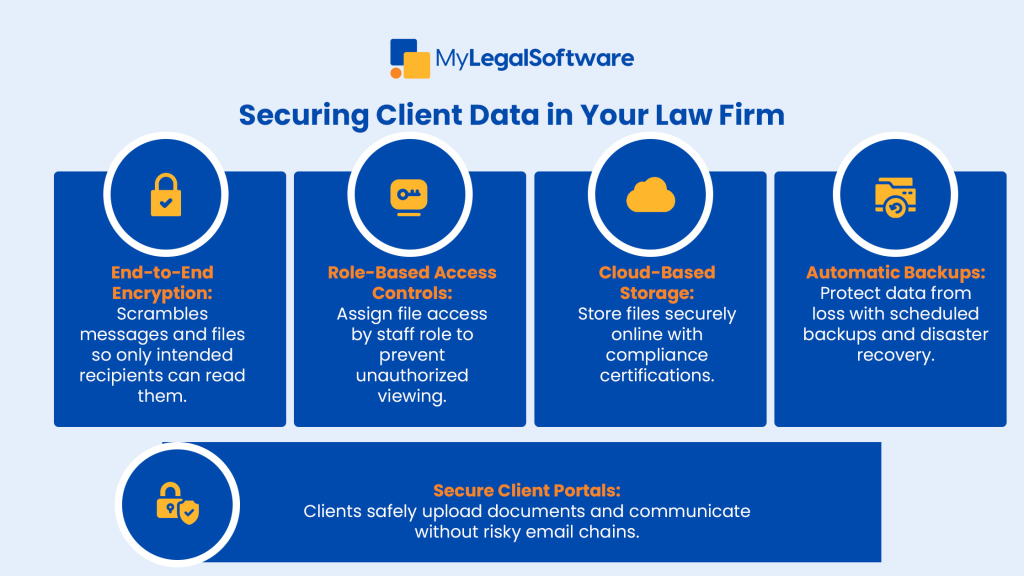
End-to-End Encryption
Imagine sending a client’s medical records via email and realizing later that the message wasn’t encrypted. That’s the nightmare encryption prevents. With end-to-end encryption, files and messages are scrambled into unreadable code until they reach the intended recipient.
-
Role-Based Access Controls
In many firms, not everyone needs to see every case. Secure client data software allows you to assign access by role. A partner might have full access, while a paralegal might only see the files relevant to their work. This ensures sensitive details aren’t accidentally shared—or deliberately misused.
-
Cloud-Based Storage with Compliance
Gone are the days of storing sensitive data in filing cabinets or on a single hard drive. Cloud-based systems not only allow remote access but also come with compliance certifications, ensuring your firm meets legal and ethical requirements.
-
Automatic Backups and Disaster Recovery
What happens if your office server crashes—or worse, if your building experiences a fire or flood? With automatic backups and disaster recovery protocols, your data is never truly lost.
-
Secure Client Portals
Clients want transparency, but they don’t want to worry about their private details leaking. Secure portals provide a safe, password-protected hub where clients can upload documents, receive updates, and message your team—all without touching risky email chains.
Transitioning from Traditional Systems to Modern Security
If your firm is still relying on spreadsheets, desktop drives, or even paper filing systems, upgrading to secure client data legal software may feel overwhelming. But think of it like moving offices: yes, there’s heavy lifting, but once you’re settled, the new space is far more functional and secure.
Here’s how to approach the transition:
- Audit Current Practices – Identify where data is most vulnerable. Are staff using personal email for client communication? Are files stored on local drives without backups?
- Define Your Needs – Do you handle sensitive medical cases requiring HIPAA compliance? Do you need multilingual portals for immigration clients? Pinpointing these needs will guide your software choice.
- Choose the Right Provider – Not all legal software is created equal. Look for platforms built specifically with law firm data security in mind.
- Migrate Securely – Work with your provider to ensure files are transferred securely, without exposing them during the move.
- Train Staff Thoroughly – Even the best software fails if users don’t know how to use it properly. Staff training is just as critical as the software itself.
Best Practices to Strengthen Law Firm Data Security
Legal software gives you the tools, but daily habits make or break security. Encourage your team to:
- Enable multi-factor authentication (MFA) on every account.
- Rotate passwords regularly and ban sticky notes on monitors.
- Schedule quarterly training sessions to keep staff updated on phishing scams and security policies.
- Monitor user activity logs to spot unusual access attempts.
- Keep systems updated—outdated versions often contain vulnerabilities.
Data security isn’t a one-time setup; it’s an ongoing culture of vigilance.
Real-World Impact: How Secure Software Changes the Game
Picture two firms side by side. One relies on outdated email chains and office servers; the other has secure client data legal software with encrypted messaging, backups, and portals.
- In the first firm, a client hesitates to share sensitive information, worried about leaks. The staff spends hours digging through emails and manually checking files.
- In the second, clients confidently upload documents into a secure portal, and attorneys access them instantly, from anywhere. The staff spends less time chasing paper and more time focusing on billable work.
The difference goes beyond convenience: you also get peace of mind. Secure software frees law firms from constant worry so they can focus on what matters: winning cases and building relationships.
Protect Trust, Protect Your Firm
Client trust is the most valuable currency in the legal profession. Without it, no amount of skill or experience can sustain a practice. By investing in secure client data legal software, your firm demonstrates its commitment to confidentiality, professionalism, and client care.
Cloud-based legal solutions don’t just shield your firm from cyber threats—they save time, reduce errors, and help your team work smarter.
Ready to safeguard your firm’s reputation and client trust? Schedule a free demo with MyLegalSoftware today and see how our secure, all-in-one platform can transform the way you work.
Frequently Asked Questions
-
What are the best practices for law firm data security?
Implementing strong passwords, enabling multi-factor authentication, encrypting sensitive data, using secure cloud storage, and regularly training staff on security protocols are essential steps to protect client information.
-
How can I ensure my law firm complies with data protection regulations?
To comply with regulations like GDPR or HIPAA, law firms should use encrypted communication tools, restrict access to sensitive data, conduct regular audits, and establish clear data handling policies.
-
What role does cloud storage play in law firm data security?
Cloud storage offers secure, encrypted environments for storing client data, ensuring accessibility and compliance. It’s crucial to choose cloud providers that meet industry standards and regulations.
-
Why is staff training important in data security?
Regular training helps staff recognize phishing attempts, understand data handling protocols, and stay informed about the latest security threats, reducing the risk of human error leading to data breaches.
-
What should be included in a law firm’s data security policy?
A comprehensive policy should cover data encryption methods, access controls, incident response procedures, staff training requirements, and compliance with relevant data protection laws.







