
Client data is a magnet for attackers, and law firms hold more of it than most industries. So, secure file sharing in law firms is the line between a normal workday and a full-blown breach.
For this, you need the right tech, solid processes, trained staff, and a plan for when things go wrong.
Let’s break it down.
Why Law Firms Are Prime Targets
Attackers know what sits inside your folders — PII, deal documents, health records, litigation strategy. It’s all valuable data they want to steal, encrypt, or leak. And one weak link is all it takes.
Law firms deal with three main risks:
- Ransomware
Hackers lock your files or leak them and then ask for money. Government security agencies, such as the FBI and CISA, keep repeating one tip: prepare for ransomware before it hits.
- Credential Theft
Phishing is still how most intruders get inside. So, if your attorneys reuse passwords or avoid MFA, you’re already exposed.
- Public Link Mistakes
A “share with anyone” link that never expires is a disaster waiting to happen.
The Security Principles You Can’t Skip
You can’t protect what you can’t name.
So, start with the basics:
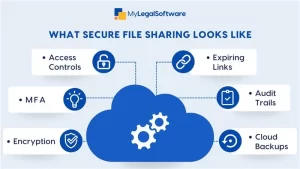
- Know what data you hold.
- Give access only to people who need it.
- Encrypt everything, in transit and at rest.
- Enforce MFA everywhere.
- Log access and monitor unusual downloads.
- Keep backups offline and test them.
What a Secure File-Sharing System MUST Include
Not every tool is built for attorneys.
Here’s a checklist you can use in any demo:
- Strong Encryption
TLS protects data in transit, and AES-256 secures it at rest, with no outdated protocols and no excuses.
- Strong Authentication
MFA is the rule, and SSO centralizes session control for secure access management.
- Least-Privilege Access
Role-based access. Time-limited links.
- DLP Protection
Scan uploads for PII, PHI, and financial data. Block suspicious sharing before it spreads.
- Malware Scanning
Every upload must be scanned to prevent corrupted files from moving through your system.
- Logging & Monitoring
You need detailed audit logs and real-time alerts.
- Secure Collaboration
View-only access with watermarks, plus editing directly inside the portal without forcing downloads.
- Immutable Backups
Offline, versioned, and tested for reliability.
Policies That Keep Your Firm Safe
Technology works only when people use it right.
So, build:
- A file-sharing policy that limits tools and defines expiry rules.
- A strong vendor due diligence checklist (SOC 2, BAAs, incident SLAs).
- A simple onboarding and offboarding list tied to HR.
- Document retention rules.
- A BYOD policy with mobile encryption and remote wipe.
Remember to keep training your team. You can do that with phishing simulations.
Prepare Like You Expect to Be Attacked
You need:
- A written incident response plan
- A ransomware playbook
- Law-enforcement contacts ready
- Quarterly tabletop exercises
When there’s a break-in, the first 30 minutes are very important.
Compliance Is Essential
Law firms must meet:
- Ethical duties of competence and confidentiality
- FTC Safeguards Rule
- State breach laws
- HIPAA, if you handle PHI
- Vendor contract requirements for security
Safe file sharing is an integral part of the job.
Metrics That Show You’re Secure
Track what’s important, such as:
- Percentage of accounts with MFA enforced
- Privileged accounts and time-to-revoke
- Percentage of external shares audited weekly
- MTTD and MTTC
- Backups restore time and restore point accuracy
If you don’t measure it, you’re guessing.
Signs You Should Never Ignore
If you see these, act immediately:
- A notification of login from another country
- External links without expiry
- Huge downloads at odd hours
- Rapid renaming or deletion of files
These are breach patterns, so beware.
How MyLegalSoftware (MyLS) Helps You Stay Secure
MyLS makes secure file sharing for law firms simple and reliable. With end-to-end encryption, access controls, audit logs, and built-in secure client portals, you can share sensitive documents confidently. Multi-factor authentication, role-based permissions, and automatic backups ensure your data stays protected. MyLS also centralizes communication, billing, and document management, so your team can work efficiently without juggling multiple platforms.
Take action today. Schedule a demo to see MyLS in action, or start a free trial.
Frequently Asked Questions
What’s the safest way for lawyers to share files with clients?
The safest way is to use a secure file-sharing system built for legal work. So, you get encryption, access controls, and audit logs in one place. Do not rely on email, as it is risky.
Why shouldn’t attorneys use regular emails for sensitive documents?
Emails can get hacked. It doesn’t have enough visibility; you can’t track who opened what. A secure platform keeps everything encrypted and logged.
How does a secure file-sharing system protect client confidentiality?
It locks every file behind encryption, MFA, permissions, and activity tracking. Only the people you approve of can view or download anything.
What features should a law firm look for in a secure file-sharing platform?
Look for encryption, MFA, audit logs, client portals, link expiration, and role-based access. And then check that it works with your case management software. Or you can invest in a one-stop tool like MyLegalSoftware.
Can secure file-sharing tools help prevent accidental leaks?
Most tools block risky actions, track downloads, and alert you when something looks off, making it less likely that human error turns into a real problem.
Is cloud-based file sharing safe enough for legal files?
It is, if the platform uses strong encryption, regular backups, and compliance-grade security. Many firms already trust cloud systems because they’re harder to breach than on-site storage.
How does MyLegalSoftware improve attorney file sharing?
MyLS gives you encrypted portals, access controls, audit logs, and safe links you can share with clients. And it ties everything back to your cases, so nothing gets lost or exposed.







