

Hiring new attorneys and support staff is one thing. Training them without losing billable hours is another story.
Every firm knows the struggle: new hires spend weeks shadowing, asking the same questions, and learning workflows the long way.
But here’s the thing – you may already have the tool to fix that. Your case management system (CMS) can be your most effective onboarding platform.
If you want to train new hires fast, the trick is to build training into the same tools they’ll use daily. Let’s go ahead and explain.
Importance of Reducing Training Time
Law school didn’t prepare most junior lawyers for the speed of real practice. Reports say that nearly half of the new associates felt underprepared when they started.
At the same time, the American Association Tech Report shows that law firms adopting AI, automation, and cloud-based systems are increasing faster than ever. So, the firms that learn and teach quickly are the ones who are winning.
Train By Doing, Not Just Watching
The fastest way to onboard new staff is to make them use the firm’s practice management tools from day one.
Start with a sandbox environment. It is a safe version of your CMS where they can practice mock matters. Give them realistic tasks, such as creating a matter, logging time, and drafting a motion from a template. Then track their accuracy and completion rates.
This builds confidence and saves you from micromanaging every little step.
Create a Role-Based Onboarding Path
Your law firm’s software training should match real roles, not random features.
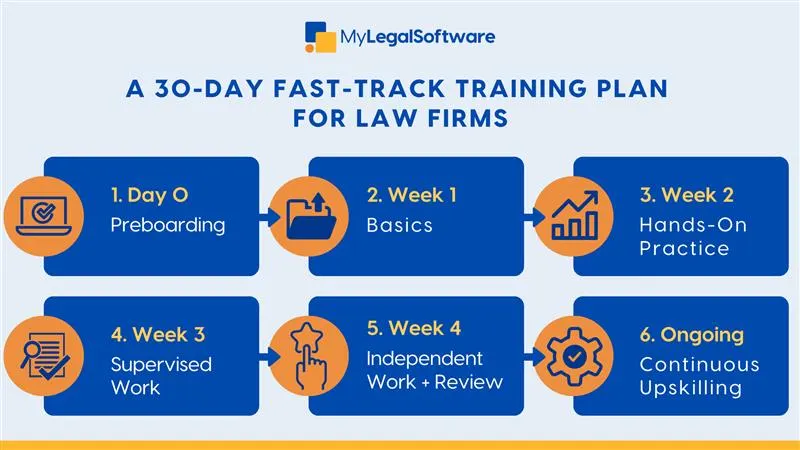
Here’s a sample outline:
First few days:
- Log in to the CMS.
- Find a case, open a client folder, and record the time spent on three mock tasks.
- Watch a short video on sorting out calendars and conflict checks.
Weeks 1 to 2:
- Complete sandbox tasks: billing, intake, and document generation.
- Shadow a supervisor in the same system.
Week 3:
- Handle one real matter under supervision.
Week 4:
- Manage a small client independently.
- Review key metrics: accuracy, billing, and time tracking.
That’s how you speed up your legal hiring process without skipping core skills.
Add Micro-Learning and Daily Sprints
Long lectures drain focus, but short, focused lessons stick better. Try 15-minute sprints with one feature, one task, one result.
For example:
- Watch a 2-minute video on document automation.
- Do it once in the sandbox.
- Get feedback from a mentor.
Legal tech onboarding best practices will give you small wins and daily progress.
Automate What You Can
Don’t waste training time on repetitive clicks. Use your CMS to automate low risk work, so new hires can focus on judgment calls.
Turn templates, task lists, and workflows into learning aids. When someone drafts a motion, let them draw from an existing clause library, rather than starting from scratch. It teaches structure, not just typing speed.
Track Progress with Metrics
If you can’t measure it, you can’t improve it.
Use your legal staff onboarding system to monitor KPIs like:
- Time for the first billable task.
- Accuracy rate.
- Template adoption.
- Time saved per matter.
Review those analytics weekly. If someone’s falling behind, the data will show it early before it affects client work.
This is how practice management reporting helps you run smarter onboarding programs.
Add Mentorship
Technology can handle repetition, but people handle judgment.
Pair every new hire with a mentor for the training period. Let the mentor log feedback directly into the CMS through task comments or review notes. That turns your software into both a training system and a coaching record.
Use Tools That Ease Setup
The best attorney onboarding platforms make training part of everyday work.
Look for:
- Role-based permissions, so new hires only see what matters.
- Built-in checklists and task reminders.
- Document automation and clause libraries.
- In-app tips and quick video guides.
- Reporting dashboards.
Using MyLegalSoftware to Onboard Faster
You don’t need lengthy training sessions. You need better systems.
When learning happens within your tools, it becomes part of the workflow instead of a separate task. That’s how firms accelerate legal hiring, cut onboarding costs, and help new hires become productive faster.
If you’re ready to simplify your onboarding, MyLegalSoftware makes it easy. It is a CMS that offers onboarding assistance through built-in practice management tools. You get automation templates, document generation, and secure dashboards.
Schedule a demo or start your free trial today.

Frequently Asked Questions
How can legal software help train new hires faster?
Your practice management software can double as a training hub. It lets new hires learn by creating cases, logging time, and drafting templates in a safe sandbox. That way, they practice the same workflows they’ll use daily without risking client data.
What’s the best way to onboard staff with practice management tools?
Build training right into your system. Start with short, role-based tasks inside your CMS. Use checklists, templates, and workflows so they can see the entire process from intake to billing. Add daily micro-lessons and track their progress through analytics.
How long does it take to train a new legal hire?
You can achieve this in under a month with a structured program. Move from basic system use to supervised cases, and in a few weeks, most new hires will be able to manage low-risk matters independently if they’ve been trained inside your CMS.
What should a law firm include in its onboarding checklist?
Keep it simple with activities like:
- CMS access and sandbox setup.
- Walkthrough videos for the top five daily tasks.
- Sample matters for practice.
- Template drafting exercises.
- Mentor feedback sessions.
How do I measure onboarding success?
Track metrics, such as time to first billable task, accuracy rate, and task completion speed. If your CMS has reporting dashboards, use them to spot who’s ready and who needs more support.
What are the common onboarding mistakes law firms make?
They rush it or overcomplicate it. Some firms skip sandbox testing, and others overwhelm new hires with too many tools.
Can small firms use legal tech for onboarding, too?
You don’t need a big team or budget. Even solo and small firms can create sandbox matters, use document templates, and track training with built-in CMS tools. It’s all about structure, not size.
How does MyLegalSoftware help with training and onboarding?
MyLegalSoftware comes with role-based dashboards, document templates, and analytics to help firms train faster. You can onboard staff directly in the tool and monitor progress.
Schedule a demo or start a free trial to see how it works for your firm.







