

A partner in litigation texts an associate for a missing client memo at 6:05 p.m., while the associate searches three different drives and a case management system. Minutes turn into half hours, and the client call starts without the memo.
What if your firm could manage every case, client update, and document in one dashboard? Unified legal software removes those small interruptions and turns fractured work into coordinated momentum.
The Problem with Siloed Workflows
Many firms still juggle email, spreadsheets, separate time tracking apps, and local file systems.
That creates duplicated work, missed deadlines, and friction when a matter touches multiple practice areas.
Silos slow decision-making, increase ethical risk from misfiled documents, and reduce the time available for billable work.
How Unified Legal Software Solves the Daily Pain
Unified legal software centralizes people, documents, calendars, and billing in a single platform.
This reduces context switching, makes records authoritative, and speeds up cross-practice handoffs.
Teams get back time to prepare strategy and serve clients, instead of hunting files.
Key Challenges Law Firms Face Without Modern Software
- Fragmented Client Records: Client details spread across CRM, files, and email.
- Inconsistent Timekeeping: Different time capture tools cause billing gaps.
- Slow Handoffs Between Practices: Referrals between departments lose momentum.
- Compliance Risk: Redundant or outdated versions of documents raise ethical concerns.
- Poor Visibility: Leadership lacks a clear, real-time view of firm capacity and backlog.
Key Features to Look for in a Cross-Practice Collaboration Platform
-
Unified Case Management
One record per matter, visible to authorized team members across practice groups.
Helps coordinate strategy, document versions, and client communications.
-
Integrated Time Tracking and Billing
Time capture is tied to matters and activities, so no billable hours are missed.
Automated billing reduces administrative overhead and improves cash flow.
-
Secure Client Portal and Communications
A single, auditable channel for client messages and file exchange keeps client interactions professional and trackable.
Reduces reliance on unsecured email and ad hoc file sharing.
-
Document Management and Version Control
Centralized storage with retention policies, check-in and check-out, and easy search.
Prevents duplicate work and reduces discovery pain.
-
Task and Workflow Automation
Templates and workflows that trigger when matters move between practices.
Eliminates repetitive administrative steps and enforces consistency.
How Unified Software Improves Efficiency, Reduces Errors, And Increases Billable Hours
- Faster Document Retrieval: Reduced search time increases attorney availability for billable work.
- Standardized Workflows: Lower error rates and consistent client service.
- Better Visibility: Managers can reassign overloads before deadlines slip.
- Faster Onboarding for New Clients: Intake templates and automated conflict checks speed start up.
Step-By-Step Guide to Implementing Unified Legal Software
- Define Outcomes and Metrics
Decide what success looks like, for example, a 20% reduction in document search time, or a 10% improvement in days-to-bill. - Audit Current Tools and Workflows
Map where client data, documents, and time entries live today and identify high-friction points. - Choose A Platform That Supports Cross-Practice Collaboration
Prioritize unified case management, integrated billing, secure portals, and workflow automation. - Pilot With One Practice Group
Start small with a representative team, gather feedback, and measure against your metrics. - Train And Document Best Practices
Offer short, role-based training sessions and quick reference guides for daily tasks. - Scale Gradually and Iterate
Expand to other practices with lessons learned and refine templates and automation. - Review Outcomes Regularly
Monitor adoption, time savings, billing improvements, and client satisfaction.
Comparison with Traditional Methods and Competitors
Traditional Methods
- Multiple Disconnected Tools: High friction, inconsistent records, longer turnaround.
- Paper or Local File Reliance: Risky for compliance and remote work.
- Ad Hoc Processes: Hard to measure or repeat efficient outcomes.
Unified Legal Software Approach
- Single Source of Truth: Less rework, fewer disputes over versions.
- Built For Law Firm Workflows: Templates and ethical walls designed for legal practice.
- Measurable Results: You can quantify time recovered, error reduction, and revenue improvements.
What To Watch for with Competitors
- Feature Gaps: Some vendors offer good billing but poor document control.
- Integration Complexity: A system that technically integrates but remains clunky will not drive adoption.
- Vendor Support and Security Posture: For legal work, responsive support and strong security are non-negotiable.
Best Practices for Law Firm Adoption and Training
- Make Leadership Visible: Partners should champion the change and model behaviors.
- Keep Training Bite-Sized: Short practical sessions succeed more than long theoretical classes.
- Create Practice-Specific Templates: Tailor workflows to how each department actually works.
- Measure and Share Wins: Publish metrics and short case studies internally to build momentum.
- Enforce Governance: Define who can see what, and keep permission management current.
Common Implementation Pitfalls and How to Avoid Them
- Over-customizing Upfront: Start with core features and adjust as you learn.
- Ignoring Change Management: Invest in communication and frontline champions.
- Skipping Data Cleanup: Migrate quality data to avoid preserving old inefficiencies.
- Not Tracking ROI: Without metrics, you cannot show the value that wins continued buy-in.
- Small Changes Lead to Big Gains
Cross-practice collaboration is not a lofty goal, it is a practical advantage. Unified legal software saves time, reduces errors, and helps your team focus on billable work and client strategy. When practice groups share a common platform, handoffs are faster, information is reliable, and leadership gets visibility that improves decision-making.
Ready to see how MyLegalSoftware can transform collaboration across your firm?
Schedule a free demo to see a unified legal software platform in action and learn how to tailor it to your firm.

Frequently Asked Questions
What Is Cross-Practice Collaboration in a Law Firm?
Cross-practice collaboration happens when attorneys from different departments (such as corporate, litigation, and tax) work together on a single client matter. It allows firms to deliver more comprehensive legal services and ensures clients receive well-rounded advice from multiple practice perspectives.
Why Do Law Firms Need Unified Legal Software?
Law firms need unified legal software to centralize information, streamline workflows, and eliminate silos between departments. With one shared platform, teams can access client data, documents, and billing records in real time, improving efficiency, and reducing administrative errors.
How Does Unified Software Improve Collaboration Between Legal Teams?
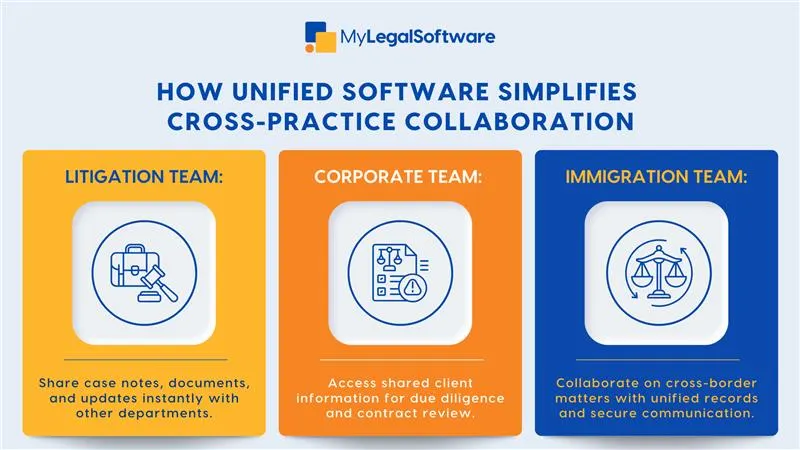
Unified software connects all practice areas under one system, making it easier to share documents, coordinate schedules, and track progress. Attorneys can view updates instantly, reducing delays, and helping teams respond faster to client needs.







