

Legal tech has come a long way. But not every shiny new tool works the way lawyers do. What attorneys really need is software that fits their workflow, not one that brings confusion or compliance worries.
User-friendly legal software is the kind that helps get work done faster, reduces errors, and manages finances.
What “User-Friendly” Means for Lawyers
For most attorneys, user-friendly means software that helps you get work done faster without compromising quality.
It’s software that maps to real-world legal tasks, not random tech features.
- Workflow fit: It matches your legal processes from intake to billing. No forced workarounds.
- Low cognitive load: You see what matters, such as client files, tasks, deadlines, all in one or a few screens.
- Speed & reliability: Fast search, quick saves, and uptime you can count on.
- Legal-specific automation: Built-in templates, conflict checks, and deadline calculations that make sense for law firms.
- Trust & security: Encryption, compliance, and data policies. Because no lawyer wants to gamble with client confidentiality.
The Core Features Lawyers Want
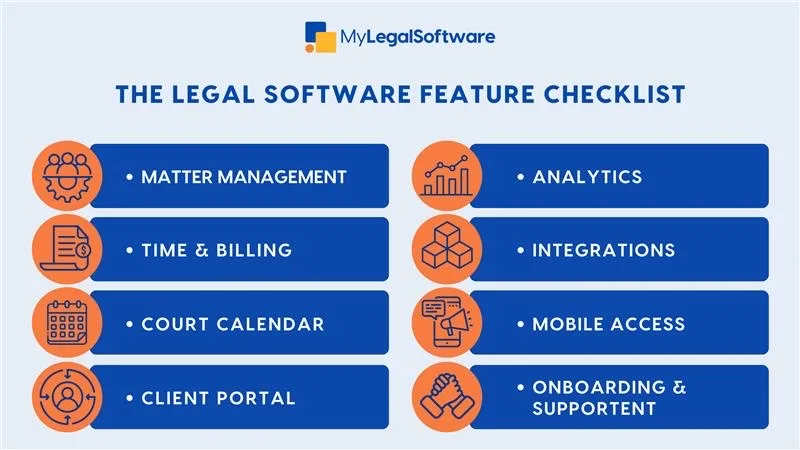
Here’s the non-negotiable checklist:
- Matter management: Keep everything in one place: contacts, notes, documents, and emails.
- Document automation: Create and edit templates to speed up workflows.
- Billing that doesn’t suck: Built-in timers, batch invoices, payment links.
- Calendar and deadlines: Court hearings, meeting reminders, and alerts that save you from late filings.
- Secure client communication: Portals and messaging that replace risky email chains.
- Integrations: Connect to other popular tools, such as DocuSign for e-signatures.
- Mobile capability: Manage tasks or approve bills from your phone.
- Analytics dashboards: See matter profitability and unpaid invoices at a glance.
- Security controls: Role-based permissions, encryption, and audit trails.
- Easy onboarding: Built-in guides, templates, and support that make adoption painless.
If it doesn’t check these boxes, lawyers are not likely to stick with it.
Why “Good” Software Still Fails
Even the best-designed tool can flop if adoption fails. Common pitfalls are:
- Too complex. Overloaded dashboards and endless configuration options turn people off.
- Bad onboarding. Without training and templates, firms revert to old habits fast.
- Billing friction. If it interferes with how lawyers track or bill time, forget it.
- AI & privacy fears. Attorneys won’t touch tools that could compromise client data.
Smarter AI, Not Riskier AI
AI can make legal software feel more intuitive by helping with summarizing discovery, drafting clauses, and pulling facts from files. But guardrails matter.
Three golden rules:
- Keep humans in the loop. Every AI output should be reviewed, not auto-approved.
- Show your sources. Retrieval-augmented generation (RAG) should link results back to your actual documents.
- Protect data. Vendors must guarantee they’re not training models with your client files.
Integration as The Secret Ingredient
A truly intuitive legal tech solution fits right into your existing setup. You shouldn’t have to jump between five apps to send one invoice.
User-friendly legal software should:
- Sync seamlessly with your email, accounting, and e-sign tools.
- Support single sign-on for security.
- Offer open APIs for firms that want custom workflows.
Adoption and Support Is Where the ROI Happens
Buying software is easy. Getting everyone to use it is the challenge.
Winning firms should focus on:
- Role-based onboarding (partners vs. paralegals need different training).
- Migration templates that cleanly transfer client data.
- Embedded help tools that guide users inside the app.
- Superusers who manage internal standards and templates.
- Responsive vendor support that fixes problems fast.
How to Measure “User-Friendly”
You can’t manage what you don’t measure. Here’s how to tell if your software’s working:
- Time saved per matter.
- Faster billing cycles.
- Higher realization and collection rates.
- Weekly active users.
- Fewer support tickets.
- Zero security incidents.
What to Ask Before You Buy
Ask important questions like:
- Does this tool fit our workflows?
- What are its security certifications?
- Can we test integrations before committing?
- What does onboarding include?
- What’s the vendor’s AI policy on client data?
MyLegalSoftware as a User-Friendly Tool for Attorneys
A user-friendly legal software should lighten your workload. That’s precisely what MyLegalSoftware (MyLS) delivers. Built by attorneys for attorneys, MyLS maps to real workflows, integrates seamlessly, and keeps client data safe.
Start a 14-day free trial or schedule a demo to get started.
Frequently Asked Questions
What does user-friendly legal software mean for attorneys?
User-friendly legal software is created to match the way attorneys work. It minimizes clicks, reduces errors, and integrates with daily tools. It helps lawyers save time while staying compliant.
What features make legal software attorney-friendly?
Attorney-friendly software focuses on the features lawyers need, including matter management, document automation, time tracking, billing, secure client communication, and integration with standard tools. These features ease everyday tasks and improve workflow efficiency.
How can law firms tell if software is easy to use?
Law firms should test usability through pilot runs. If attorneys can manage matters, track time, and issue invoices without long training sessions or constant help tickets, it’s a good sign. Metrics like time saved per matter and adoption rate across staff are also indicators of ease of use.
Why do some “good” legal software products fail after implementation?
Even strong tools can fail due to poor onboarding, complex interfaces, or a lack of integration. Attorneys won’t use software that adds extra steps or doesn’t fit their workflow. A user-friendly system must feel intuitive from day one and come with implementation support.
Why is integration important for user-friendly law firm software?
Integrations eliminate double work. When legal software syncs with email, calendars, accounting, and e-signature tools, attorneys can manage everything in one place. It saves time and reduces errors caused by manual data entry or app switching.
What should law firms look for in legal software vendors?
Law firms should ask for proof of legal expertise, GDPR compliance, robust integrations, and onboarding assistance. Vendors like MyLegalSoftware stand out by combining legal-specific workflows, data security, and strong customer support.
How does MyLegalSoftware ensure attorney-friendly design?
MyLegalSoftware is purpose-built for law firms. It streamlines legal workflows, offers intuitive navigation, integrates seamlessly with tools attorneys already use, and provides onboarding and security features.







