
You open your inbox after a long weekend and find a single email that stops you: a client asking why their invoice looks confusing and why a charge seems unexpected. You scramble through time entries, invoices, and notes, and the client still sounds frustrated.
Imagine a world where your firm could design invoices that reduce confusion, speed up payment, and reinforce trust with every bill? MyLegalSoftware helps you create invoices that clients understand and respond to, while saving your team time.
Why a Well-Designed Legal Invoice Matters
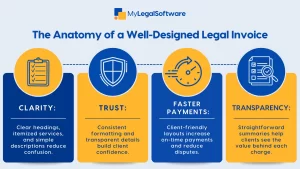
A law firm invoice isn’t simply a request for payment; it’s more. It is a trust signal. That’s why you should aim for clear invoices. Clear invoices reduce questions, lower dispute rates, and shorten Days Sales Outstanding (DSO).
When invoices are messy, clients delay payment and call your staff. That wastes hours in reconciliation and damages relationships. A clean legal invoice turns billing into a smooth, professional touchpoint.
The Psychology of Clarity and Trust
People make quick judgments based on first impressions. An invoice that is visually organized communicates competence. Clear headings, simple breakdowns, and concise explanations reduce the cognitive load for clients.
Transparency reduces anxiety. When clients see exactly what they are paying for, with dates, descriptions, and totals laid out logically, they feel respected and are more likely to pay on time.
Key Challenges Law Firms Face Without Modern Software
- Inconsistent Invoice Formats: Different attorneys use different styles, which confuses clients.
- Manual Data Entry Errors: Transcription mistakes lead to disputes.
- Poor Time Tracking: Lost minutes mean lost revenue and opaque charges for clients.
- Slow Approval Workflows: Bottlenecks delay billing and cash flow.
- Weak Client Communication: Invoices without context prompt calls and email threads.
How Modern Legal Software Improves Invoicing Efficiency
Legal software centralizes time, expense, and matter data, so invoices are consistent and accurate. Automated templates enforce branding, standard language, and required fields.
When time entries sync automatically, your team spends less time compiling bills and more time on billable work. Automated reminders and online payment options also reduce Days Sales Outstanding (DSO).
What A Well-Designed Invoice Looks Like
A well-designed law office invoice does these things:
- Presents A Clear Header: Firm name, logo, invoice number, and due date.
- Shows ClientandMatter Details: So, the recipient knows this bill is relevant.
- Itemizes ServicesbyDate and Task: Short descriptions with time units.
- Displays SubtotalsandTaxes Clearly: No hidden fees.
- Includes A Simple Summary: Total due, due date, and payment methods.
- Offers Friendly Explanations: Short notes for unusual charges or retainer usage.
Key Features of Legal Software That Support Better Invoices
Case Management and Matter Linking
Link time and expenses directly to matters, so each invoice reflects the correct case and phase.
Time Tracking and Activity Logs
Capture time in real time, convert entries into billable items, and preserve context for each task.
Customizable Invoice Templates
Enforce consistent layout, legal disclaimers, and client-friendly language with templates.
Client Portals And Online Payments
Allow clients to review invoices, ask questions, and pay electronically from one place.
Automated Billing Rules and Retainers
Automatically apply trust balances, pre-bill checks, and billing rules to avoid errors.
Step-By-Step Guide to Implementing Better Invoices with MyLegalSoftware
- Audit Your Current Invoices
Collect samples and note recurring client questions. Identify confusing sections and inconsistent terminology.
- Standardize Terminology and Layout
Choose consistent names for services and create a template that places totals, due dates, and contact details prominently.
- Map Time Entries to Invoice Lines
Ensure each billable activity links to a clear description, date, and time unit. Use short, plain-language descriptions.
- Configure Billing Rules and Retainer Application
Set rules for trust accounting, tax inclusion, and how expenses appear on the invoice.
- Train Your Team on Best Practices
Run a short workshop covering time entry etiquette, description guidelines, and approval workflows.
- Pilot With a Subset of Clients
Send the new invoice format to a small client group and collect feedback to refine clarity and tone.
- Automate Reminders and Offer Multiple Payment Options
Implement automated reminders and set up Stripe, ACH, or card payments to make it frictionless for clients.
- Monitor Results and Iterate
Track dispute rates, time to payment, and client queries. Use those metrics to continually improve your invoice design.
Real-World Applications and Examples
Imagine a small litigation team that used to send invoices with dense time logs. After switching to a client-friendly format, the firm added a two-line summary for each block of work: the issue, the work performed, and the outcome or next step. That simple change cut client queries by 40 percent and reduced follow-up calls.
A family law practice adopted online payments and short explanatory notes for retainer draws. Clients appreciated the transparency and average payment time fell from 45 days to 18 days.
Comparison With Traditional Methods
Traditional methods rely on spreadsheets, inconsistent templates, and manual approvals. That results in:
- Higher Error Rates: Manual copy and pasteintroduces mistakes.
- Slower Billing Cycles: Delayed approvals and offline signatures.
- Bad Client Experience: Confusing line items and noeasy way to pay.
By contrast, cloud-based legal software standardizes invoices, automates rules, and offers client portals, transforming billing from a friction point to a value moment.
Best Practices for Law Firm Adoption and Training
- Keep Descriptions Short and Client-Focused
Use plain language and avoid firm-internal codes on client-facing bills.
- Define Mandatory Fields
Make matter number, date, and description required when time is entered.
- Create A Billing Playbook
Document naming conventions, discount policies, and how to annotate unusual charges.
- Run Regular Training Sessions
Five-to-ten-minute refreshers prevent drift and maintain consistency.
- Measure KPIs
Track invoice dispute rate, average days to payment, and percentage of invoices paid online.
Design Tips That Influence Payment Behavior
- Place The Amount Due in a Prominent Location
Make the total impossible to miss.
- Use Visual Hierarchy
Bold totals and headings to guide the eye.
- Offer Multiple Payment Options
The fewer the steps to pay, the faster you get paid.
- Add A Friendly Note or Next Step
A one-line thank you or explanation improves goodwill and reduces friction.
Legal Invoice Language That Builds Trust
Avoid dense legalese when possible. Use succinct phrases like:
- “Work Performed” instead of “Professional Services Rendered.”
- “Total Hours” and “Hourly Rate” spelled out clearly.
- “Retainer Applied” with an exact amount shown.
When clients understand what they are paying for, they are less likely to dispute the bill.
Measuring Success After Implementation
Track these metrics to quantify improvement:
- Days Sales Outstanding (DSO)
- Invoice Dispute Rate
- Percentage Of Invoices Paid Online
- Time Spent on Billing Tasks
A decline in DSO and disputes signals that your invoice design and process improvements are working.
Make Billing a Strategic Advantage
A well-designed law firm invoice is a strategic tool. It reduces disputes, shortens payment cycles, and communicates professionalism. With the right templates, automated workflows, and client-focused language, billing becomes a seamless, trust-building process.
Schedule a free demo to see how MyLegalSoftware can transform your law office invoice workflow, reduce billing friction, and help your team focus on billable work. Click here to Book a Demo and start designing invoices that get paid faster.
Frequently Asked Questions
- Why is a well-designed legal invoice important for law firms?
A clear legal invoice reduces client confusion, prevents billing disputes, and speeds up payments. It also strengthens trust because clients understand exactly what they are being charged for.
- What should be included in a professional lawfirm invoice?
A good invoice includes client and matter details, itemized services by date, clear totals, payment options, and short explanations for any unusual charges. This makes billing transparent and easy to review.
- How can legal software improve my law office invoice process?
Legal software automates time tracking, links entries to matters, generates consistent templates, and offers online payments. This reduces errors, saves time, and helps invoices get paid faster.







