

Walk into any large law firm at 8 a.m. and you’ll find the same scene unfolding: attorneys hurrying between meetings with files tucked under their arms, paralegals scrambling to track updates from multiple departments, and inboxes overflowing with hundreds of unread emails.
Everyone’s moving fast, but nothing feels like it’s moving forward.
There’s a quiet tension running through these firms. On one side, there’s comfort in doing things the traditional way; the manual processes everyone knows. The paper trails feel reliable.
On the other hand, there’s mounting pressure to modernize. To keep up with firms that have already automated to meet client expectations for instant updates and seamless service.
Here’s the question firm leaders are asking themselves: is manual case handling holding us back? The answer for most large practices is yes! Understanding workflow automation vs manual handling isn’t just about technology anymore- it’s about survival in a competitive market.
Why Large Firms Are Rethinking Their Workflows
Large firms face unique pressure, high case volumes, multiple practice areas, and dozens of attorneys working on overlapping matters. Traditional manual systems weren’t built to handle this complexity at scale.
When everything runs manually, coordination becomes a nightmare. Someone forgets to update the case notes. Another person misses a filing deadline because the reminder was buried in an email. A third attorney duplicates work because they didn’t know a colleague had already handled it. These aren’t rare incidents; they are daily occurrences in firms relying on manual processes.
Extensive law firm automation is a strategic shift, not just a tech upgrade. It’s about building systems that can handle the volume and complexity modern practices demand. Automation manages coordination across departments without constant meetings. It tracks deadlines without anyone needing to remember them. It organizes documentation so that everyone can find what they need instantly.
The Legal Case Workflow Comparison
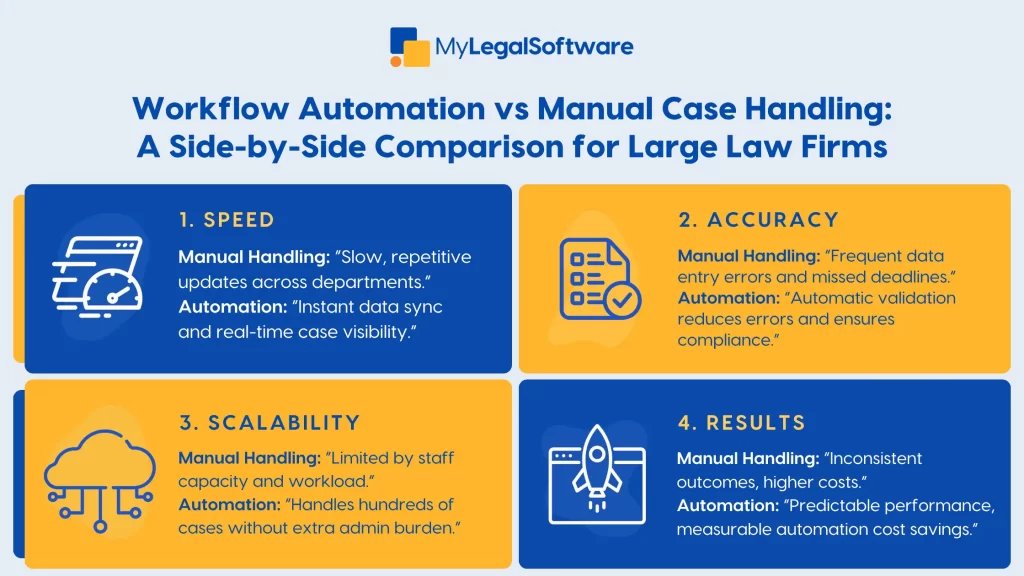
Let’s examine the actual differences. In a manual system, case updates require someone to physically enter information, save it, and notify relevant team members. In an automated system, updates happen instantly, and everyone sees them in real-time.
Manual data entry creates errors. Someone might type a date wrong, or another person might enter a client’s name incorrectly. These minor mistakes can lead to significant problems. Automated systems validate data as it’s entered and maintain consistency across every record.
Client communication in manual systems depends on someone remembering to send updates. Automated workflows send reminders, status updates, and document requests on schedule without human intervention.
Scalability becomes the key differentiator. Manual systems eventually hit a wall, as you can only hire so many people to manage administrative tasks before overhead eats into profitability. Automated systems, on the other hand, scale seamlessly, allowing you to handle 50 or even 500 cases with the same infrastructure.
A legal case workflow comparison reveals that automation also empowers collaboration. Remote attorneys access the same information as in-office staff. Different practice areas coordinate seamlessly. Everyone works from a single source of truth, rather than relying on scattered emails and documents.
Automated vs Manual Case Management
Some attorneys resist automation because they worry about losing control. They believe using automated systems means sacrificing personalization or accuracy. However, modern tools prove this fear to be unfounded.
Automated vs manual case management isn’t about replacing human judgment. It’s about enhancing it. The system handles repetitive tasks. You handle strategy, client relationships, and complex legal analysis. That’s the proper division of labor.
Manual handling gives you complete control over every detail, but that control comes at an enormous cost. You’re spending hours on administrative work that adds no real value to your cases. You’re missing deadlines because you’re drowning in detail. You’re making mistakes because you’re exhausted from managing everything manually.
Automation delivers tangible benefits. Less time wasted on administrative work means more time for client advocacy. Fewer missed deadlines mean better outcomes. Consistent processes mean predictable quality across all matters. The benefits of workflow automation far outweigh the manual case handling drawbacks that drain resources and create liability.
From Chaos to Control with the Right Tool
The comparison is clear. Workflow automation frees your team from repetitive tasks while maintaining complete oversight and control. You’re not losing anything. Rather, you’re gaining capacity, accuracy, and peace of mind.
MyLegalSoftware makes this transition seamless for both immigration and general practice firms. MyLS handles case management, automates intake processes, and dramatically reduces administrative workload in one integrated platform. Everything your firm needs to operate efficiently lives in a single system.
The platform manages cases from first contact through resolution. Automation handles routine tasks, allowing your team to focus on practicing law, while clients receive better service and your firm operating more profitably. That’s what modern legal practice looks like.
Ready to see the difference automation makes? MyLS offers a 14-day free trial. Experience how automated workflows transform your practice without sacrificing control or quality. Automation isn’t the future anymore. It’s the present. Firms that adapt now will lead their markets for years to come.

Frequently Asked Questions
What’s the biggest difference between workflow automation and manual handling?
Speed and consistency. Automation handles routine tasks instantly and identically every time, while manual processes depend on individual memory and effort.
Is automation too complex for large law firms to implement quickly?
No. Modern platforms are designed for quick deployment with minimal disruption. Most firms see immediate benefits within weeks of implementation.
How can automation improve team collaboration?
Everyone accesses the same real-time information regardless of location. This eliminates confusion from scattered communications and outdated documents.
What are the common risks of relying on manual systems?
Human error, missed deadlines, inconsistent processes, scalability limitations, and high administrative overhead that reduce profitability.







