

Imagine it’s another day at work, a client email pings about an urgent filing, and your case management system crashes while the paralegal scrambles to find the right document in three different places. It’s a small mismatch of tools, but it just costs you hours and a client’s confidence.
If any of this sounds familiar, don’t worry; it’s not peculiar to you. A yearly software reassessment can stop those small failures from becoming big problems. Read on to learn a clear, compassionate, and practical way to evaluate your legal software stack so your team works more efficiently.
Why Do a Yearly Legal Software Stack Review?
Technology wears out in practice long before it does on paper. Annual reviews help you catch hidden costs, fix security gaps, and keep client service fast and accurate.
For immigration practices, compliance and secure handling of sensitive client data are critical and should, as such, not be treated as optional. A yearly check ensures tools still meet legal standards and real-world workflows.
What a “Software Stack Reassessment” Really Means
Think of it as a structured look at how every tool contributes to outcomes: time saved, risk reduced, client experience improved, and costs controlled.
A proper reassessment covers usability, integrations, licensing, security, vendor health, training needs, and the true ROI of each system.
When To Reassess
Pick one committed month each year for the full review; ideally after your slow season or at fiscal-year planning.
Do light touchpoints quarterly: usage checks, ticket trends, and any critical security updates. Those mini-checks keep surprises to a minimum.
Who Needs to Be Involved
Include at least one partner or senior attorney for strategic buy-in.
Bring operations (paralegals, intake staff), IT or an outsourced provider, finance for cost analysis, and compliance/privacy leads for data handling.
If possible, invite 2–3 active users to pilot new features. They’ll spot real workflow problems faster than anyone.
Step-by-Step Guide: How To Evaluate Your Legal Tech Annually
-
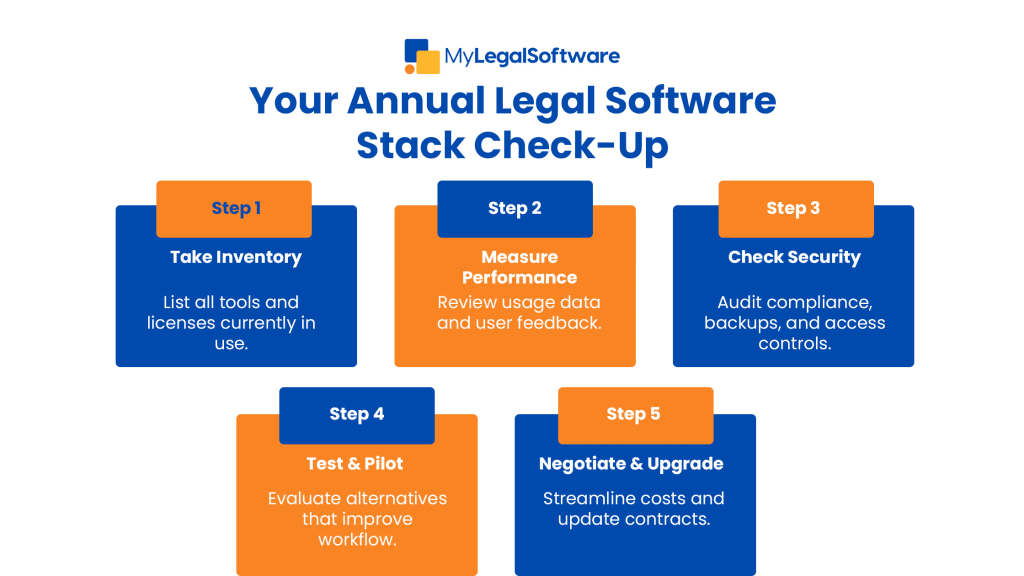
Inventory every tool and integration
List case management, document automation, e-signature, billing, calendaring, email plugins, storage, intake forms, and any niche immigration tools.
Record who owns each license and how often it’s used. This simple list often reveals underused subscriptions and overlaps.
-
Define practical goals and KPIs
Decide what “success” looks like: fewer missed deadlines, shorter intake times, fewer support tickets, or lower monthly license costs.
Use measurable KPIs (e.g., average intake time, number of duplicate documents, case cycle time) to avoid opinions-only decisions.
-
Gather user feedback systematically
Run a short anonymous survey for everyday users and follow with 30-minute interviews for heavy users.
Ask what slows them down, which features they wish for, and where integrations fail. Real users point to the root causes.
-
Measure usage and performance data
Look at login frequency, feature usage stats, open support tickets, and response time logs.
If a tool has a license cost but low engagement, it’s prime for consolidation or renegotiation.
-
Perform a security & compliance audit
Check encryption at rest and in transit, access controls, multi-factor authentication, and data residency policies.
Confirm the vendor’s compliance posture with applicable rules (e.g., GDPR-style protections for international clients, secure transmission of PII).
-
Run a cost vs. value analysis
Compare annual spend to business outcomes: time savings, reduced errors, and client satisfaction.
Consider the total cost of ownership: licenses, integrations, customization, training, and staff time, not just sticker price.
-
Test alternatives and pilot carefully
Shortlist replacements only after mapping how a candidate connects with your current stack.
Run a small pilot with real cases, back up all data, and set success metrics before fully switching.
-
Plan migration and change management
Create a migration playbook: full data backup, pilot run, staff training schedule, and a rollback plan.
Communicate timelines and responsibilities clearly: anxiety about tech changes often comes from poor communication, not the tools themselves.
-
Negotiate contracts and support
Use your annual review to ask vendors for better pricing, clearer SLAs, or bundled features.
If a vendor is unresponsive on critical issues, their support failures are a valid reason to switch.
-
Document the decision and schedule follow-ups
Record why you kept, upgraded, or replaced each tool and assign owners for any action items.
Set dates for 30-, 90-, and 180-day follow-ups to validate whether the change improved outcomes.
Evaluation Criteria to Use (Short, Practical Checklist)
- Functionality: Does it do the job end-to-end?
- Usability: Do non-technical staff complete tasks quickly?
- Integrations: Does it play well with your case management, calendar, and email?
- Reliability: Uptime history and incident response.
- Security & compliance: Encryption, MFA, data access logs.
- Cost & TCO: Licenses + training + custom work.
- Vendor health & roadmap: Are they actively developing and supporting the product?
- Client experience: Does the tool positively impact how clients interact with your firm?
Rate each area qualitatively (e.g., Good / Needs Improvement / Replace) and let that guide priorities.
Common Mistakes Law Firms Make — And How to Avoid Them
- Keeping redundant tools “just in case”: Consolidate after testing; shadow systems cause confusion.
- Ignoring integrations: A great tool that doesn’t integrate usually creates more work than it saves.
- Underestimating training time: Budget at least 10–20% of implementation time for hands-on training.
- Focusing only on price: The cheapest tool can cost more in lost time and rework.
- Waiting until something breaks: Reactive upgrades lead to rushed migrations and data loss risks.
- Not involving actual users: Leadership decisions without user input create friction and low adoption.
Timeline Example for An Annual Reassessment (Realistic and Manageable)
- Weeks 1–2: Inventory & KPI definition.
- Weeks 3–4: User surveys and usage data collection.
- Weeks 5–6: Security review and cost analysis.
- Weeks 7–8: Pilot shortlisted alternatives (if any).
- Week 9: Negotiate contracts and finalize decisions.
- Weeks 10–12: Migrate, train, and schedule follow-up checks.
Adjust duration to your firm’s size: solo or small firms can compress this; larger firms may spread it over a quarter.
How To Build the Business Case for Upgrades
Frame recommendations around outcomes that matter: fewer missed deadlines, lower malpractice exposure, better client retention, and measurable time savings.
Show a before-and-after scenario: how much time a feature saves per user and what that time is worth monthly. Decision-makers respond best to risk reduction and revenue/profit examples.
Quick Vendor Negotiation Tips
- Ask for an annual review clause and performance SLAs in your contract.
- Request a pilot period with reduced cost or refundable deposit.
- Bundle modules to lower per-user costs and reduce integration complexity.
- Push for clear data export options. You should always be able to take your data with you.
Practical Tips for Smoother Adoption
- Appoint a “tool champion” for each system to answer questions and drive adoption.
- Use short, role-specific training sessions, not one long demo.
- Keep an internal FAQ or short video clips for common tasks.
- Celebrate small wins to encourage staff to try new features.
Final Checklist to Run Right Now
- Make a complete inventory of your legal software.
- Pick 3 measurable KPIs tied to client outcomes.
- Survey your users this week and schedule two 30-minute interviews.
- Run a quick security checklist: MFA enabled? Backups tested? Vendor contact responsive?
- Flag 1–2 underused subscriptions for consolidation or renegotiation.
Conclusion: Your Next Practical Step
Technology shouldn’t stress your company; it should strengthen it. A yearly software reassessment gives you the clarity to cut inefficiencies, protect client data, and invest only in tools that truly support your practice.
Start today. List every tool your team uses and schedule a one-hour strategy meeting to review what’s working and what isn’t. From there, you can plan upgrades with purpose.
With MyLegalSoftware, you can stay ahead with technology that’s secure, efficient, and built for modern legal work. Whether you’re ready to optimize your current setup or explore smarter integrations, you’ll experience a seamless reassessment process.

Frequently Asked Questions
Why should law firms reassess their software stack every year?
A yearly review helps identify outdated tools, security risks, and inefficiencies. It ensures your firm’s technology still supports compliance, client service, and overall productivity.
What should be included in a legal software stack review?
A thorough review covers usability, integrations, licensing costs, security, compliance, and actual user feedback. It’s not just about features; it’s about how each tool supports daily workflows.
How can law firms evaluate whether to replace or keep a tool?
Measure usage, ROI, and integration performance. If a tool is underused, lacks critical security, or creates workflow bottlenecks, it may be time to replace or renegotiate.







