Busy immigration practices know that errors often start at intake. Small gaps in names, dates, or travel history turn into form corrections, rework, and delays. A clear intake checklist, supported by immigration form filling software and immigration forms software, reduces those errors and shortens the path from intake to filing.
This post outlines the intake fields that matter most, how legal intake software keeps data consistent, and how immigration case management software carries those details through to forms, drafts, and audits.
Intake Basics for Legal Teams
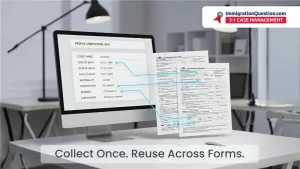
Intake is the process of gathering client and case data before any drafting begins. In a legal intake system or client intake software, these fields feed every downstream step: eligibility review, form preparation, exhibits, tasks, and timelines. For immigration software for attorneys, the goal is simple: collect the right data once, keep it consistent, and reuse it across all matters.
The Intake Fields That Matter Most
Use a short, repeatable list. Keep the wording clients see as plain as possible.
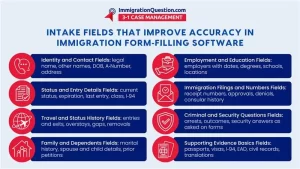
- Identity and Contact
- Legal name as it appears on passports and prior filings
- Other names used
- Date of birth, place of birth, country of birth
- A‑Number, Social Security Number if applicable
- Current address, phone, email
Name or date mismatches trigger corrections and can delay filings if they do not match travel documents or past receipts.
- Status and Entry Details
- Current status and expiration date
- Most recent entry date, port of entry, class of admission
- I‑94 number and expiration (if available)
Missing I‑94 details or entry dates can lead to avoidable questions during review and slow eligibility checks.
- Travel and Status History
- All prior entries and exits with approximate dates
- Overstays, unauthorized employment, or status gaps
- Prior removal, exclusion, or voluntary departure
Gaps in travel history can cause inconsistent answers across forms and require time‑consuming follow‑up.
- Family and Dependents
- Marital history with dates
- Spouse and child details with locations and status
- Prior petitions filed by or for family members
Missing family details can break eligibility links or omit required dependents on related forms.
- Employment and Education
- Current and prior employers with dates and roles
- Degrees, fields of study, schools, and locations
Incomplete job or education data leads to edits when work or study history is needed for specific categories.
- Immigration Filings and Numbers
- Receipt numbers for pending or past cases
- Prior approvals or denials
- Consular processing history
Missing receipt numbers reduce tracking accuracy and can mix activity between matters.
- Criminal and Security Questions
- Arrests, charges, outcomes
- Security and admissibility questions as they appear on common forms
Incomplete answers here cause review delays and create back‑and‑forth before filing.
- Supporting Evidence Basics
- Passports, visas, I‑94, EAD, marriage certificates, birth certificates
- Translations and certifications where needed
Missing documents stall attorney review and lead to repeat client requests that slow preparation.
These fields map neatly into immigration form filling software and immigration forms software. Keeping them complete and consistent prevents most downstream corrections.
Using Immigration Forms Software to Reuse Data
Modern immigration form filling software pulls fields from a single client profile into multiple forms. When identity, status, and travel data live in one master record, duplicate typing drops, and form consistency rises. If your team compares options and talks about the best immigration forms software, look for:
- Field Reuse Across Forms
- Clear Flags for Missing Data
- Date Validation and Format Controls
- Simple Audit Trails for Edits
- Export And Print with Clean Formatting
Keeping Data Clean and Consistent
Even strong tools fail without basic hygiene. Legal client intake and law firm intake processes should include:
- Standardized Data Entry
- Use the same date formats.
- Match passport spellings exactly.
- Record unknowns as “unknown,” not blanks.
- Controlled Updates
- Assign an owner for profile edits.
- Log each change with a short reason.
- Attachment Rules
- Use file names that show document type and date.
- Store translations with the source document.
A small routine like this inside client intake software or a legal intake system keeps profiles clean so forms do not drift.
How Case Management Software Connects Intake and Forms
Immigration case management software links intake fields, tasks, forms, and deadlines in one place. When combined with immigration lawyer software features like checklists, reminders, and role‑based access, teams see the same information and act on the same numbers. This is also where immigration tracking software helps, since receipt numbers, milestones, and interview dates flow from intake to calendars and reports without retyping.
ImmigrationQuestion.com 3-in-1 Case Management
Many firms prefer one system where intake, forms, and tasks live together. ImmigrationQuestion.com 3‑in‑1 Case Management is designed for that type of workflow. Intake fields feed form packets, drafts, and task queues, and the same profile powers status updates and simple reports.
Teams that want a single place for immigration case management software, immigration forms software, and everyday collaboration often choose an integrated approach to reduce duplicate typing and version confusion. To see how this looks in practice, you can learn more at ImmigrationQuestion.com.
Frequently Asked Questions
- What Is The Best Way To Start With Immigration Forms Software?
Begin with a short template for the core fields in this post. Keep labels simple, map each field to a form field, and test the workflow on one matter before rolling it out. - How Does Legal Intake Software Reduce Errors?
It standardizes fields, validates dates, and reuses answers so teams do not type the same data across many forms. It also keeps changes in one profile so edits update every draft. - When Should A Firm Use A Legal Intake System Instead Of Spreadsheets?
As soon as intake data feeds more than one form or more than one person edits the same case. A system prevents version drift and lost context. - What If A Client Does Not Remember Exact Dates?
Record the best available information and note that the date is approximate. Use reminders to confirm details later and update the profile so forms stay consistent. - How Do Immigration Software Programs Help With Reviews?
They show a single profile, the related forms, and the audit trail. Reviewers can check names, dates, and numbers once and trust that the same values appear across the filing set.