
You open your inbox and see a dozen emails from clients asking for updates. Across the office, your team is juggling spreadsheets, sticky notes, and stacks of paper files. Someone misplaced a key document, another is trying to piece together hours for billing, and the clock keeps ticking. If this scenario feels familiar, you are not alone.
Many law firms still rely on traditional methods to manage cases, which may have worked in the past but are increasingly slowing productivity, causing errors, and frustrating both staff and clients. What if there was a way to keep every case, document, and client interaction in one organized, easy-to-access place?
That is precisely what modern legal case management software offers. Beyond neatness, it streamlines operations, improves accuracy, and lets your team spend less time chasing information and more time practicing law.
Why Case Management Software Matters
Managing a law firm without a centralized system is like trying to run a business while blindfolded. You can get by for a while, but mistakes are inevitable. Missed deadlines, lost documents, and under-recorded billable hours quietly eat away at productivity and revenue.
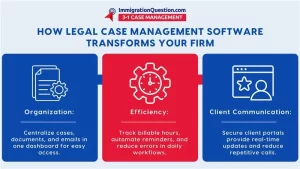
Law offices that adopt attorney software case management see a noticeable difference. With everything in one platform, your team can track case progress, manage client communications, and record hours with precision. Client portals mean fewer phone calls, while automated reminders and alerts reduce the chance of missing critical deadlines.
For small firms, this can level the playing field with larger competitors, allowing them to provide professional, timely service without the overhead of cumbersome manual processes. In short, integrated case management software saves time, reduces mistakes, and gives law firms the clarity they need to focus on what matters most: their clients.
Features That Make a Difference
Not all software is built the same, and understanding the key features that make a platform effective is critical. Case management tools form the backbone of any system, allowing you to organize every case from intake to resolution, centralize documents and emails, and assign tasks with built-in alerts.
Time tracking and billing modules ensure that billable hours are captured accurately and invoicing is streamlined. Client portals provide transparency, letting clients check updates and access documents securely, which reduces repetitive calls and fosters trust.
Reporting and analytics give partners insight into financial performance and productivity, helping to identify bottlenecks before they become problems. The best legal case management software, especially for small firms, integrates these tools seamlessly, supporting workflows rather than complicating them.
Questions You Should Ask Before Buying
Selecting the right software is a strategic decision, not just a purchase. Start by asking whether the platform fits your firm’s size and practice areas. A small law office may need simplicity and affordability, while a larger firm may require more customization and scalability.
Consider whether the software is cloud-based, offering remote access and automatic updates, or on-premise, giving you greater control over data security. Implementation and training are often overlooked but crucial: even the most sophisticated system fails if your team cannot use it effectively.
Ask about integration with existing tools such as email, accounting, and document management systems, as duplication of effort can erode the benefits of any software.
Data security should be non-negotiable; your clients’ confidential information must be protected at every level. Finally, evaluate the total cost of ownership, including subscription fees, support, training, and potential add-ons, to avoid surprises down the line.
Making Adoption Work
Even the most advanced software is only as good as its adoption by your team. Consider starting with a pilot program, implementing the system with a single team or practice area before rolling it out firm-wide.
Provide thorough training through webinars, tutorials, and hands-on sessions, and encourage feedback so adjustments can be made early. Plan the migration of data carefully, as a messy transfer can frustrate staff and undermine confidence in the new system.
Ongoing monitoring ensures that workflows are improving and that the software is being used to its full potential. Firms that approach adoption thoughtfully, rather than treating it as a one-time installation, maximize efficiency and reduce the risk of errors, missed deadlines, and lost billable hours.
Comparing Modern Software to Traditional Methods
For years, law offices relied on spreadsheets, paper files, and standalone calendars to manage cases. While functional, these methods are limited. Collaboration is slow, deadlines can be overlooked, and client communications are often reactive rather than proactive.
Modern legal software eliminates these gaps, creating a centralized environment where everyone on the team has access to the same, up-to-date information.
Integrated systems allow tasks to flow naturally from one step to the next, deadlines are automatically tracked, and billing is accurate.
The result is a more organized, responsive, and client-focused law practice. Small firms in particular can compete more effectively by adopting systems that increase productivity without requiring additional staff.
Taking the Next Step
Choosing the right legal case management software is more than a tech decision; it is a commitment to improving your firm’s operations, efficiency, and client service.
Cloud-based platforms reduce errors, save time, and allow legal professionals to focus on billable work instead of administrative chaos. Whether your firm is small or mid-sized, integrated case management software levels the playing field, providing tools that make organization, collaboration, and communication seamless.
For attorneys and staff who have spent too many afternoons searching for files, calculating hours, or answering repetitive client calls, this is a game-changer.
Schedule a free demo today to see how ImmigrationQuestion.com 3-1 Case Management can transform your law firm’s workflow, streamline operations, and let your team focus on what they do best: practicing law.

Frequently Asked Questions
- What Is Legal Case Management Software?
Legal case management software is a system that helps law firms organize cases, track deadlines, manage documents, and streamline firm operations in one centralized platform instead of relying on spreadsheets and paper files.
- Why Do Law Firms Need Case Management Software?
Firms use legal case management software to improve efficiency, reduce errors, and enhance collaboration by automating routine tasks, centralizing case data, and providing tools like billing and client communication all in one place.
- What Are Key Features to Lookforin a Case Management System?
Important features include document management, deadline and calendaring tools, time tracking and billing, and secure client communication portals that help firms keep everything organized and easily accessible.
- Can Legal Case Management Software Improve Billing Accuracy?
Yes. Built‑in time tracking and invoicing functions help law firms record hours and generate invoices more accurately, reducing disputes and improving revenue capture.
- Is It HardToImplement a Legal Case Management System?
Implementation can take planning, but choosing a system with strong onboarding support, training resources, and good integration with existing tools makes the transition smoother and boosts staff adoption.