Late afternoons in many law offices look the same.
Someone is searching for the latest document version. Someone else is asking whether the client was updated. A deadline is on the calendar, but the supporting details live across email, shared drives, and separate notes.
When that becomes routine, the issue is rarely effort. It is navigation. This is where better legal software can change day-to-day work by making the case file easier to follow from intake to closure.
What Case Viewer Software and Legal Data Platforms Mean
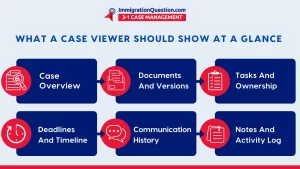
A case viewer is not just a place to store files. A good case file viewer is a working view of the matter. It helps a user open a case and quickly understand what is happening and what is next.
In practical terms, that means seeing the case overview, key contacts, documents, tasks, deadlines, communication history, and notes in one place.
A legal data platform is the system underneath that view. It keeps information connected and consistent, so the case record stays reliable over time.
This is where permissions, activity logs, time-stamps, reminders, and reporting usually live. When the platform is structured well, the case viewer becomes a single point of reference rather than another folder to maintain.
Why “Easy to Navigate” Matters in Legal Work
Navigation problems are not just inconvenient. They can create risk and cost time. When case information is scattered, teams may:
- Use an older document version without realizing it
- Miss a follow-up because a deadline is saved without context
- Lose continuity when staff changes or cases are handed off
- Re-enter the same information in multiple places
In immigration work, this shows up fast. A mismatch in names, dates, or prior filing details can trigger corrections and slowdowns. Across practice areas, it can mean avoidable delays, more internal review time, and less confidence that everyone is working from the same facts.
The Core Pieces of Legal Software That Navigates Well
Not all legal software solutions support navigation equally. The most usable systems tend to share a few building blocks that make the case record easy to move through.
- Case overview that orients users quickly: A strong case overview answers basic questions immediately: where the matter stands, who owns the next step, and what is due soon. The goal is simple. Any authorized team member should be able to open the case and orient themselves quickly, even if they have not touched the matter in weeks.
- Legal document management software built into the matter: Cloud storage alone is not legal document management software. Legal work needs organization that stays tied to the case context. A navigable system typically supports:
- Clear separation between drafts and final documents
- Time-stamps and activity history
- Consistent organization within the case
- Faster retrieval through search and filters
When documents live inside the matter, teams spend less time asking “which version is right?” and more time moving the case forward.
- Deadlines and reminders that stay attached to the case: Calendars are useful, but a date without context creates guesswork. Better legal software ties deadlines, hearings, and reminders directly to the matter. That way, a user can go from a deadline to the related tasks, notes, and documents without hunting across systems.
- Communication that does not disappear into inboxes: Client questions, document requests, and status updates are part of the case story. When communication trails live only in email threads, context is easy to lose. Case viewer software is easier to navigate when it keeps key messages, notes, and updates connected to the matter, especially during handoffs or staffing changes.
Where ImmigrationQuestion.com 3-in-1 Case Management Fits
Legal teams usually do not struggle because they lack tools. They struggle because the tools do not stay connected. A case might live in one system, documents in another, communication in email, and deadlines in a separate calendar.
That fragmentation makes case files harder to navigate and increases the chance of missing context.
ImmigrationQuestion.com 3-in-1 Case Management is positioned around reducing that fragmentation by keeping day-to-day casework inside one matter view.
In practical terms, the case viewer experience is meant to feel predictable: a user opens a case, sees the overview, then moves through documents, tasks, deadlines, and communication without switching systems.
For document-heavy work, the value is often in how the document workflow stays attached to the matter. Instead of treating documents as loose files, ImmigrationQuestion.com 3-in-1 Case Management keeps drafts, signed copies, and final versions within the same case record, along with an activity history that helps teams understand what changed and when. This reduces the “Which version is right?” confusion.
It also supports a more timeline-like view of the case by keeping events, reminders, and updates tied to the matter. When dates, tasks, and messages live inside the same case file viewer, teams can quickly see what happened, what is due next, and what is still pending.
For immigration attorneys and legal professionals, that can translate into fewer repeat follow-ups, faster internal handoffs, and a case record that stays easy to navigate as the matter grows.
From Fragmented Tools to a Connected Case Record
The most effective legal software solutions are not defined by long feature lists. They are defined by how well the system helps people navigate real work. Strong case viewer software keeps the matter readable.
Strong legal document management software keeps documents controlled and easy to retrieve. A solid legal data platform keeps everything connected through permissions, logs, reminders, and structured organization.
For legal professionals, including immigration attorneys, the goal is straightforward: fewer places to search, fewer chances to lose context, and a case record that stays easy to navigate as the matter evolves.
Platforms like ImmigrationQuestion.com 3-in-1 Case Management reflect this direction by centering the case file viewer experience around a connected, case-first workflow.

Frequently Asked Questions
1) What is case viewer software in a legal setting?
Case viewer software is part of legal software that lets users open a matter and view key information in one place, such as the overview, contacts, documents, tasks, deadlines, communication history, and notes, so the file is easier to navigate.
2) What is the difference between a case file viewer and legal document management software?
A case file viewer focuses on how users view and navigate the full matter. Legal document management software focuses on organizing, controlling versions, and retrieving documents reliably. Many legal software solutions combine both, so context and documents stay together.
3) Why do immigration attorneys benefit from legal data platforms?
Immigration matters often involve high document volume, frequent updates, and time-sensitive steps. A legal data platform keeps case details connected, reduces duplicate entry, and makes it easier to find the right document or update when preparing filings or responding to clients.
4) What features help legal software stay easy to navigate over time?
A clear case overview, case-linked documents, deadlines tied to the matter, communication and notes inside the case record, strong search, and permission controls all help the case file stay usable as it grows.
5) How do integrations help case files stay easy to navigate?
Integrations can reduce tool-switching by connecting calendars, e-signature, video meetings, and document storage. Navigation improves when these activities still connect back to the matter, so the case viewer remains complete.