It’s a busy workday. A client is calling for an update, a judge has moved a hearing date, and someone on your team cannot find the most recent filing version. The case is active, the deadline is real, and everything feels harder than it should.
Now imagine opening one dashboard and seeing the case status, upcoming deadlines, documents, client notes, and court activity in one place. That’s the power of modern court case management software, and in 2026, there’s more to expect.
Why Court Case Management Software Matters More Than Ever
Law firms and legal departments are handling more cases with fewer margins for error. Courts are faster, clients expect real-time updates, and compliance requirements continue to grow.
Without full court case management software, firms often struggle with:
- Missed deadlines and scheduling conflicts
- Scattered documents across emails, folders, and drives
- Limited visibility into case progress
- Time lost on manual updates and status checks
Court management software is no longer a nice-to-have. It is a core infrastructure for running a modern legal practice.
Centralized Case Management as the Foundation
At its core, court case software should give your firm a single source of truth for every matter.
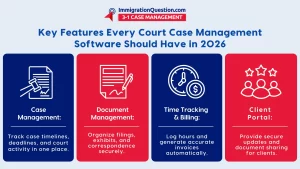
In 2026, centralized case management must include:
- A complete case timeline with filings, hearings, and outcomes
- Linked contacts for clients, opposing counsel, and court staff
- Case notes that update in real time across the team
- Clear status indicators so nothing slips through the cracks
When all case data lives in one system, attorneys spend less time searching and more time practicing law.
Smart Deadline and Calendar Automation
Manual calendaring is one of the most common sources of risk in legal practice.
Modern court software solutions should automatically:
- Calculate deadlines based on court rules and filing dates
- Sync hearings and reminders with firm calendars
- Alert teams to conflicts or upcoming milestones
- Adjust timelines when courts reschedule matters
This kind of automation reduces human error while giving attorneys confidence that deadlines are covered.
Document Management Built for Litigation Workflows
Generic file storage is not enough for court-facing work.
Court case management software should offer:
- Version-controlled document storage
- Easy tagging by case, filing type, or court
- One-click access to filings, exhibits, and correspondence
- Secure sharing with internal teams or clients
Strong document management keeps cases organized and ensures the right document is always used.
Integrated Time Tracking and Billing
Billing accuracy directly affects firm revenue. The best court management software in 2026 will:
- Track time directly from case activity
- Convert logged actions into billable entries
- Reduce lost time caused by delayed billing
- Provide clear reporting on billable versus non-billable work
When time tracking is integrated into court case software, billing becomes more accurate and less disruptive.
Client Portals That Reduce Back-and-Forth
Clients want transparency, but constant calls and emails drain staff time. A secure client portal allows firms to:
- Share case updates automatically
- Upload and request documents securely
- Reduce repetitive status inquiries
- Improve client trust and satisfaction
Court software solutions that include client-facing tools help firms scale without adding administrative overhead.
Security, Compliance, and Access Controls
Legal data is sensitive, and courts expect high standards. In 2026, court case management software should include:
- Role-based access for attorneys, staff, and clients
- Audit logs for document and case activity
- Strong encryption for data at rest and in transit
- Compliance with regional and industry standards
Security is not just about protection. It is about credibility with courts and clients.
Reporting and Insights for Better Decision-Making
Firms need visibility into how cases move through the system. Advanced reporting features help firms:
- Track case duration and outcomes
- Identify workflow bottlenecks
- Monitor staff workloads
- Forecast revenue and resource needs
Court management software should turn daily activity into actionable insight.
How To Implement Court Case Management Software Successfully
Adopting new software does not have to disrupt your practice.
A practical rollout approach includes:
- Mapping current workflows before migration
- Importing active cases first
- Training staff in short, role-specific sessions
- Assigning internal champions to support adoption
- Reviewing usage metrics after the first 60 days
Successful implementation focuses on people and process, not just technology.
Traditional Methods Versus Modern Court Software Solutions
Spreadsheets, shared drives, and email threads may feel familiar, but they do not scale. Compared to traditional methods, full court case management software offers:
- Fewer errors and missed deadlines
- Faster response times to courts and clients
- Better collaboration across teams
- Stronger data security and compliance
The difference becomes more visible as caseloads grow.
Best Practices for Long-Term Adoption
To get lasting value from court case software:
- Standardize how cases are opened and closed
- Require all case activity to be logged in the system
- Review reports regularly, not just during audits
- Update workflows as court rules and firm needs evolve
Consistency is what turns software into a competitive advantage.
The Takeaway and Your Next Step
In 2026, Court case management software must do more than store information. It must help firms move faster, reduce risk, and focus on billable work.
The right court software solutions centralize cases, automate deadlines, secure documents, and give firms the visibility they need to grow with confidence.
If you are ready to see how ImmigrationQuestion.com 3-1 Case Management can simplify your court workflows and strengthen your practice, schedule a free demo today and experience modern court case management in action.

Frequently Asked Questions
1.What Is Court Case Management Software?
Court case management software is a digital solution used by legal professionals to track cases, manage documents, schedule hearings, and streamline court activities from one central system.
2. What Are the Core Features of Court Management Software?
Key features typically include case tracking, document management, deadline calendars, built‑in billing, client portals, and reporting tools to help firms stay organized and efficient.
3. How Does Court Case Software Improve Efficiency?
By automating routine tasks, centralizing information, and sending automated reminders for deadlines and hearings, the software reduces manual work and helps legal teams avoid missed dates and errors.
4. Is Cloud‑Based Court Software Better Than On‑Premise?
Cloud‑based systems offer scalability, remote access, and often lower infrastructure costs, allowing teams to work securely from anywhere while keeping data centralized.
5. Can Small Law Firms Benefit from Court Case Management Software?
Yes. Even smaller practices see improved organization, time tracking, and document handling when moving from manual methods to an integrated court case software solution.