In 2026, top law firms thrive by harnessing AI-driven workflow software to streamline cases, compliance, and client wins.
You started this morning with clear intentions: finish the brief, return three client calls, review the settlement offer, and prepare for tomorrow’s hearing.
Instead, you spent 30 minutes searching for a document you know exists somewhere, answered fifteen emails that generated ten more, attended a meeting that could have been avoided, and realized at 4 p.m. that the filing you thought your paralegal handled is still sitting incomplete.
This is the quiet frustration of feeling busy without being in control, and it’s exactly what law firm workflow software exists to prevent.
What Workflow Really Means Inside a Law Firm
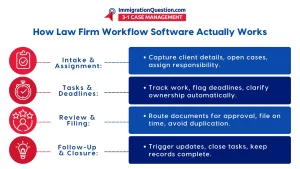
Workflow describes how work moves through your practice, starting from the moment a potential client contacts you and continuing through intake, assignment, work completion, review, filing, follow-up, and eventual case closure.
When these steps exist only in people’s heads or are scattered across disconnected tools, the entire process becomes vulnerable to whoever happens to remember what needs to be done next.
This is where law firm workflow software provides structure that doesn’t depend on individual memory, heroic effort, or constant coordination meetings that interrupt actual legal work.
Why Systems Fail Attorneys
When deadlines get missed, it’s rarely because attorneys don’t care; it’s because systems don’t flag the deadline early enough or make responsibility clear enough.
When work gets duplicated, it’s not because people want to waste time; it’s because visibility into who’s handling what doesn’t exist.
When task ownership becomes unclear, and cases stall, the problem isn’t a lack of competence- but a lack of structure supporting smooth handoffs between team members.
The human cost of broken workflows shows up as stress, burnout, and client dissatisfaction that damages both attorney well-being and firm reputation.
This is why law firm workflow software functions as risk management rather than mere convenience, creating reliable systems that protect against the operational failures that cause malpractice claims, unhappy clients, and exhausted attorneys who can’t sustain their practices long-term.
Mapping the Legal Workflow
Consider what happens after a client agrees to representation. Someone must send engagement documents, collect initial information, open a case file, assign tasks, and set deadlines.
You also need to request documents and draft initial pleadings. Coordination with opposing counsel, court filings, and client updates must follow. Responses must be tracked, hearings prepared for, settlements negotiated, and files properly closed.
Each of these steps represents a handoff point where work can stall if systems don’t clearly indicate what happens next and who’s responsible, which is precisely what legal workflow software addresses by making every step visible and every responsibility explicit.
Automation Without Losing Legal Judgment
Knowing what to automate versus what must remain attorney-driven is critical. Without this clarity, firms either under-automate or over-automate.
Under-automation means attorneys handle tasks that systems should manage. Over-automation risks delegating judgment that requires legal expertise.
Legal workflow automation works best for repetitive administrative tasks. These include engagement letters, document templates, routine follow-ups, and status reports. Complex legal analysis, strategy decisions, and client counseling must remain attorney-controlled.
This distinction matters because legal workflow automation software should amplify your capabilities. It should never constrain your judgment.
By handling mechanical tasks, systems free mental energy. Attorneys can then focus on work requiring legal training and experience.
Visibility, Accountability, and Team Alignment
Knowing who owns each task and when it is due helps prevent a common failure. That failure happens when everyone assumes someone else has handled critical work.
Internal handoffs between attorneys and staff create risk. Document reviews that require approval and coordinated client communications do as well.
These moments benefit from systems that clearly show responsibility and status. Everyone can see what matters and when it matters.
Legal workflow management software creates accountability through transparency. It does this without surveillance or micromanagement.
Leadership gains visibility into operations, and teams avoid constant status meetings that interrupt productive legal work.
Client Experience Is a Workflow Issue
When clients experience delays, extended silence, or confusion about case status, they’re not experiencing attorney incompetence; they’re experiencing workflow failures where systems don’t prompt timely communication or make case status easily accessible.
How you structure internal processes directly affects whether clients receive proactive updates, whether they can easily submit documents, and whether they feel informed throughout their legal matter.
This is why law firm workflow software improves client experience indirectly. Better internal operations naturally create better external communication.
Status updates become automatic. Client portals provide access to case information. Follow-ups happen systematically instead of relying on memory.
Scaling Without Breaking Your Practice
Growth exposes workflow weaknesses that remain hidden at a smaller scale because when you personally handle five cases, you can track everything mentally.
But when your practice grows to fifty cases with multiple team members, mental tracking becomes impossible, and workflow structure becomes essential.
Small firms benefit from workflow systems, preventing the chaos that limits growth, while expanding firms need these systems to handle increased complexity without proportional increases in coordination overhead or stress.
Law firm workflow software functions as a growth stabilizer that lets practices scale smoothly by maintaining consistent processes regardless of how many cases or team members you’re managing, ensuring quality doesn’t degrade, and nothing is missed as volume increases.
The Practice Runs on Workflow, Not Willpower
Attorneys shouldn’t need to rely on exceptional memory and heroic effort to maintain practice operations, yet that’s exactly what happens when workflow exists only as an informal understanding rather than a systematic structure.
Sustainable practices require infrastructure supporting reliable operations even when individual attorneys are overwhelmed, unavailable, or simply having normal human memory limitations that make tracking everything impossible.
ImmigrationQuestion.com 3-1 Case Management provides comprehensive workflow support for immigration attorneys and general practitioners, managing cases systematically from first client contact through final resolution with structured processes ensuring nothing gets overlooked and everyone knows their responsibilities.

Frequently Asked Questions
1.What is law firm workflow software, and how is it different from case management?
Workflow software defines processes, handoffs, and responsibilities, while case management covers broader functions like documents, communication, and billing. Many modern platforms combine both.
2. Can workflow software reduce missed deadlines?
Yes. Workflow systems provide structured deadline tracking, clear task ownership, and early visibility, help prevent missed deadlines.
3. How much legal work should be automated?
Automate repetitive administrative tasks and routine communications. Keep legal analysis, strategy, and client counseling under attorney control.
4. Is workflow software useful for small or solo law firms?
Yes. Small and solo firms often benefit most because workflows reduce overload and prevent missed tasks without added staff.
5. How does workflow software improve client communication?
It triggers automatic updates, enables client portal access, and ensures follow-ups happen consistently.