For any growing practice, billable time is revenue. Every minute spent searching for files, tracking emails, or manually updating spreadsheets is time that cannot be billed. Over weeks and months, those small inefficiencies add up to significant financial loss.
Case management software plays a direct role in protecting billable hours. By bringing structure, visibility, and organization to daily operations, it reduces time leakage and allows attorneys and staff to focus on meaningful legal work rather than administrative tasks.
Here’s a closer look at how this works in practice.
The Hidden Ways Billable Time Gets Lost
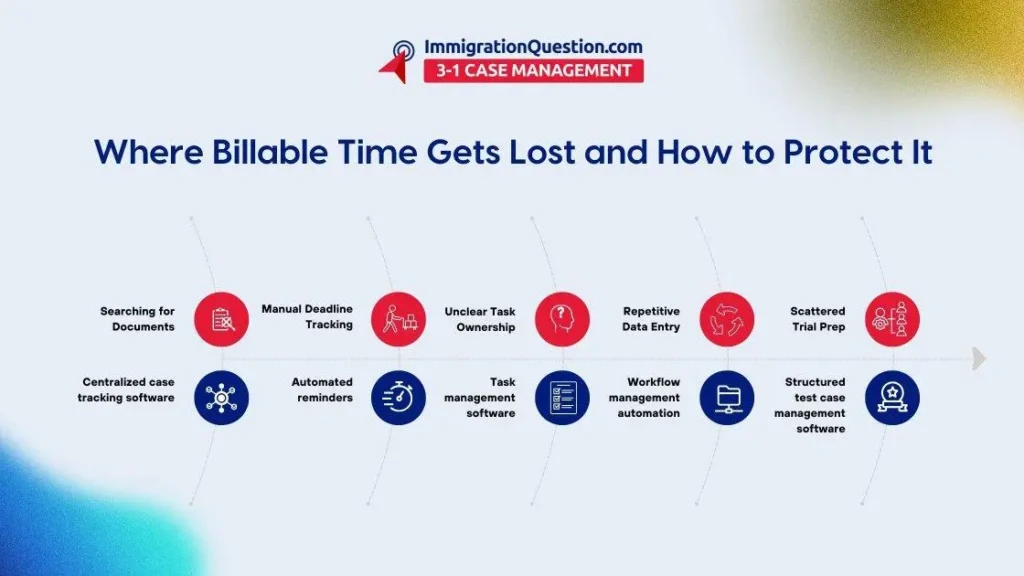
Even experienced teams lose time without realizing it. Common sources of time leakage include:
- Switching between multiple platforms to locate case details
- Recreating documents that already exist
- Missed follow-ups due to scattered notes
- Manual deadline tracking
- Repetitive data entry
- Unclear task ownership
Without structured systems in place, these small delays become routine. This is where case management software becomes essential.
Centralized Case Tracking Reduces Search Time
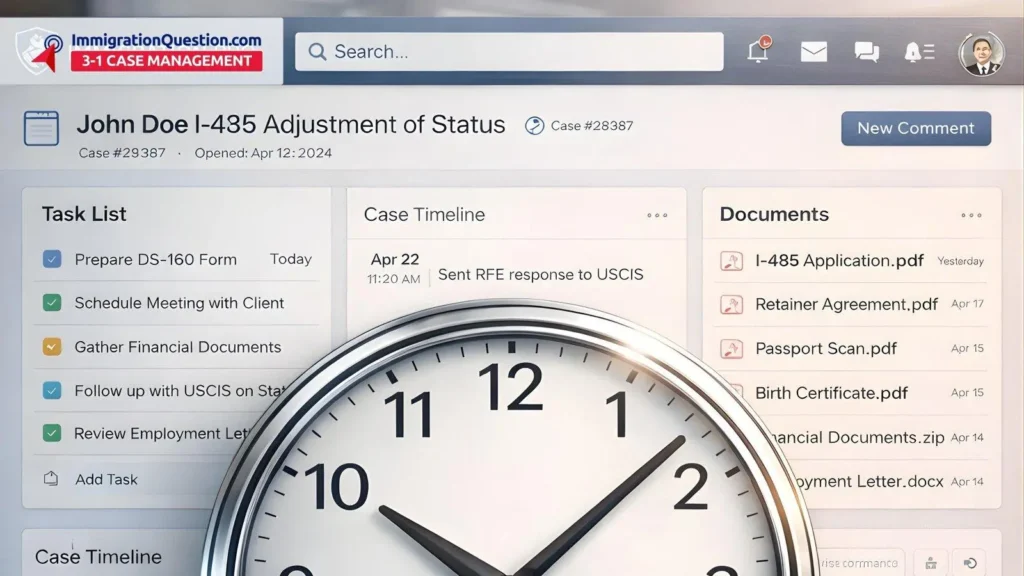
Case tracking software centralizes documents, communication logs, timelines, and client updates in one place. Instead of searching through emails or shared drives, legal teams can access everything within a unified dashboard.
This saves time by:
- Reducing back and forth between staff members
- Eliminating duplicate document creation
- Providing quick visibility into case status
- Allowing faster response times to inquiries
When information is organized and accessible, attorneys spend less time searching and more time billing.
Strong Case Organization Improves Focus
Case organization software structures files, notes, evidence, and correspondence in a logical way. Organized cases reduce cognitive overload and allow professionals to focus fully on analysis and drafting.
Benefits include:
- Clear folder structures for every matter
- Categorized communication history
- Easy reference to prior submissions
- Faster preparation for hearings or meetings
The more structured the case file, the less time spent reconstructing context.
Task Management Keeps Work Moving
Task management software assigns responsibility, deadlines, and priority levels. It removes ambiguity about who is handling what.
This protects billable time by:
- Preventing missed deadlines
- Reducing internal email chains
- Clarifying next steps
- Improving accountability
When every team member understands their assigned tasks, work progresses smoothly without unnecessary interruptions.
Workflow Management Standardizes Processes
Workflow management software creates repeatable processes for recurring case types. Instead of reinventing procedures for each new matter, teams follow a predefined sequence.
For example:
- Intake checklist
- Document request timeline
- Filing preparation steps
- Post-filing follow-up
Standard workflows reduce errors and prevent time spent correcting avoidable mistakes. They also make onboarding new staff more efficient because procedures are documented and structured.
Test Case Management for Litigation Teams
Litigation often involves complex documentation, evidence tracking, and strategic planning. Test case management software allows teams to organize trial materials, witness preparation notes, and procedural milestones.
Advantages include:
- Structured storage of evidence
- Clear tracking of procedural steps
- Consolidated trial preparation notes
- Reduced risk of overlooked documents
When trial preparation is organized early, attorneys avoid rushed, inefficient preparation close to deadlines.
Automation Reduces Administrative Burden
One of the most effective ways case management software protects billable time is through automation.
Common automated processes include:
- Deadline reminders
- Template document generation
- Status updates
- Intake data population
- Calendar synchronization
Automation does not replace professional judgment. Instead, it reduces repetitive manual work so that billable hours are focused on substantive tasks.
Improved Communication Reduces Interruptions
Centralized communication logs reduce repetitive conversations. When team members can review prior notes and updates, fewer clarification meetings are required.
Case tracking software often includes:
- Internal comment threads
- Timeline updates
- Shared notes
- Status indicators
This transparency minimizes unnecessary follow-ups and allows attorneys to concentrate on revenue-generating activities.
Better Reporting Protects Financial Health
Case management software also supports financial visibility. With accurate time tracking and reporting, firms can:
- Monitor billable versus non-billable hours
- Identify bottlenecks
- Analyze workload trends
- Improve future planning
Clear reporting provides insight into where time is being lost and where processes can be refined.
Long-Term Impact on Growth
Protecting billable time is not just about efficiency. It directly impacts sustainability and growth.
When administrative burden decreases:
- Attorneys can take on additional matters
- Staff experience less burnout
- Deadlines are managed more effectively
- Revenue forecasting becomes clearer
Over time, structured case organization supports a scalable practice model.
Grow Your Law Practice with Structured Case Management
Protecting billable time starts with structured systems. When your team uses organized case tracking software, clear workflow management software, and integrated project management software, daily operations become more predictable and efficient.
If you are looking for a structured environment that combines case tracking software, task management software, and communication features in one place, explore ImmigrationQuestion.com 3-1 Case Management.
This case management software brings organization, visibility, and clarity to growing practices while supporting licensed attorneys and legal teams with streamlined case handling.
Frequently Asked Questions
How does case management software increase billable hours?
It reduces time spent on administrative work such as document searches, deadline tracking, and repetitive communication. This allows more time to be allocated to substantive legal work.
What is the difference between case tracking software and task management software?
Case tracking software focuses on the overall progress and documentation of a matter. Task management software assigns specific responsibilities and deadlines to individuals within that matter.
Can workflow management software reduce errors?
Structured workflows guide teams through consistent processes, which reduces missed steps and minimizes the need for corrections.
Is project management software necessary for small practices?
Even smaller practices benefit from visibility into deadlines and workload distribution. Project management helps organize multiple cases without confusion.
How does test case management software support litigation?
It organizes trial materials, evidence, and preparation notes in one place, making it easier to manage complex litigation processes efficiently.