Automated workflows for onboarding and intake are digital systems that guide a new client from their initial contact to becoming an active case file. These technological solutions replace manual data entry with a structured workflow that collects necessary information and automatically generates required documents.
Implementing automated workflows for onboarding and intake ensures that the very first interaction a client has is professional, fast, and accurate.
This modern approach allows legal teams to focus on case strategy immediately, rather than focusing on manual administrative work.
Designing a Smooth Legal Client Journey
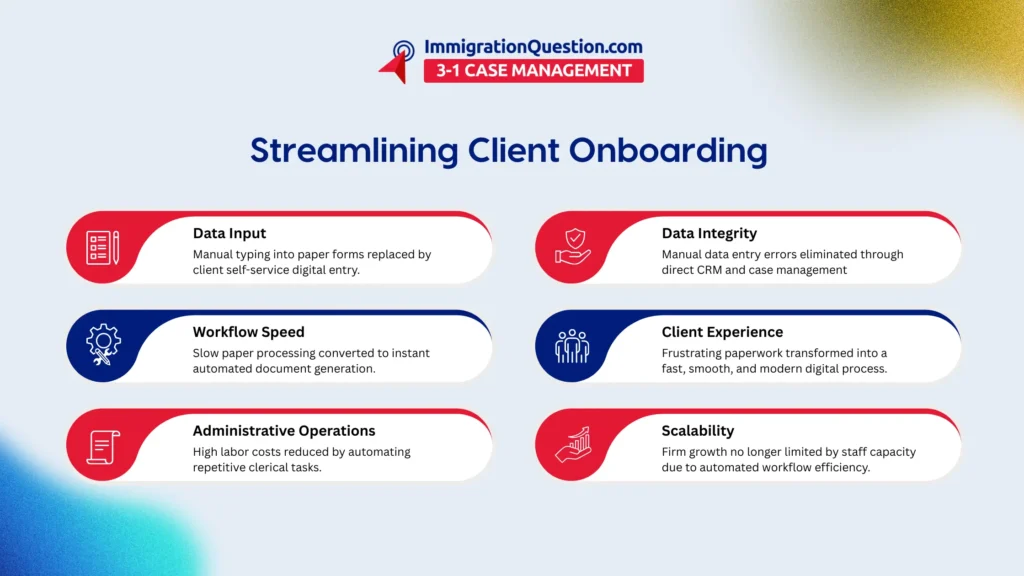
A successful law practice depends on how quickly and comfortably a client can provide their information. Moving away from paper-based files toward cloud-based legal onboarding software is the most effective way to achieve this.
This technology allows clients to submit their details from any device at any time. Creating a smooth legal client journey is about making the process feel effortless for the person seeking a firm’s services.
When a client sees a firm using high-quality digital tools, their confidence in the legal team grows. This initial experience sets the tone for the rest of the professional relationship.
Reducing Law Firm Administrative Operations
One of the biggest expenses in legal practice is the time staff spend on routine tasks. Utilizing automated workflows for onboarding and intake allows a firm to remain profitable while handling more cases.
This shift allows the administrative team to perform higher-value work. Instead of spending 5 hours a week typing data from paper forms, they can use that time to assist with research or client communication. The cost savings from this efficiency can be significant over a full year.
Implementing Conditional Logic for Intake Forms
To keep forms short and relevant, firms should use conditional logic for intake forms.
This technology ensures that clients only see questions that apply to their specific situation.
For example, if a client selects a certain case type, the form will only show the fields required for that category.
Using smart form fields for intake forms prevents the client from feeling overwhelmed by long, irrelevant documents. It ensures that the firm receives high-quality, case-specific data.
This targeted approach saves time for both the client and the legal staff during the review process.
The Power of Integration Between CRM and Case Management
Data should never be typed twice in a professional law firm. Achieving a full integration between CRM (Customer Relationship Management) and case management systems is the key to maintaining data integrity.
When a potential client’s data is captured in the CRM, it should flow directly into the case management system once it is filled in.
This integration between CRM and case management removes the risk of swapping numbers or misspelling names during the transfer. It creates a single source of truth for every client file.
Having a unified system allows for better reporting and a clearer view of the firm’s overall performance.
Final Thoughts: Modernizing the Onboarding Experience
Modernizing your firm’s intake process is a strategic move that pays off in both efficiency and client loyalty.
Adopting automated workflows for onboarding and intake builds an infrastructure that can support significant growth.
These tools enable you to deliver the high-tech experience today’s clients expect. To see how these features can transform your practice, you can book a free demo session on ImmigrationQuestion.com 3-1 Case Management.

Frequently Asked Questions
How do automated workflows for onboarding and intake save time?
They save time by removing the need for manual data entry and automatically triggering the next steps in a case file.
Is cloud-based legal onboarding software secure for sensitive data?
Yes, professional legal software uses bank-level encryption to ensure that all client information remains private and protected.
What is the main benefit of conditional logic for intake forms?
It simplifies the experience for the client by only asking for information that is relevant to their specific legal issue.
Why is the integration between CRM and Case Management important?
It prevents data entry errors by allowing information to flow seamlessly from the marketing phase to the active case phase.
Can automation really help in reducing law firm administrative overhead?
Yes, it reduces the hours staff must spend on clerical tasks such as scanning, filing, and retyping information.
Does a smooth legal client journey improve retention?
Absolutely, because clients are more likely to stay with a firm that makes the legal process feel organized and easy to navigate.
How long does it take to set up these automated workflows?
Most firms can have their basic onboarding and intake workflows running within a few days of selecting the right software.
Do I need to be a tech expert to use these tools?
No, modern legal technology is designed with a user-friendly interface so that any staff member can manage the system.
What is the first step to implementation?
The first step is identifying your most repetitive manual tasks and finding a software partner to automate those workflows.