Modern law practices handle large volumes of documents, deadlines, communication, and financial records. Without a structured system, these responsibilities can quickly become overwhelming.
Many firms now rely on legal operation tools that bring together case organization, communication, research, and financial management in one environment.
Case Management for Organized Legal Workflows
Managing legal files requires consistent tracking of documents, deadlines, and communications. The best case management systems offer a structured environment where attorneys and staff can manage cases with clarity.
Key case management features include:
- Real-time alerts for every file to keep teams informed about updates and deadlines
- Auto-populated USCIS forms that help reduce repetitive data entry and filing errors
- Customizable forms and documents that can be adapted for firm-specific workflows
- Document tracking and case activity monitoring to maintain organized case histories
- Precision audits designed to support detailed file tracking within the firm
These capabilities allow firms to manage immigration case documentation in a consistent and organized way.
Financial and Accounting Management Within the Platform
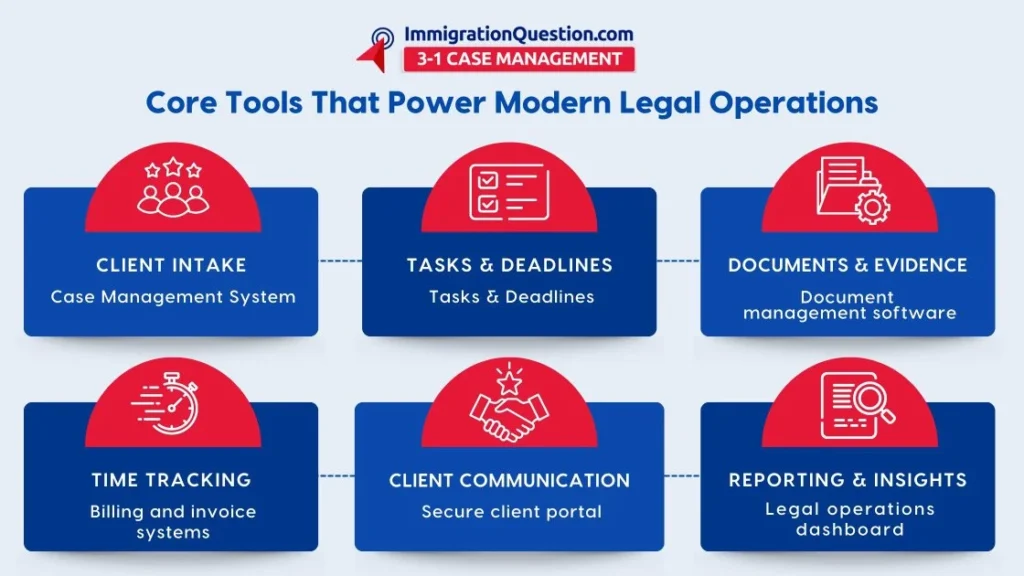
Legal operations involve more than case files. Financial tracking, billing, and payment management also require consistent organization.
Legal case management software integrates financial management features that support daily accounting activities:
- All-in-one accounting management to track financial activity connected to cases
- Credit card payment processing for convenient client transactions
- Timesheet tracking for billable hours that supports clear invoicing records
- Centralized financial oversight for firm administrators
With financial records connected to case files, firms can monitor billing activity and time tracking without switching between multiple systems. This structure simplifies internal financial oversight.
Employee Collaboration and Workflow Coordination
Many legal teams operate with remote members or distributed staff. Effective collaboration requires consistent communication and shared access to documents.
A good system supports team coordination through:
- Employee productivity monitoring features that help administrators review workflow activity
- Shared document environments that allow team members to work on files together
- Virtual client meeting support for remote discussions
- Internal communication features that keep case updates visible to relevant team members
These collaboration features allow law firms to coordinate work across locations while keeping files and communication connected within the same platform.
Document Management and Secure File Handling
Legal practices generate a significant volume of documents. Efficient storage and retrieval systems are essential for maintaining organized records. The right system should suppor:
- Centralized document creation and storage
- Joint editing and document sharing among team members
- Encrypted document storage for sensitive information
- Quick retrieval of case files and documents when needed
Having a central document environment helps firms maintain consistent records while making documents easier to locate during case preparation.
Integration and Customization Capabilities
Legal operations often involve external storage systems and communication platforms. Integration features allow firms to connect their workflows with commonly used services.
The platform offers several integration and customization options:
- Dropbox integration for document access and sharing
- Client access portals where users can review case materials
- Consistent case creation templates that reduce repetitive setup tasks
These integrations allow firms to adapt the platform to their existing workflow structure.
Legal Research Support
Access to legal research materials is another component of legal operations. Legal case management software includes research features designed to support case preparation.
Research features include:
- Access to legal information resources
- Search functionality that helps locate relevant references for cases
- Streamlined research workflow within the platform
By keeping research access within the case management environment, firms can move between case files and legal references without leaving the system.
Risk Awareness and Operational Alignment
Law firms often work within complex regulatory environments. Having internal processes that support organized record keeping and documentation can contribute to operational alignment.
The platform includes features that support internal oversight, including:
- Activity monitoring
- Documentation tracking
- Process visibility across teams
These features allow administrators to review case activity and maintain structured documentation practices.
Automation and Workflow Optimization
Administrative tasks can take a significant amount of time within legal practices. Automation features within the platform help reduce repetitive manual work.
Examples include:
- Automated task management for routine processes
- Structured workflows that reduce manual file handling
- Automated document population for immigration forms
- Deadline reminders connected to court calendars
Automation allows legal teams to allocate more time toward case preparation and research rather than administrative repetition.
Operational Features That Support Daily Legal Tasks
The platform also includes practical features designed to assist with everyday operations.
These include:
- Court calendar integration with reminder notifications
- Centralized access to immigration forms for filings
- Dashboard tracking for incoming, outgoing, and returned mailing packets
- Preparation support for future electronic filing features
These operational components help keep deadlines and documentation organized within the case management system.
Grow Your Law Practice with the Right Legal Software
Law firms seeking structured legal management software often look for platforms that centralize operations rather than separating them across multiple systems.
ImmigrationQuestion.com 3-1 Case Management brings together case organization, financial tracking, research access, document management, and collaboration features in one environment.
In addition to case management capabilities, the platform also includes social media publicity support and free leads, creating a broader operational framework for firms.
Frequently Asked Questions
What are legal operation tools used for in law firms?
Legal operation tools refer to systems that assist with managing case files, documents, financial records, deadlines, and internal communication within a law practice.
What does ImmigrationQuestion.com 3-1 Case Management include?
The platform includes case management, document handling, financial tracking, legal research access, employee collaboration features, and social media publicity capabilities.
Can law firms customize documents within the case management software?
Yes. The platform allows firms to customize forms and documents so they align with the firm’s workflow and case requirements.
4. Does the system support immigration form preparation?
Yes. The platform includes auto-populated USCIS forms that help reduce repetitive data entry and support more consistent form preparation.
5. How does the legal case management system support collaboration among team members?
The system includes shared document access, employee productivity monitoring features, and virtual meeting capabilities that help teams coordinate case work across locations.
[AO1]Please take note that we focus on making the blogs valuable. That’s all we do in the blogs. we typically bring “ImmigrationQuestion.com” into the picture in the conclusion.
However, on rare occassions when you’re asked specifically to write about ImmigrationQuestion.com in the entire blog, please do.
Otherwise, we just create value in the blog but introduce our case management in the conclusion. That’s why I removed the mentions throughout the blog.