
A new inquiry calls a busy legal practice seeking urgent representation. Intake notes are written on paper, follow-up details sit in an email thread, and another team member records partial information in a spreadsheet. When the managing partner asks for an update, no one has a complete view of the history.
Each person holds part of the information. No one sees the full picture.
This is not simply an inconvenience. It is a structural weakness that affects productivity, communication, and overall efficient legal operations.
The Hidden Cost of Fragmented Information
Paper files, notebooks, and scattered spreadsheets create disconnected systems. Over time, this fragmentation leads to:
- Duplicate data entry across notebooks, emails, and spreadsheets
- Confusion over which version of a document is current
- Delays in responding to user inquiries
- Increased administrative stress
- Higher risk of missed deadlines
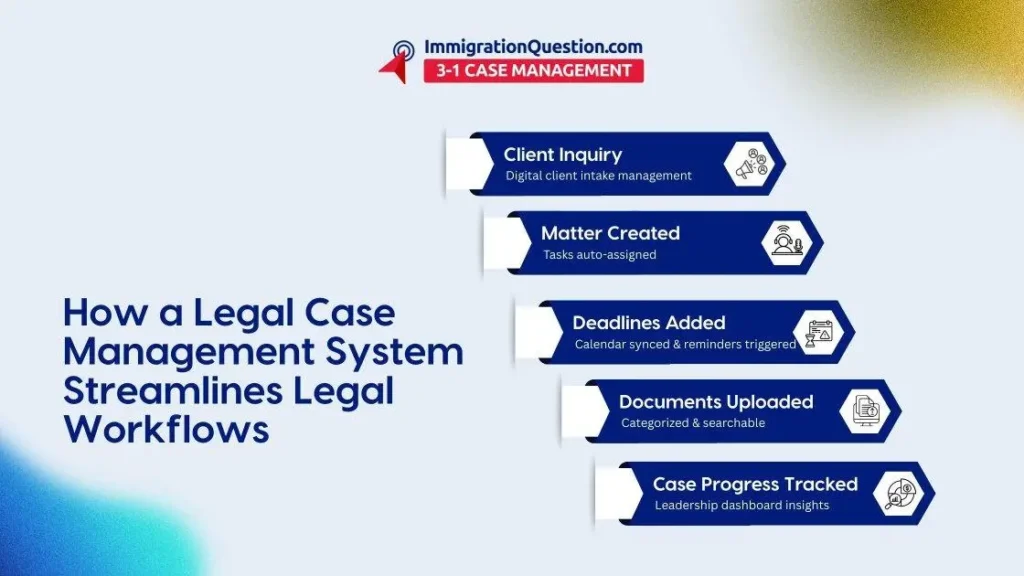
Without centralized case tracking, staff members spend valuable hours searching for updates instead of moving matters forward. A legal case management system consolidates communication logs, task lists, and document storage into one structured environment.
Instead of asking, “Who has the latest version?” The team can view updates in real time.
Spreadsheets Do Not Support Growing Firms
Spreadsheets often begin as a simple tracking tool. However, as caseloads expand, they become harder to manage. Multiple tabs, formulas, and manual updates create complexity that does not scale well.
Common spreadsheet challenges include:
- Accidental overwriting of data
- Limited collaboration features
- Manual status updates
- Lack of integrated task reminders
- Difficulty generating meaningful reports
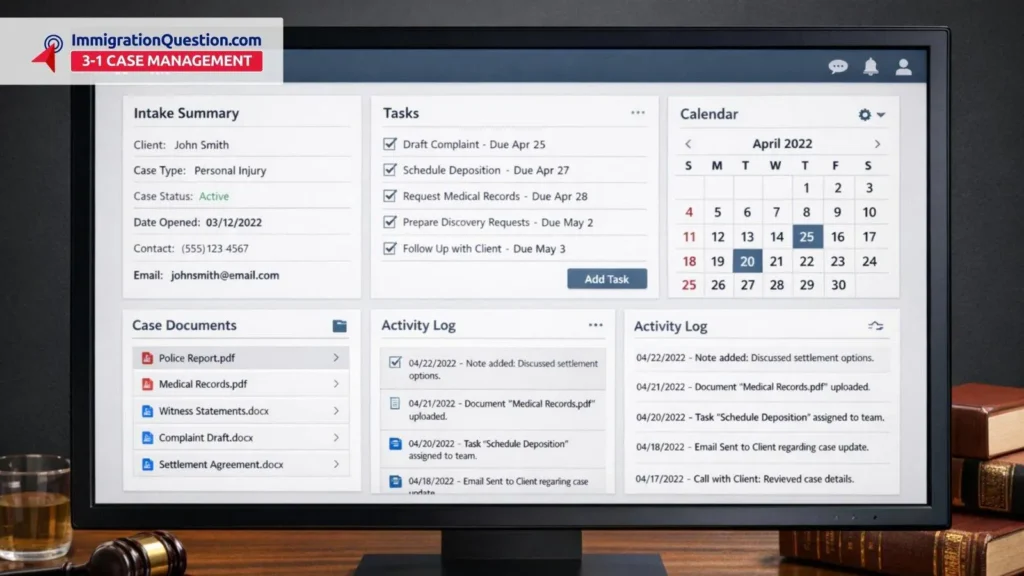
Case management for busy firms requires more than rows and columns. Having an attorney case management software allows multiple team members to access and update files simultaneously. Permissions can be structured by role, and activity logs provide transparency.
This structure supports coordination without constant back-and-forth communication.
Limited Visibility Affects Leadership Decisions
Leadership teams need insight into workload distribution, matter timelines, and performance patterns. Paper folders cannot generate meaningful analytics. Spreadsheets may provide numbers, but only if someone dedicates time to constant manual updates.
Law practice management tools provide reporting dashboards that present a clearer overview of firm activity. This visibility supports:
- Better workload balancing
- Identification of recurring delays
- More accurate planning for staffing needs
- Clearer tracking of open and closed matters
Instead of relying on assumptions, managing partners can respond to observable patterns within the system.
Missed Deadlines and Administrative Pressure
Deadlines are central to legal practice. Relying on wall calendars or isolated reminders increases the possibility of oversight. Even small administrative errors can create unnecessary stress.
A legal case management system integrates:
- Calendar synchronization
- Automated reminders
- Task assignments with due dates
- Notifications when updates are made
When deadlines are connected directly to matter files, the entire team can see what is pending and what has been completed. This coordinated structure reduces confusion and supports efficient legal operations.
Collaboration Becomes Complicated Without Centralization
In paper-based environments, files physically move between desks. One team member may be waiting while another reviews documents. Remote work becomes difficult when access depends on being in the office.
With centralized digital systems, authorized team members can:
- Access matter files from different locations
- Add notes directly within the case record
- Review document histories
- Track communication in one place
Attorney case management software enables smoother collaboration without relying on physical file transfers.
Organizational and Data Handling Challenges
Paper documents can be misplaced or damaged. Spreadsheets stored on individual computers may not be consistently backed up. Disorganized storage structures make retrieval time-consuming.
A structured law firm case management platform typically includes categorized document storage, role-based access, and searchable records. While careful handling is always required, centralized systems create clearer organization than scattered files.
Moving Toward Structured Case Management
Transitioning to centralized case tracking requires thoughtful planning. Firms should review current workflows and identify areas where information becomes fragmented. Training and gradual implementation can ease the adjustment process.
When properly implemented, a legal case management system becomes the operational backbone of the practice. Intake, document storage, calendaring, reporting, and communication function within one coordinated framework.
For practices handling complex or high-volume matters, this structure supports long-term sustainability.
Knowing When It’s Time to Upgrade
Paper notes and spreadsheets may have supported your firm in its early stages. However, as caseloads grow and teams expand, fragmented systems often lead to confusion and inefficiency.
Modern law practice management tools offer a more organized approach to client intake management, centralized case tracking, and overall coordination. By adopting structured systems designed for case management for busy firms, practices can reduce administrative strain and improve daily workflows.
To explore a centralized platform built to connect intake, tracking, and reporting in one environment, try out ImmigrationQuestion.com 3-1 Case Management and learn how a structured system can support clearer workflows and stronger operational alignment.
Frequently Asked Questions
1. What is attorney case management software?
Attorney case management software is a digital platform that organizes matter details, communication logs, documents, and task lists in one place to improve coordination across the firm.
2. How does a law firm case management system support centralized case tracking?
It consolidates deadlines, notes, and document storage into a unified dashboard so team members can access current information without relying on multiple tools.
3. Can a legal case management system improve client intake management?
Yes. Structured digital intake forms and automated follow-ups help capture complete information from the beginning and reduce manual data transfer.
4. Is case management for busy firms difficult to implement?
Implementation requires planning and team training. Many platforms are designed to adapt to existing workflows and can be introduced gradually.
5. How do law practice management tools contribute to efficient legal operations?
They connect task management, calendaring, document storage, and reporting in one system, reducing duplication and improving internal coordination.